Kilo Code
Kilo Code is an open-source AI programming assistant that supports two usage modes: the VS Code extension and the CLI.
Prerequisites
- You have activated a TCB environment and obtained the environment ID
cloudBaseEnvID - Enable the required model in the AI console
- Obtain the
Base URLandAPI Keyin the AI console
Configuration Steps
Kilo Code provides both an IDE extension and a CLI tool. If you have installed Kilo CLI, you can add or modify the provider through the model configuration file.
- IDE Plugin
- Via Model Configuration File
The example uses VS Code.
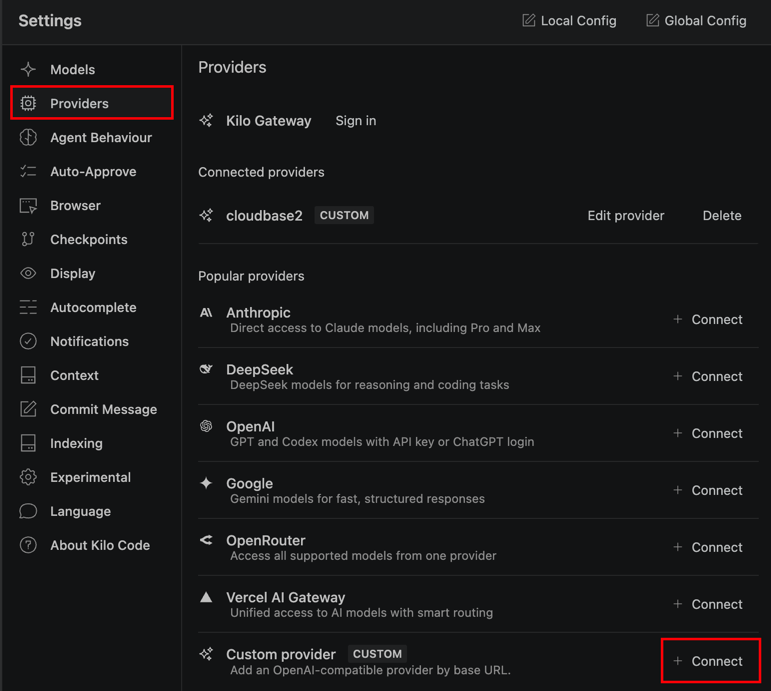
- Open VS Code, click the Kilo Code icon in the sidebar, click the settings icon at the top of the panel, go to the Model settings, select Custom provider, and click Connect.
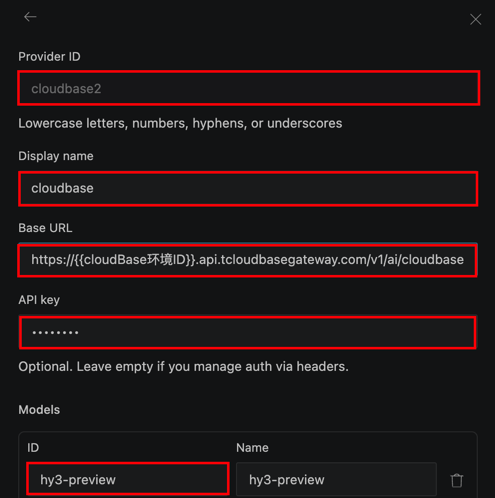
- Fill in the custom large model configuration.
The meanings of each field are as follows:
| Field to Enter | Explanation |
|---|---|
| Provider ID | The vendor ID, which can be any value. In the screenshot example, cloudbase is entered for distinction. |
| Display name | The display name, which can be any value. In the screenshot example, cloudbase is entered for distinction. |
| BaseURL | The Base URL for the large model, which is obtained from the AI console. |
| API key | The API key for calling the large model, which is obtained from the AI console. |
| models.ID | The large model ID. Copy the identifier of an enabled large model from the model list in the AI console and enter it here. |
| models.Name | The display name of the large model, which can be filled in arbitrarily. |
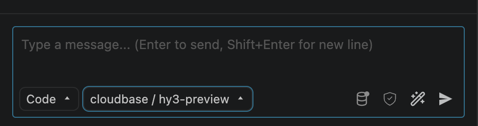
- Click Save, select the custom model you added from the conversation model list, and then you can start a conversation.
- Open the configuration file.
note
If you use your file browser to locate files, note that the file browser hides files with names starting with a period (.) by default. You may need to enable the hidden files option in your file browser to view them.
On macOS, use the Finder shortcut Command + Shift + . to show hidden files. On Windows, you can select "File Explorer - View - Show - Hidden items".
- Configuration Path for Windows
C:\Users\<YourUsername>\.config\kilo\kilo.jsonc
- Configuration Path for Mac/Linux
~/.config/kilo/kilo.jsonc
- Edit or add the
providerfield.
| Field | Explanation |
|---|---|
| Subfield name of the provider object | The vendor ID, which can be any value. In the example, cloudbase is entered for distinction. |
| provider.cloudbase.name | The display name, which can be any value. In the example, cloudbase is entered for distinction. |
| provider.cloudbase.options.baseURL | The Base URL for the large model, which is obtained from the AI console. |
| provider.cloudbase.options.apiKey | The API Key for calling the large model, which is obtained from the AI console. |
Subfield name of the provider.cloudbase.models | The large model ID. Copy the identifier of an enabled large model from the model list in the AI console and enter it here. |
| provider.cloudbase.models.hy3.name | The display name for the large model |
{
  "provider": {
    "cloudbase": {
      "name": "cloudbase",
      "npm": "@ai-sdk/openai-compatible",
      "options": {
        "baseURL": "https://{{cloudBaseEnvID}}.api.tcloudbasegateway.com/v1/ai/cloudbase",
        "apiKey": "eyJhbGciOiJSUzI1..."
      },
      "models": {
        "hy3": {
          "name": "hy3"
        }
      }
    }
  }
}