Frequently Asked Questions FAQ
For recent update logs of the CloudBase AI Module, see
Getting Started and Basic Features
How to Try CloudBase AI Capabilities for Free?
Trial Method:
- New User Privilege: New users get a free trial for the first month at 0 CNY.
- Method 1: For existing Mini Programs, activate CloudBase via WeChat Developer Tools or via the WeChat Official Account Platform (log in to the Mini Program account, use the WeChat Cloud Service Assistant Mini Program to activate, no need to download the Developer Tools). Free for the first month (applicable to users who have not used CloudBase before).
- Method 2: If you don't have a Mini Program, you can first activate the Low-code trial version link
- Then log in to the access link to trial the AI+ feature.
What Can CloudBase AI Agents Do?
Core Features
- Multiple AI Capabilities: Directly call large model APIs or customize Agents to integrate with knowledge bases.
Omni-channel Deployment
- Release Channels: Support Mini Programs, Web pages, WeChat official accounts/service accounts, and WeChat customer service system.
- Model Support: Compatible with both DeepSeek and Hunyuan dual models.
How to Access AI in Mini Programs?
See "Guide to Accessing CloudBase AI Capabilities for Mini Programs": Link
For further operations or suggestions, please refer to the guidance document.
Are There Any Pre-developed CloudBase AI Mini Program Cases?
Yes. You can experience CloudBase AI capabilities through Mini Programs:
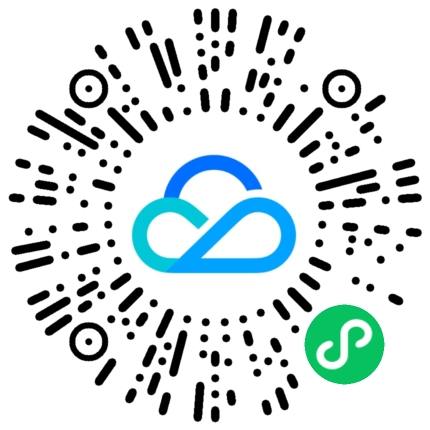
Supports DeepSeek and real-time agent trials.
How to Publish an AI Agent Without Writing Code?
You can choose to publish the Agent as web pages or mini programs with one click, or refer to the above documentation to publish it to WeChat official accounts.
How to Quickly Create an AI Agent?
First, ensure that you have activated the CloudBase environment. For the free activation and trial process, see the above section How to Try CloudBase AI Capabilities for Free?
- Log in to AI+: After logging in as an Agent, access the entry point to trial the AI+ feature.
- Create an Agent: Create an Agent, select a model (supports DeepSeek/Hunyuan large models), fill in configuration information, upload a personal knowledge base, and click to save the Agent.
Is it supported to quickly create a mini program/web page based on an AI Agent?
Supported, and it can be launched with zero code without requiring any coding foundation.
After creating the Agent, you can click "Create Application" in the pop-up window after saving, which supports publishing as an independent mini program or website.
How to Use in Existing Mini Programs?
Requires a certain coding foundation, and can refer to the "Guide to Accessing CloudBase AI Capabilities for Mini Programs": Link
Do WeChat official accounts support integrating AI to implement intelligent customer service?
Supported. CloudBase Agents can be published to WeChat official accounts and service accounts with one click to serve as intelligent customer service, leveraging the conversation interface of WeChat official accounts to provide customer service capabilities.
- Publish to WeChat official accounts: Refer to How to quickly create an AI Agent?, after saving, click to publish to the WeChat platform, select official account or service account, fill in the appid of the official account, and after authorization, it can be published to the official account.
- Experience the conversation feature: Engage in a conversation on the WeChat official account interface to experience it.
Limitation: For subscription accounts or unauthenticated service accounts, passive replies can only be made within 15 seconds. If message processing exceeds this time limit, the system will automatically send a prompt: "Thinking, please reply 'Continue'". Authenticated service accounts are not subject to this restriction.
Other Methods
- Embedding Intelligent Customer Service in WeChat Official Account Menus: After creating an Agent, you can generate an application with one click, publish it as an h5 webpage, and then embed the URL into the official account menu.
Do WeChat Channels support integrating AI to implement intelligent customer service?
Supported. You can refer to the previous step 1/2, first create the Agent, then select to publish to WeChat Customer Service. WeChat Customer Service supports users of WeChat Channels.
Does CloudBase Agent support intelligent customer service for WeCom?
Supported. CloudBase Agent can be published to the WeChat Customer Service system. You can refer to the previous process: first create the Agent, then select to publish to WeChat Customer Service. It is based on WeCom and can serve external WeChat customers.
Does DeepSeek support online search?
Supported. The online search capability can be enabled via Agent, and it supports the Hunyuan large model and DeepSeek.
Does it support users uploading documents and images during conversations?
Supported. Documents and images can be uploaded during conversations through the Agent, and it supports the Hunyuan large model and DeepSeek.
Does it support users viewing history records?
Supported, you can use the latest Agent UI, which integrates the view history records feature by default.
Does it support the multiple conversation grouping feature?
Multiple conversation grouping is supported. See Multi-conversation Management.
Why is the Agent's response speed a bit slow?
Please check whether the DeepSeek R1 model is used, as the reasoning process of the DeepSeek R1 model takes longer.
You can switch to the DeepSeek V3 model, which provides faster responses without the reasoning process.
Alternatively, you can also use the Hunyuan large model's Turbo S fast inference model.
Whether it supports integrating agents built on other platforms?
Support integrating agents from other platforms through functional agents, such as those developed on Yuanqi and other platforms. They can be invoked via the Agent UI and the Mini Program basic library SDK.
Is the API available for calling via other languages or platforms?
Yes, the model access interface will seamlessly integrate with open-source libraries such as the OpenAI SDK. Agent conversation-related interfaces can be invoked via HTTP requests in any programming language on other platforms.
Whether it supports invocation by Mini Programs developed via server-side methods or third-party developed Mini Programs?
As long as CloudBase can be activated, the AI+ capabilities provided by CloudBase can be used normally in Mini Programs.
For existing Mini Programs, activate CloudBase via WeChat Developer Tools or through the WeChat Official Account Platform - log in to the Mini Program - activate CloudBase. Free for the first month (applicable to users who have not used CloudBase before).
Development
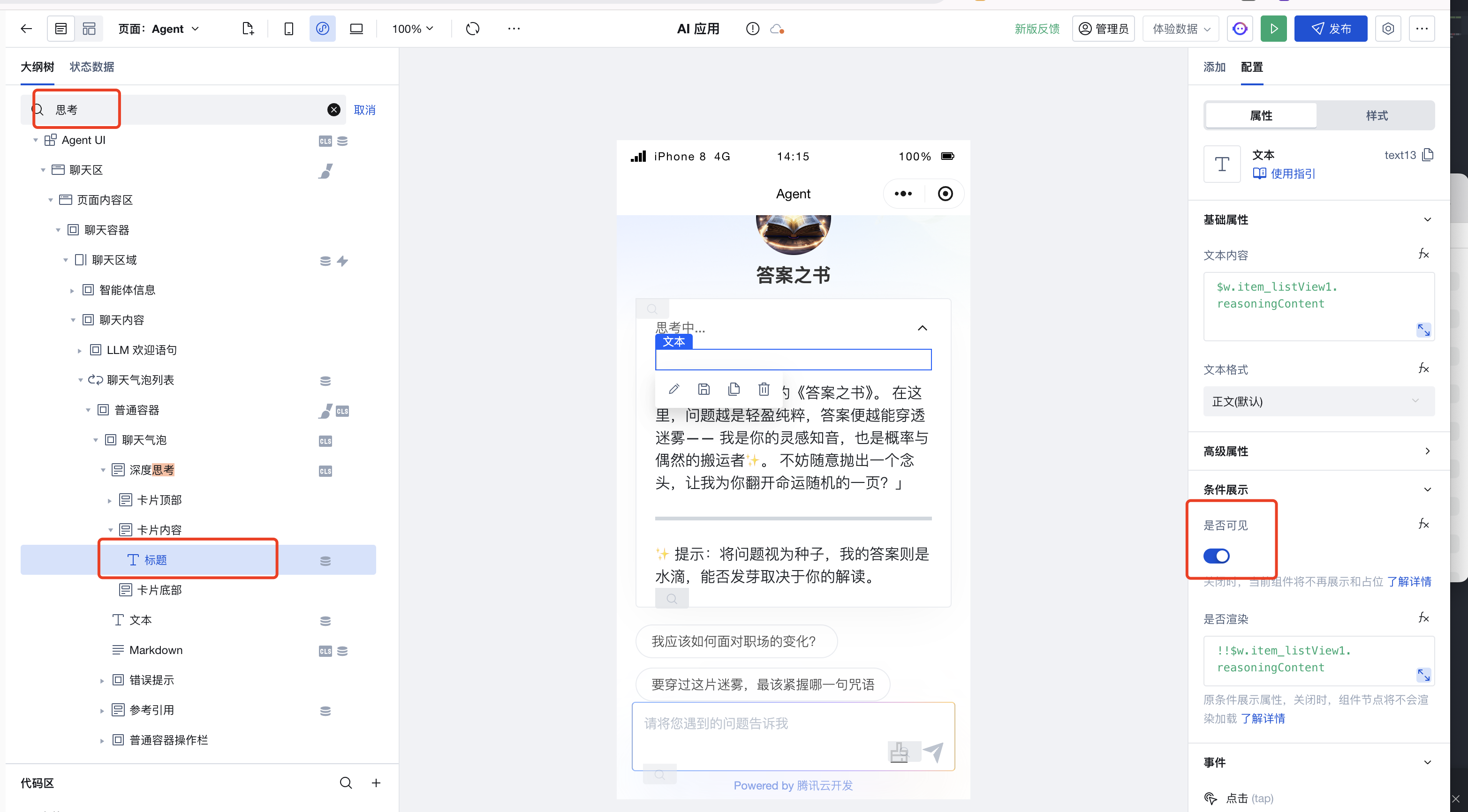
How to hide the reasoning process of Agent UI?
DeepSeek R1 and other models have longer reasoning processes. If you wish to hide the reasoning process, you can switch to the Hunyuan large model or the DeepSeek V3 model, which provides faster responses without the reasoning process.
Alternatively, hide it in AgentUI
Mini Program Agent UI Component
Locate and delete the following code
<markdownPreview markdown="{{item.reasoning_content||''}}"></markdownPreview>
Agent UI Visual Component
Locate the reasoning process and click Invisible to hide it.
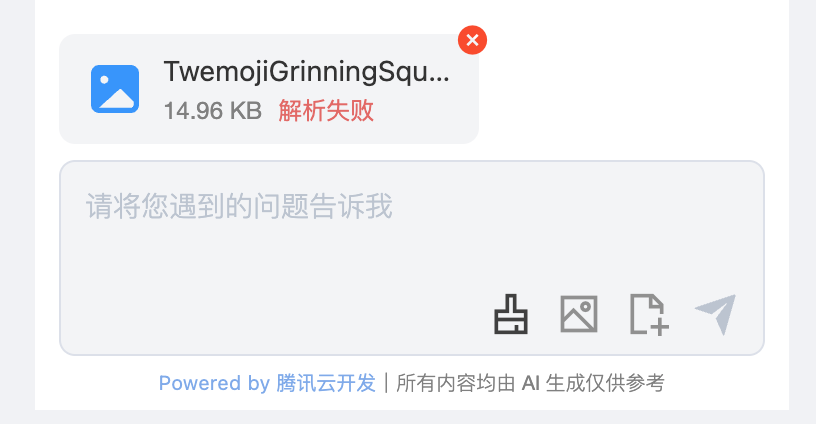
How to troubleshoot Agent file upload or parsing failures?
Due to the security policy upgrade in the WeChat Mini Program core library, the file upload feature parsing process may be affected. Developers are advised to upgrade the Agent-UI component:
- For Mini Program source code components, please update to the latest version.
- WeDa low-code component: please create a new page, then drag and drop to update the agent-ui block, and publish the application once done.
Can the Agent view conversation history?
Yes, in the console's Agent details, click to view history records.
Does it support invoking large language models via API?
Yes, refer to AI Tools Configuration (OpenAI-compatible protocol).
Does it support invoking Agent via API?
Supported. See Agent Integration Guide.
Does the Agent support invoking plugins and tools?
Support is available through functional agents for development, compatible with open-source Agent frameworks such as Langchain and Mastra. These can be adapted via functional agents. Additionally, visual development is supported, and agents can be invoked via APIs and JavaScript SDKs in Mini Programs and web applications.
Can the Agent integrate with external APIs or external databases?
Yes, development can be achieved through functional agents via tool invocation to integrate with external APIs or external databases. Additionally, visual development is supported, and agents can be invoked via APIs and JavaScript SDKs in Mini Programs and web-based applications.
Does the Agent support visual workflows?
Currently not supported for visual workflow orchestration. Complex Agent features can be achieved through functional Agent via code orchestration.
Does it support integrating with Agents provided by other Agent development tools such as Yuanqi/LKE?
Yes, it can be adapted through functional Agents, seamlessly integrating with Agents provided by Agent development tools such as Yuanqi/LKE. Additionally, visual development is supported, and agents can be invoked via APIs and JavaScript SDKs in Mini Programs and web-based applications.
Can functional Agents integrate with WeChat official accounts/service accounts/WeChat Customer Service?
Supported. See Integrate with WeChat Official Account/Service Account and Integrate with WeChat Customer Service.
How to use CloudBase AI capabilities in frameworks such as UniApp/Taro?
If developing applications using the WeChat Donut multi-end framework, you can invoke CloudBase AI capabilities via the wx.cloud.extend.AI interface, consistent with WeChat Mini Programs. For details, refer to the Multi-end Framework wx.cloud.extend.AI Interface
UniApp/Taro can achieve multi-end invocation by calling the WeChat basic libraries and JSSDK respectively. Refer to SDK Initialization
How to use CloudBase AI capabilities in other languages or frameworks?
It can be invoked via HTTP API. Refer to HTTP API
Release and Deployment
How to Pass WeChat Review Before Official Launch When Using AI Capabilities in Mini Programs
Please refer to the Mini Program Deep Synthesis Algorithm Filing Guide to complete the algorithm filing and category review step by step.
Pricing and Billing
How is CloudBase AI Capabilities Priced?
Users of the Free Edition and Personal Edition packages can use large model conversational capabilities, as well as the Agent's persona, opening lines, question suggestions, knowledge base, data models, and online search capabilities.
Team Edition and above users can also use advanced capabilities on top of the above features, such as MCP, voice features, file uploads, multi-conversation mode, etc.
1 Million token Limited-Time Offer
CloudBase limited-time offer: Each environment receives 1 million tokens, valid for 6 months until December 31, 2025. Specific details are as follows:
- For environments created before February 14, 2025, the complimentary resource package takes effect on February 14, 2025 and expires on August 14, 2025.
- For environments created between February 14, 2025 and December 31, 2025, the complimentary resource package takes effect on the environment creation date and expires after 6 months.
How will I be charged after the complimentary tokens are exhausted?
When the complimentary tokens are about to run out or have been exhausted, you are not charged separately outside your plan. Subsequent calls are deducted from your CloudBase plan instead. Whether they can be deducted depends on your current plan type:
| Current Plan | After Complimentary Tokens Run Out | What to Do |
|---|---|---|
| Resource-Point plan | Usage automatically switches to the Resource Points in your plan, converted from each model's Token usage. As long as your Resource Points are sufficient, usage continues | No code change needed; we recommend switching the provider to cloudbase |
| Non-Resource-Point plan (e.g. quota-based plan) | The plan does not support deducting large model Token usage, and calls fail directly | Go to CloudBase Console → Plan Management and switch to a Resource-Point plan. After switching, usage is deducted from the plan |
- Go to CloudBase Console → Plan Management and switch the environment to a Resource-Point plan.
- Call models with the
cloudbaseprovider (ai.createModel("cloudbase")). Once the complimentary quota is used up, usage is deducted from your plan's Resource Points automatically — no API Key required. - After switching, you can also use more models directly, such as
deepseek-v4-flash,glm-5.2,kimi-k2.6, andminimax-m3.
For details, see AI Model Access - Resource-Point Plan.
- With the
hunyuan-v3provider, usage is not switched to plan deduction after the complimentary quota runs out, and calls return an error. To keep usage going on a pay-as-you-go basis, switch to thecloudbaseprovider. See the Mini Program Growth Initiative Usage Guide for the full comparison. - To call third-party models, you can still configure custom models in the AI+ module. In that case usage is billed by the model provider. See Access custom models.
Knowledge Base Related
Click to view Knowledge Base FAQs
Testing and Troubleshooting
Common Error Codes
You may encounter the following errors when calling the AI model API:
| Status Code | Description | Solution |
|---|---|---|
| 401 | Authentication failed | Check if API Key is correct |
| 403 | Insufficient permissions | Check environment config and model permissions |
| 429 | Too many requests | Reduce request frequency, or see Token Quota Limit |
| 500 | Server error | Retry later |
Error response example:
{
  "error": {
    "message": "Invalid API key",
    "type": "authentication_error",
    "code": "invalid_api_key"
  }
}
Why is the AI not responding to messages after the Mini Program is published?
Possible Causes and Solutions
- Agent UI Parameter Configuration: Check whether the correct
botIdor large model configuration is passed. - Low-code Visual Development Authorization and Authentication: Ensure the Mini Program uses scan code authorization. Fully managed authentication is not currently supported.
- Mini Program IDE Core Library Version: Select version 3.7.7 or later.
- User WeChat Client Version: Must be higher than 8.0.55. If lower than this version, it is recommended to upgrade WeChat.
Further Operations
- Check the above settings to ensure the configuration is correct.
- If the issue persists, it is recommended to consult the official documentation or contact technical support to obtain assistance.
How to Optimize AI Dialogue Output Quality?
Possible Causes and Solutions:
1. Knowledge Base Content Quality Issues
The quantity and quality of knowledge base content are important factors affecting the output quality of AI dialogues. If the knowledge base content has low quantity and poor quality, it may lead to poor output quality of AI dialogues. It is recommended to add high-quality content to the knowledge base, such as official documentation, common issues, FAQs, etc.
2. Prompt Configuration
Improper configuration of the Agent's prompts may result in suboptimal output quality of AI dialogues.
You can employ some general techniques of prompt engineering to optimize prompts. Refer to Prompt Engineering
Methods that can be adopted include:
- Use clear, explicit, and concise prompts to guide the AI in generating answers, avoiding overly complex or ambiguous prompts.
- Structured Prompt Template (CO-STAR Framework)
- For requirements that must be strictly followed, you can add emphasis words to guide the AI, such as including phrases like especially important to ensure the AI adheres to the requirements.
- Provide the AI with output examples, such as adding phrases like Example: in the prompts to guide the AI in generating answers that conform to the requirements.
- For many complex tasks, you can define steps, such as "Step 1: xxx, Step 2: xxx, Step 3: xxx".
- Guide the model to think, such as adding phrases like Please consider in the prompts to encourage the AI to deliberate before generating answers.
- Iteration of prompts: evaluate their effectiveness in production responses and iterate the prompts.
What causes the sudden interruption during the streaming output process?
If the Agent experiences issues where thinking or responses are interrupted midway, this primarily occurs during long thinking or response processes. When requesting large models, multiple factors such as prompt simplicity and network speed can increase the request duration.
Possible cause: Client request timeout. You can modify the client network timeout configuration.
Global Timeout Configuration on the Mini Program Side
You can configure the global timeout duration in the app.json file of the WeChat Mini Program. Adjust it based on actual circumstances, and it is recommended to set it within 10 minutes.
{
  "networkTimeout": {
    "request": 600000
  }
}
Reference: https://developers.weixin.qq.com/miniprogram/dev/reference/configuration/app.html#networkTimeout
web Timeout Configuration
The cloudbase-js-sdk sets a default timeout of 15 seconds. When a request times out, it is actively canceled. Users can customize the timeout duration during cloudbase.init.
import cloudbase from "@cloudbase/js-sdk";

const app = cloudbase.init({
  env: "your-env", // Needs to be replaced with the actual environment id
  timeout: 600000, // Set timeout to 10 minutes
});
const auth = app.auth();
await auth.signInAnonymously(); // Or use other login methods.
const ai = app.ai(); // You can then invoke ai capabilities in the conventional manner.
What to do if the Mini Program package size exceeds the limit after introducing the Agent UI block component
It is recommended to use the source code component in the Mini Program source code. For details, refer to Guide 3: Using CloudBase AI Chat Component to Quickly Integrate AI Chat, or refer to the link below to use subpackage import.
Step 1: Import using subpackage
-
Download the component code package: Component download address.
-
Unzip and place: Place the component package in the
components/agent-uidirectory under the root directory of the Mini Program project. -
Configure app.json:
{"lazyCodeLoading": "requiredComponents","subpackages": [{"root": "components/agent-ui","name": "agent-ui","pages": []}]} -
Configure project.config.json:
{"setting": {"ignoreDevUnusedFiles": true,"ignoreUploadUnusedFiles": true}}
Step 2: Initialize the Conversation Component
-
Modify
./components/agent-ui/index.js:import * as sdk from "@cloudbase/weda-client";sdk.init({envID: "<TCB Environment ID>",}); -
Add reference at the top of the component: Add
import '../../index'in./components/agent-ui/dist/Agent-UI/index.jsto ensure the SDK is initialized immediately upon component loading.
Through the above steps, the size of the main package of the Mini Program can be effectively reduced, ensuring the proper initialization and usage of the Agent UI component.
Why do you receive the response "Processing, please reply 'continue'" after sending a message to the subscription account?
For subscription accounts or unverified service accounts, passive replies can only be made within 15 seconds. If message processing exceeds this time limit, the system will automatically send the prompt "Processing, please reply 'continue'".
Verified service accounts are not subject to this restriction.
You can try:
- Manually reply "continue": Prompt the system to continue the reply process.
- Optimize intelligent reply settings: Adjust the agent's reply policy to ensure responses are concise and can be completed within the specified time.
Optimization suggestion:
- Adding the following setting to the prompts can significantly improve response speed. During testing, it is recommended to use a different WeChat ID to test the response effect of the WeChat official account (changing prompts, historical replies may affect the model's output).
- The agent responds to questions in a minimalist style.
- Simplify responses to complex questions by extracting key information.
- Strictly restrict the length and relevance of response content to avoid redundancy.
- Do not output markdown format, output plain text directly.
- If using deep thinking models (such as DeepSeek R1), the response time will be slower; you can consider using Hunyuan model or DeepSeek V3 model.
- For a better experience, consider using the WeChat official account's personalized menu to embed H5/Mini Programs, delivering an enhanced conversation experience.
How to know when the streaming transmission has ended during streaming calls?
As long as you perform operations related to streaming call completion notifications/setting flags after the for await code block, since the code after the for await block executes only after streaming transmission ends.
const hy = ai.createModel("cloudbase"); // Create a model
const res = await hy.streamText({
  model: "hy3",
  messages: [{ role: "user", content: "Hello, please introduce Li Bai to me" }],
});

for await (let str of res.textStream) {
  console.log(str);
}
console.log("Streaming has ended!"); // This code executes only after streaming transmission ends.
Does selecting "Enable code protection during upload" in the Agent UI source code version Developer Tools cause an error?
Enabling this option will cause the Developer Tools to attempt to protect the project code, primarily by flattening files and replacing the file names referenced in require.
Since it involves dynamic references, such as var a = 'somefile.js'; require(a);, which are not suitable for this feature, it is recommended to disable this option.
Technical Details
For using AI+ in Mini Programs, should I use the WeChat Mini Program Core Library or the AI SDK?
The AI SDK and the WeChat Mini Program Core Library provide the same AI capabilities.
The AI SDK is a multi-platform SDK provided by CloudBase, offering a consistent experience across various platforms. If you require cross-platform compatibility, you can choose the AI SDK.
However, using the AI SDK in Mini Programs comes with certain limitations:
- The Mini Program package size has limitations, and introducing the AI SDK will increase the package size to some extent.
- The Mini Program requires configuring the server domain name; only after this configuration is completed can the AI SDK make requests.
The WeChat Mini Program Core Library has built-in CloudBase AI capabilities, which do not occupy package size and require no server domain configuration. For developers focused on Mini Programs, using the WeChat Mini Program Core Library is a good choice. It provides full access to CloudBase's AI+ capabilities without installing any external packages.
The WeChat Mini Program Core Library and the AI SDK have certain distinctions in usage. Please refer to the documentation for details.