Cline
Cline is an AI coding assistant built into your editor and terminal. It can read and write files, run terminal commands, use a browser, and help you build features through natural conversation.
Prerequisites
- You have activated a TCB environment and obtained the environment ID
cloudBaseEnvID - Enable the required model in the AI console
- Obtain the
Base URLandAPI Keyin the AI console

Configuration Steps
Cline provides both an IDE plugin edition and a terminal CLI edition.
- Cline Plugin
- Cline CLI
Taking the VS Code Cline plugin as an example
- Open the Cline settings and enter the large model configuration information.
The meanings of each field are as follows:
| Field to Enter | Explanation |
|---|---|
| API Provider | Model Protocol. CloudBase AI models support multiple protocols. Select the most universal one, OpenAI Compatible, here. |
| Base URL | The Base URL for the large model, which is obtained in the AI console. |
| OpenAI Compatible API Key | The API Key for calling the large model, which is obtained in the AI console. |
| Model ID | The large model ID. Copy the identifier of an enabled large model from the model list in the AI console and enter it here. |
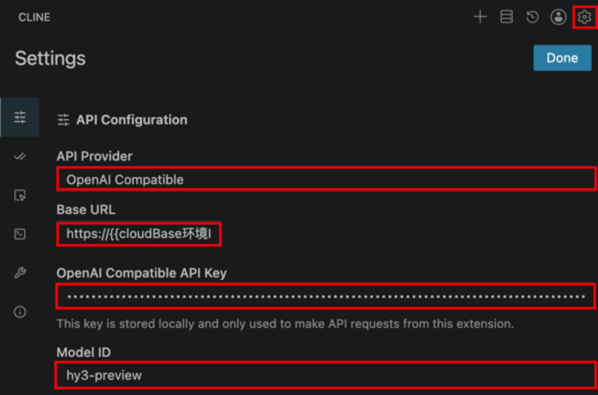
- Click Done to complete the setup. Confirm that the model selection is the custom model you just created, and then you can start a conversation.

Configuring the Large Model via CLI
- Open a terminal and run the command.
cline auth
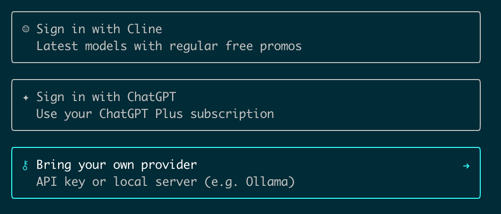
- Select Bring your own provider.
-
Select OpenAI Compatible.
-
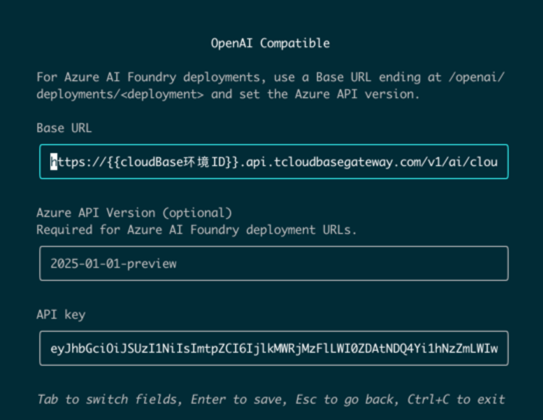
Fill in the form configuration.
Please fill in the following large model configurations (you can switch between form fields using the Tab key).
| Field to Enter | Explanation |
|---|---|
| Base URL | The Base URL for the large model, which is obtained in the AI console. |
| API Key | The API Key for calling the large model, which is obtained in the AI console. |
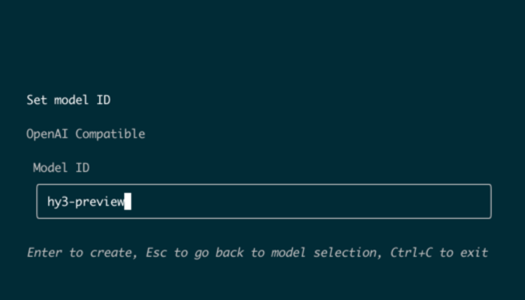
- Fill in the model ID.
The large model ID. Obtain it from the model list in the AI console. After filling it in and pressing Enter to complete the setup, you can enter cline in the terminal to start a conversation.