Hermes Agent
Hermes Agent is an open-source terminal AI programming assistant. It supports intelligent conversation and code assistance by allowing the integration of custom models.
Prerequisites
- You have activated a TCB environment and obtained the environment ID
cloudBaseEnvID - Enable the required model in the AI console
- Obtain the
Base URLandAPI Keyin the AI console

Configuration Steps
- Configuration via CC Switch
- CLI Interactive Wizard
- Manually Modify Configuration File
CC Switch is an open-source desktop application for centrally managing provider configurations for multiple AI coding tools. For installation instructions, refer to the CC Switch configuration guide.
- Open CC Switch and add CloudBase as a provider
| Field | Description |
|---|---|
| API Key | Obtained from the AI console |
| Base URL | https://{{cloudBaseEnvID}}.api.tcloudbasegateway.com/v1/ai/cloudbase |
| API Format | Chat Completions |
- Switch to the CloudBase provider and start using Hermes Agent
The system guides you through entering the API Key and model name step by step via the command-line interactive menu. This method is recommended for initial configuration.
- Run the following command in the terminal to start up the configuration wizard.
hermes model
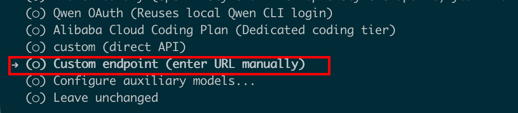
- Select Custom endpoint (enter URL manually) and fill in the interactive form below according to the table.
| Field | Description |
|---|---|
| API Base URL | The request address for the large model API, which is obtained in the AI console and has the format https://{{cloudBaseEnvID}}.api.tcloudbasegateway.com/v1/ai/cloudbase. |
| API Key | The key for calling the large model, which is obtained in the AI console. |
| API compatibility mode | Select "1" Auto-detect |
| Model Name | The large model identifier. Copy the ID of an enabled model from the model list in the AI console and enter it here, for example, hy3. |
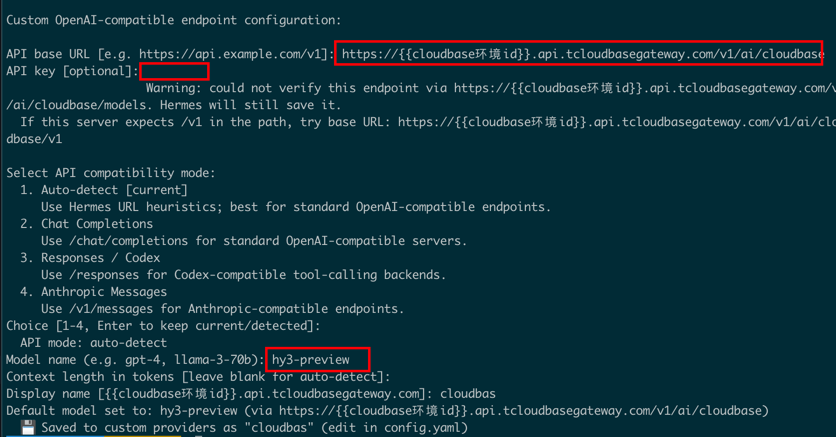
- You can start using it after the configuration is complete.
The core settings of Hermes Agent are stored in the ~/.hermes/config.yaml file. You can directly modify this file to integrate custom models.
- Open the configuration file.
If you use your file browser to locate files, note that the file browser hides files with names starting with a period (.) by default. You may need to enable the hidden files option in your file browser to view them.
On macOS, use the Finder shortcut Command + Shift + . to show hidden files. On Windows, you can select "File Explorer - View - Show - Hidden items".
Open.
- Configuration Path for Mac/Linux
~/.hermes/config.yaml
- Configuration Path for Windows
C:\Users\<YourUsername>\.hermes\config.yaml
- Enter the configuration.
Enter your custom model configuration in config.yaml. The meanings of the fields are as follows:
| Field | Description |
|---|---|
| model.default | The name of the model used by default. Copy the ID of an enabled model from the model list in the AI console and enter it here. |
| model.provider | The provider type. Enter custom to indicate a custom integration. |
| model.base_url | The request address (Base URL) for the large model API, which is obtained in the AI console. |
| model.api_key | The key (API Key) for calling the large model, which is obtained in the AI console. |
Configuration example:
model:
  default: hy3
  provider: custom
  base_url: https://{{cloudBaseEnvID}}.api.tcloudbasegateway.com/v1/ai/cloudbase
  api_key: eyJhbGciOiJSUzI1N...
- You can start using it after the configuration is complete.
Common Error Troubleshooting
| Error Message | Solution |
|---|---|
404 AI_MODEL_NOT_FOUND | The Base URL is entered incorrectly. Go to the AI console to copy the correct Base URL. |
401 Authentication Failed | The API Key is entered incorrectly or may have been deleted. |
429 Token usage exceeded quota | An incorrect large model name is configured, or the large model is not enabled in the AI console. |