Cursor
Cursor is a next-generation intelligent code editor designed for working with AI.
note
Due to Cursor's limitations, only users subscribed to Cursor Pro or higher plans can customize model configurations.
Prerequisites
- You have activated a TCB environment and obtained the environment ID
cloudBaseEnvID - Enable the required model in the AI console
- Obtain the
Base URLandAPI Keyin the AI console
Configuration Steps
The meanings of each field are as follows:
| Field to Enter | Explanation |
|---|---|
| OpenAI API Key | The API Key for calling the large model, which is obtained in the AI console. |
| Override OpenAI Base URL | The Base URL for the large model, which is obtained in the AI console. |
| Add Custom Model | The large model ID. Copy the identifier of an enabled large model from the model list in the AI console and enter it here. |
-
Open the Cursor settings and go to Models.
-
Enter the CloudBase API Key in the OpenAI API Key field, enable the Override OpenAI Base URL switch, and enter the Base URL in the Override OpenAI Base URL field.
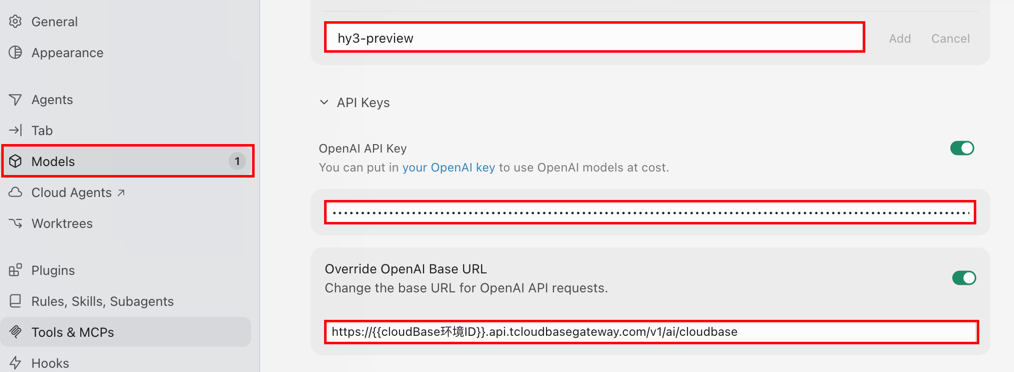
- Click Add Custom Model, copy the identifier of an enabled large model from the model list in the AI console and enter it, then click Add.

- Select the custom large model you added from the model list to start a conversation.
