Access Cloud Run via HTTP
Through the HTTP Gateway, you can configure cloud run services as standard HTTP interfaces, achieving flexible domain and path management. This document explains how to configure HTTP access for cloud run and how to use custom paths.
If you need to bind a custom domain to a cloud run service (recommended for production), in addition to "Method 1: Bind on the Resource Detail Page" below, the complete custom domain workflow (add domain, configure SSL certificate, choose CDN, domain ownership verification, DNS resolution, etc.) is documented in Custom Domain Configuration. All domains added through any entry point are listed and managed centrally in the HTTP Gateway.
Prerequisites
- CloudBase environment created
- At least one cloud run service deployed
Configure HTTP Access
You can bind a domain directly on the cloud run detail page (recommended), or configure it globally in the HTTP Gateway.
Method 1: Bind on the Resource Detail Page (Recommended)
- Go to Cloud Run and open the detail page of the target cloud run service
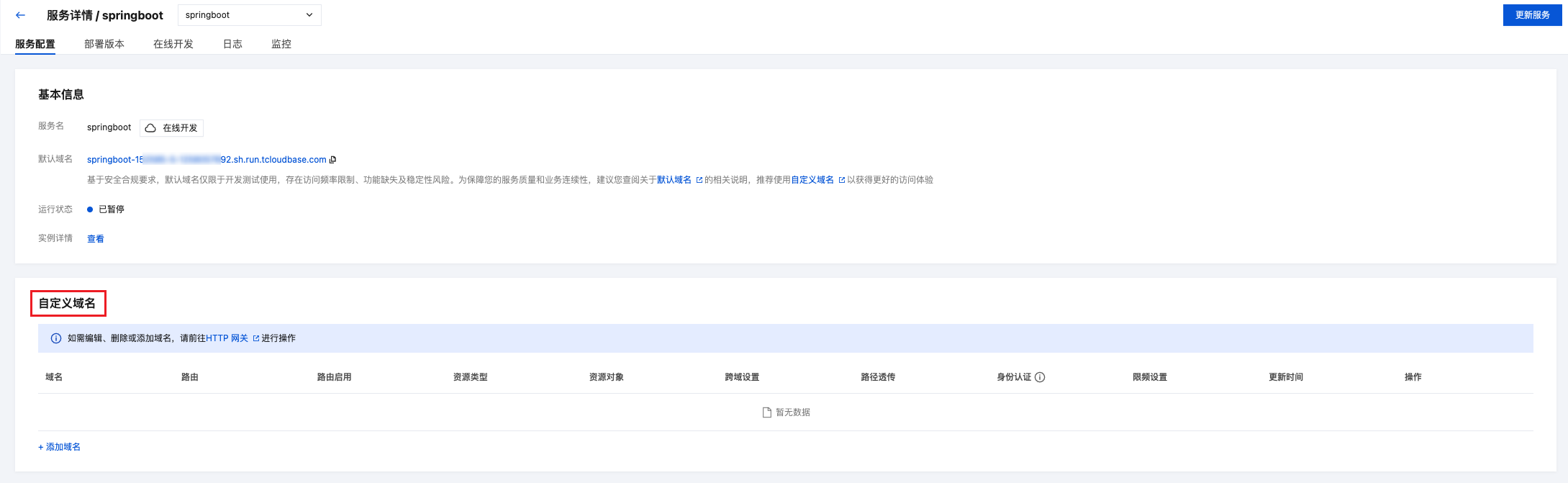
- In the "Custom Domain" section, click "Add Domain" to open the binding dialog
- Set the trigger path for the HTTP access, supports
/or a custom path - Select a custom domain and confirm. All bound domains are listed in the "Domain Management" section of the detail page
Method 2: Bind via the HTTP Gateway
If you prefer to manage domain-resource mappings from a global view, you can also configure them in the HTTP Gateway:
- Go to HTTP Gateway
- Navigate to Route Management and click "New"
- Configure the following information:
| Configuration Item | Description | Example |
|---|---|---|
| Associated Resource Type | Select "Cloud Run", then choose target cloud run service | my-service |
| Domain | Select default domain, custom domain, or * (matches all domains) | Default domain |
| Trigger Path | Set HTTP access path, supports / or custom path | /helloworld |
Tip: For production environments, it's recommended to bind a custom domain to get full service capabilities. Please refer to Custom Domain Configuration for configuration methods.

Step 2: Test Access
After configuration, access domain + trigger path to invoke the cloud run service:
# Example: Access cloud run service via default domain
curl https://your-env-id.<your-env-region>.app.tcloudbase.com/helloworld
Make HTTP Requests
After configuration, you can use any HTTP client to access cloud run services.
- curl
- JavaScript
- Python
# GET request
curl https://your-domain/helloworld

# POST request
curl -X POST https://your-domain/helloworld \
  -H "Content-Type: application/json" \
  -d '{"name": "Zhang San", "email": "zhangsan@example.com"}'

# PUT request
curl -X PUT https://your-domain/helloworld/123 \
  -H "Content-Type: application/json" \
  -d '{"name": "Li Si"}'

# DELETE request
curl -X DELETE https://your-domain/helloworld/123
// Using fetch API
const response = await fetch('https://your-domain/helloworld', {
  method: 'POST',
  headers: {
    'Content-Type': 'application/json'
  },
  body: JSON.stringify({
    name: 'Zhang San',
    email: 'zhangsan@example.com'
  })
});

const data = await response.json();
console.log(data);
import requests

# POST request
response = requests.post(
    'https://your-domain/helloworld',
    json={'name': 'Zhang San', 'email': 'zhangsan@example.com'}
)

data = response.json()
print(data)
Cloud Run Service Development
Receive HTTP Requests
Cloud run services are standard HTTP services and can use any web framework to receive requests:
- Express (Node.js)
- Flask (Python)
- Spring Boot (Java)
- Gin (Go)
const express = require('express');
const app = express();

// Parse JSON request body
app.use(express.json());

// GET request
app.get('/helloworld', (req, res) => {
  res.json({
    users: [
      { id: 1, name: 'Zhang San' },
      { id: 2, name: 'Li Si' }
    ]
  });
});

// POST request
app.post('/helloworld', (req, res) => {
  const { name, email } = req.body;

  res.json({
    success: true,
    user: { id: 3, name, email }
  });
});

// Start service
const PORT = process.env.PORT || 8080;
app.listen(PORT, () => {
  console.log(`Service running on port ${PORT}`);
});
from flask import Flask, request, jsonify

app = Flask(__name__)

# GET request
@app.route('/helloworld', methods=['GET'])
def get_users():
    return jsonify({
        'users': [
            {'id': 1, 'name': 'Zhang San'},
            {'id': 2, 'name': 'Li Si'}
        ]
    })

# POST request
@app.route('/helloworld', methods=['POST'])
def create_user():
    data = request.get_json()
    name = data.get('name')
    email = data.get('email')

    return jsonify({
        'success': True,
        'user': {'id': 3, 'name': name, 'email': email}
    })

# Start service
if __name__ == '__main__':
    app.run(host='0.0.0.0', port=8080)
import org.springframework.boot.SpringApplication;
import org.springframework.boot.autoconfigure.SpringBootApplication;
import org.springframework.web.bind.annotation.*;

@SpringBootApplication
@RestController
@RequestMapping("/api")
public class Application {

    public static void main(String[] args) {
        SpringApplication.run(Application.class, args);
    }

    // GET request
    @GetMapping("/users")
    public Map<String, Object> getUsers() {
        List<Map<String, Object>> users = Arrays.asList(
            Map.of("id", 1, "name", "Zhang San"),
            Map.of("id", 2, "name", "Li Si")
        );
        return Map.of("users", users);
    }

    // POST request
    @PostMapping("/users")
    public Map<String, Object> createUser(@RequestBody Map<String, String> body) {
        String name = body.get("name");
        String email = body.get("email");

        return Map.of(
            "success", true,
            "user", Map.of("id", 3, "name", name, "email", email)
        );
    }
}
package main

import (
    "github.com/gin-gonic/gin"
    "net/http"
)

type User struct {
    ID    int    `json:"id"`
    Name  string `json:"name"`
    Email string `json:"email,omitempty"`
}

func main() {
    r := gin.Default()

    // GET request
    r.GET("/helloworld", func(c *gin.Context) {
        users := []User{
            {ID: 1, Name: "Zhang San"},
            {ID: 2, Name: "Li Si"},
        }
        c.JSON(http.StatusOK, gin.H{"users": users})
    })

    // POST request
    r.POST("/helloworld", func(c *gin.Context) {
        var user User
        if err := c.ShouldBindJSON(&user); err != nil {
            c.JSON(http.StatusBadRequest, gin.H{"error": err.Error()})
            return
        }

        user.ID = 3
        c.JSON(http.StatusOK, gin.H{
            "success": true,
            "user":    user,
        })
    })

    // Start service
    r.Run(":8080")
}
RESTful API Example
- Express
- Flask
const express = require('express');
const app = express();

app.use(express.json());

// Mock database
let users = [
  { id: 1, name: 'Zhang San', email: 'zhangsan@example.com' },
  { id: 2, name: 'Li Si', email: 'lisi@example.com' }
];

// Get all users
app.get('/helloworld', (req, res) => {
  res.json({ success: true, users });
});

// Get single user
app.get('/helloworld/:id', (req, res) => {
  const user = users.find(u => u.id === parseInt(req.params.id));

  if (!user) {
    return res.status(404).json({
      success: false,
      error: 'User not found'
    });
  }

  res.json({ success: true, user });
});

// Create user
app.post('/helloworld', (req, res) => {
  const { name, email } = req.body;

  const newUser = {
    id: users.length + 1,
    name,
    email
  };

  users.push(newUser);
  res.status(201).json({ success: true, user: newUser });
});

// Update user
app.put('/helloworld/:id', (req, res) => {
  const user = users.find(u => u.id === parseInt(req.params.id));

  if (!user) {
    return res.status(404).json({
      success: false,
      error: 'User not found'
    });
  }

  user.name = req.body.name || user.name;
  user.email = req.body.email || user.email;

  res.json({ success: true, user });
});

// Delete user
app.delete('/helloworld/:id', (req, res) => {
  const index = users.findIndex(u => u.id === parseInt(req.params.id));

  if (index === -1) {
    return res.status(404).json({
      success: false,
      error: 'User not found'
    });
  }

  users.splice(index, 1);
  res.json({ success: true, message: 'User deleted' });
});

const PORT = process.env.PORT || 8080;
app.listen(PORT, () => {
  console.log(`Server running on port ${PORT}`);
});
from flask import Flask, request, jsonify

app = Flask(__name__)

# Mock database
users = [
    {'id': 1, 'name': 'Zhang San', 'email': 'zhangsan@example.com'},
    {'id': 2, 'name': 'Li Si', 'email': 'lisi@example.com'}
]

# Get all users
@app.route('/helloworld', methods=['GET'])
def get_users():
    return jsonify({'success': True, 'users': users})

# Get single user
@app.route('/helloworld/<int:user_id>', methods=['GET'])
def get_user(user_id):
    user = next((u for u in users if u['id'] == user_id), None)

    if not user:
        return jsonify({'success': False, 'error': 'User not found'}), 404

    return jsonify({'success': True, 'user': user})

# Create user
@app.route('/helloworld', methods=['POST'])
def create_user():
    data = request.get_json()

    new_user = {
        'id': len(users) + 1,
        'name': data.get('name'),
        'email': data.get('email')
    }

    users.append(new_user)
    return jsonify({'success': True, 'user': new_user}), 201

# Update user
@app.route('/helloworld/<int:user_id>', methods=['PUT'])
def update_user(user_id):
    user = next((u for u in users if u['id'] == user_id), None)

    if not user:
        return jsonify({'success': False, 'error': 'User not found'}), 404

    data = request.get_json()
    user['name'] = data.get('name', user['name'])
    user['email'] = data.get('email', user['email'])

    return jsonify({'success': True, 'user': user})

# Delete user
@app.route('/helloworld/<int:user_id>', methods=['DELETE'])
def delete_user(user_id):
    global users
    user = next((u for u in users if u['id'] == user_id), None)

    if not user:
        return jsonify({'success': False, 'error': 'User not found'}), 404

    users = [u for u in users if u['id'] != user_id]
    return jsonify({'success': True, 'message': 'User deleted'})

if __name__ == '__main__':
    app.run(host='0.0.0.0', port=8080)
Related Documentation
- HTTP Gateway Overview - Understand the core features and advantages of HTTP Gateway
- Quick Start - Quick start guide
- Route Configuration - Configure flexible routing rules
- Custom Domain Configuration - Bind custom domains
- Cloud Run Development Guide - Complete cloud run development tutorial