通过 HTTP 访问云托管
通过 HTTP 网关,您可以将云托管服务配置为标准的 HTTP 接口,实现灵活的域名和路径管理。本文档介绍如何配置云托管的 HTTP 访问以及如何使用自定义路径。
自定义域名
前置条件
- 已创建云开发环境
- 已部署至少一个云托管服务
配置 HTTP 访问
您可以在云托管详情页直接绑定域名(推荐),也可以在 HTTP 网关统一配置。
方式一:详情页就地绑定(推荐)
- 前往 云托管,进入目标云托管服务的详情页
- 在「自定义域名」模块点击「添加域名」按钮,弹出绑定窗口
- 在「触发路径」中填写 HTTP 访问路径,支持
/或自定义路径 - 选择自定义域名后确认,已绑定的所有域名会展示在详情页的「域名管理」列表中
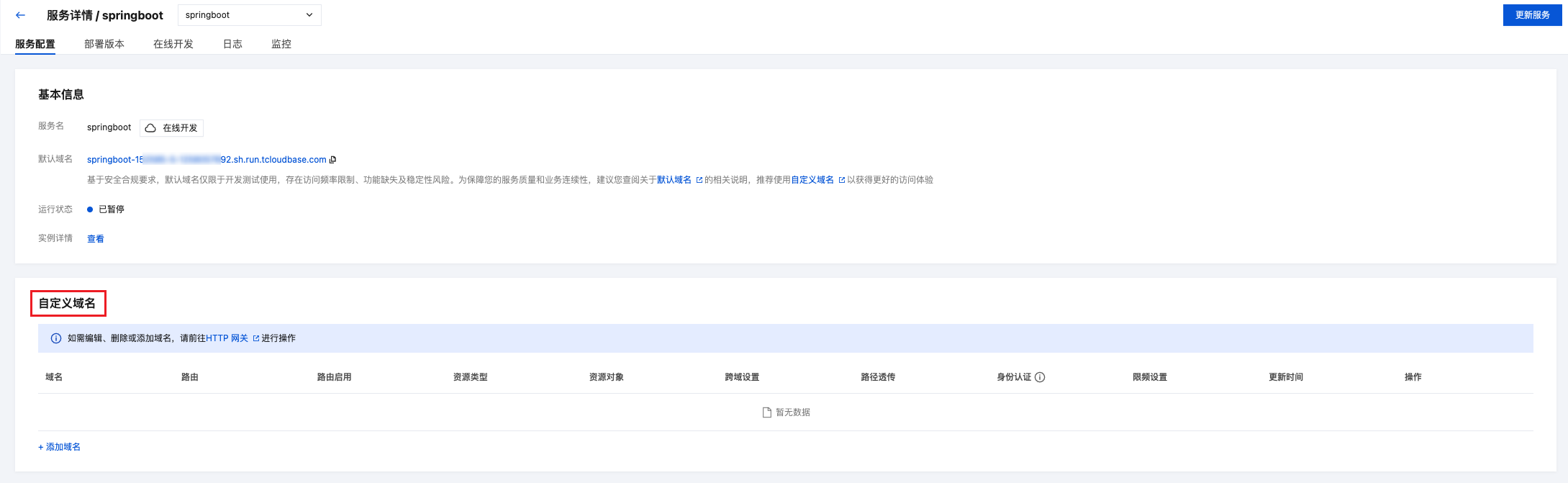
方式二:在 HTTP 网关绑定
如果您更习惯从全局视角管理域名与资源的关系,也可以在 HTTP 网关统一配置:
- 前往 HTTP 网关
- 进入 路由管理,点击「新建」按钮
- 配置以下信息:
| 配置项 | 说明 | 示例 |
|---|---|---|
| 关联资源类型 | 选择「云托管」,然后选择目标云托管服务 | my-service |
| 域名 | 选择默认域名、自定义域名或 *(匹配所有域名) | 默认域名 |
| 触发路径 | 设置 HTTP 访问路径,支持 / 或自定义路径 | /helloworld |
💡 提示:生产环境建议绑定已备案的自定义域名,以获得完整的服务能力。配置方法请参考 自定义域名配置。

步骤 2:测试访问
配置完成后,访问 域名 + 触发路径 即可调用云托管服务:
# 示例:访问默认域名的云托管服务
curl https://your-env-id.<your-env-region>.app.tcloudbase.com/helloworld
发起 HTTP 请求
配置完成后,可以使用任何 HTTP 客户端访问云托管服务。
- curl
- JavaScript
- Python
# GET 请求
curl https://your-domain/helloworld

# POST 请求
curl -X POST https://your-domain/helloworld \
  -H "Content-Type: application/json" \
  -d '{"name": "张三", "email": "zhangsan@example.com"}'

# PUT 请求
curl -X PUT https://your-domain/helloworld/123 \
  -H "Content-Type: application/json" \
  -d '{"name": "李四"}'

# DELETE 请求
curl -X DELETE https://your-domain/helloworld/123
// 使用 fetch API
const response = await fetch('https://your-domain/helloworld', {
  method: 'POST',
  headers: {
    'Content-Type': 'application/json'
  },
  body: JSON.stringify({
    name: '张三',
    email: 'zhangsan@example.com'
  })
});

const data = await response.json();
console.log(data);
import requests

# POST 请求
response = requests.post(
    'https://your-domain/helloworld',
    json={'name': '张三', 'email': 'zhangsan@example.com'}
)

data = response.json()
print(data)
云托管服务开发
接收 HTTP 请求
云托管服务是标准的 HTTP 服务,可以使用任何 Web 框架接收请求:
- Express (Node.js)
- Flask (Python)
- Spring Boot (Java)
- Gin (Go)
const express = require('express');
const app = express();

// 解析 JSON 请求体
app.use(express.json());

// GET 请求
app.get('/helloworld', (req, res) => {
  res.json({
    users: [
      { id: 1, name: '张三' },
      { id: 2, name: '李四' }
    ]
  });
});

// POST 请求
app.post('/helloworld', (req, res) => {
  const { name, email } = req.body;

  res.json({
    success: true,
    user: { id: 3, name, email }
  });
});

// 启动服务
const PORT = process.env.PORT || 8080;
app.listen(PORT, () => {
  console.log(`服务运行在端口 ${PORT}`);
});
from flask import Flask, request, jsonify

app = Flask(__name__)

# GET 请求
@app.route('/helloworld', methods=['GET'])
def get_users():
    return jsonify({
        'users': [
            {'id': 1, 'name': '张三'},
            {'id': 2, 'name': '李四'}
        ]
    })

# POST 请求
@app.route('/helloworld', methods=['POST'])
def create_user():
    data = request.get_json()
    name = data.get('name')
    email = data.get('email')

    return jsonify({
        'success': True,
        'user': {'id': 3, 'name': name, 'email': email}
    })

# 启动服务
if __name__ == '__main__':
    app.run(host='0.0.0.0', port=8080)
import org.springframework.boot.SpringApplication;
import org.springframework.boot.autoconfigure.SpringBootApplication;
import org.springframework.web.bind.annotation.*;

@SpringBootApplication
@RestController
@RequestMapping("/api")
public class Application {

    public static void main(String[] args) {
        SpringApplication.run(Application.class, args);
    }

    // GET 请求
    @GetMapping("/users")
    public Map<String, Object> getUsers() {
        List<Map<String, Object>> users = Arrays.asList(
            Map.of("id", 1, "name", "张三"),
            Map.of("id", 2, "name", "李四")
        );
        return Map.of("users", users);
    }

    // POST 请求
    @PostMapping("/users")
    public Map<String, Object> createUser(@RequestBody Map<String, String> body) {
        String name = body.get("name");
        String email = body.get("email");

        return Map.of(
            "success", true,
            "user", Map.of("id", 3, "name", name, "email", email)
        );
    }
}
package main

import (
    "github.com/gin-gonic/gin"
    "net/http"
)

type User struct {
    ID    int    `json:"id"`
    Name  string `json:"name"`
    Email string `json:"email,omitempty"`
}

func main() {
    r := gin.Default()

    // GET 请求
    r.GET("/helloworld", func(c *gin.Context) {
        users := []User{
            {ID: 1, Name: "张三"},
            {ID: 2, Name: "李四"},
        }
        c.JSON(http.StatusOK, gin.H{"users": users})
    })

    // POST 请求
    r.POST("/helloworld", func(c *gin.Context) {
        var user User
        if err := c.ShouldBindJSON(&user); err != nil {
            c.JSON(http.StatusBadRequest, gin.H{"error": err.Error()})
            return
        }

        user.ID = 3
        c.JSON(http.StatusOK, gin.H{
            "success": true,
            "user":    user,
        })
    })

    // 启动服务
    r.Run(":8080")
}
RESTful API 示例
- Express
- Flask
const express = require('express');
const app = express();

app.use(express.json());

// 模拟数据库
let users = [
  { id: 1, name: '张三', email: 'zhangsan@example.com' },
  { id: 2, name: '李四', email: 'lisi@example.com' }
];

// 获取所有用户
app.get('/helloworld', (req, res) => {
  res.json({ success: true, users });
});

// 获取单个用户
app.get('/helloworld/:id', (req, res) => {
  const user = users.find(u => u.id === parseInt(req.params.id));

  if (!user) {
    return res.status(404).json({
      success: false,
      error: 'User not found'
    });
  }

  res.json({ success: true, user });
});

// 创建用户
app.post('/helloworld', (req, res) => {
  const { name, email } = req.body;

  const newUser = {
    id: users.length + 1,
    name,
    email
  };

  users.push(newUser);
  res.status(201).json({ success: true, user: newUser });
});

// 更新用户
app.put('/helloworld/:id', (req, res) => {
  const user = users.find(u => u.id === parseInt(req.params.id));

  if (!user) {
    return res.status(404).json({
      success: false,
      error: 'User not found'
    });
  }

  user.name = req.body.name || user.name;
  user.email = req.body.email || user.email;

  res.json({ success: true, user });
});

// 删除用户
app.delete('/helloworld/:id', (req, res) => {
  const index = users.findIndex(u => u.id === parseInt(req.params.id));

  if (index === -1) {
    return res.status(404).json({
      success: false,
      error: 'User not found'
    });
  }

  users.splice(index, 1);
  res.json({ success: true, message: 'User deleted' });
});

const PORT = process.env.PORT || 8080;
app.listen(PORT, () => {
  console.log(`Server running on port ${PORT}`);
});
from flask import Flask, request, jsonify

app = Flask(__name__)

# 模拟数据库
users = [
    {'id': 1, 'name': '张三', 'email': 'zhangsan@example.com'},
    {'id': 2, 'name': '李四', 'email': 'lisi@example.com'}
]

# 获取所有用户
@app.route('/helloworld', methods=['GET'])
def get_users():
    return jsonify({'success': True, 'users': users})

# 获取单个用户
@app.route('/helloworld/<int:user_id>', methods=['GET'])
def get_user(user_id):
    user = next((u for u in users if u['id'] == user_id), None)

    if not user:
        return jsonify({'success': False, 'error': 'User not found'}), 404

    return jsonify({'success': True, 'user': user})

# 创建用户
@app.route('/helloworld', methods=['POST'])
def create_user():
    data = request.get_json()

    new_user = {
        'id': len(users) + 1,
        'name': data.get('name'),
        'email': data.get('email')
    }

    users.append(new_user)
    return jsonify({'success': True, 'user': new_user}), 201

# 更新用户
@app.route('/helloworld/<int:user_id>', methods=['PUT'])
def update_user(user_id):
    user = next((u for u in users if u['id'] == user_id), None)

    if not user:
        return jsonify({'success': False, 'error': 'User not found'}), 404

    data = request.get_json()
    user['name'] = data.get('name', user['name'])
    user['email'] = data.get('email', user['email'])

    return jsonify({'success': True, 'user': user})

# 删除用户
@app.route('/helloworld/<int:user_id>', methods=['DELETE'])
def delete_user(user_id):
    global users
    user = next((u for u in users if u['id'] == user_id), None)

    if not user:
        return jsonify({'success': False, 'error': 'User not found'}), 404

    users = [u for u in users if u['id'] != user_id]
    return jsonify({'success': True, 'message': 'User deleted'})

if __name__ == '__main__':
    app.run(host='0.0.0.0', port=8080)