WeDa Private Deployment Kubernetes Cluster Deployment Guide
This document will guide you through deploying the WeDa private platform in a Kubernetes cluster environment, achieving high availability and scalable enterprise-level deployment.
K8s cluster version is only applicable to WeDa private Enterprise Edition and above packages
Deployment Overview
WeDa Kubernetes cluster version provides a high-availability, scalable deployment solution suitable for production environments and large-scale application scenarios.
Deployment Architecture
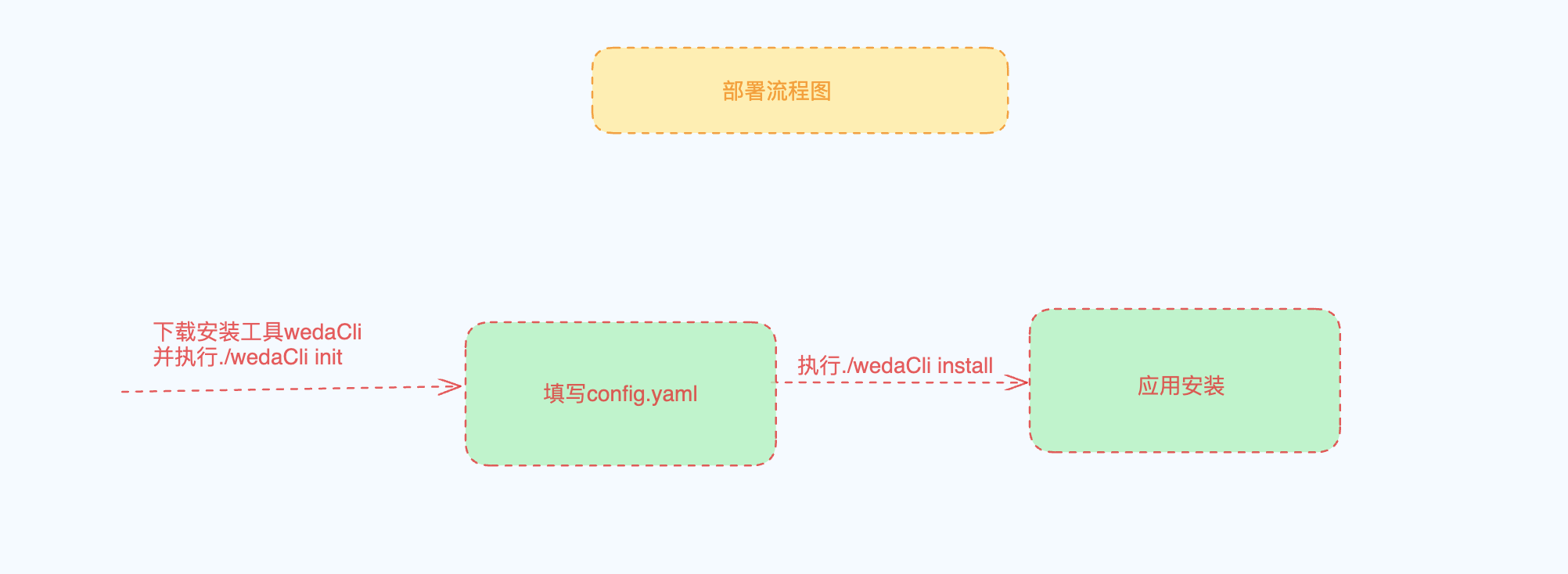
1. Environment Preparation
1.1 Cluster Requirements
Please ensure you have Kubernetes cluster operations capability before deployment. K8s underlying operations are not within the maintenance scope.
Hardware Configuration Requirements
| Component Type | Node Count | Configuration Requirements | Purpose |
|---|---|---|---|
| WeDa Core Services | 3 nodes | 8 vCPU + 16GB memory | Deploy platform services (multi-replica, high availability, rolling updates support) |
| CI/CD Services | 1 node | 4 vCPU + 8GB memory | Optional: Built-in auto deployment or separate deployment |
Software Environment Requirements
| Software Component | Version Requirements | Description |
|---|---|---|
| Kubernetes | v1.22.0 and above | Cluster version |
| kubectl | Compatible with cluster version | Installation Guide |
| helm | 3.x version | Installation Guide |
| Ingress Controller | Any compatible version | Configuration Guide |
Storage Middleware Requirements
The following middleware components are required. If unavailable, please refer to Middleware Deployment Guide
| Middleware Type | Version Requirements | Configuration Guide |
|---|---|---|
| MySQL Database | 8.x version | MySQL Configuration Guide |
| Object Storage | S3 compatible protocol | S3 Object Storage Configuration Guide |
System Tools Requirements
Ensure the following tools are installed in the deployment environment:
wget: For downloading deployment scriptsunzip: For extracting installation packages
1.2 Network Configuration Requirements
External Network Access Whitelist
The following external network addresses need to be accessed during deployment. Please ensure network policies allow access:
| Address | Port | Purpose |
|---|---|---|
weda-private.tencentcloudcr.com | 443 | Image repository access |
https://license.tcloudbasegateway.com | 443 | Certificate activation/latest version retrieval |
https://weda-private.tencentcloudcr.com | 443 | Image pulling |
https://tcr-9r3x9jec-1302110647.cos.ap-guangzhou.myqcloud.com | 443 | Image pulling |
2. Deployment Configuration
2.1 Get Deployment Tools
Choose the corresponding deployment tool based on server architecture:
x86_64 Architecture
# Create deployment directory
mkdir -p k8s_weda && cd k8s_weda

# Download deployment tool
wget -L -O wedaCli https://software-1302110647.cos.ap-guangzhou.myqcloud.com/rc/k8s/x86_64/lastest/wedaCli && chmod +x wedaCli
aarch64 Architecture
# Create deployment directory
mkdir -p k8s_weda && cd k8s_weda

# Download deployment tool
wget -L -O wedaCli https://software-1302110647.cos.ap-guangzhou.myqcloud.com/rc/k8s/arm64/lastest/wedaCli && chmod +x wedaCli
Initialize Configuration
# Initialize configuration file
./wedaCli init
2.2 Configuration Parameters
Edit the generated config.yml file, which is used to generate Helm values.yaml. Main configuration parameters:
WeDa Core Configuration
| Configuration Item | Description | Example Value |
|---|---|---|
weda.ns | K8s namespace for WeDa deployment | weda-software |
weda.ingressClass | Ingress Controller class name | Use kubectl get ingressClass to get |
weda.nodeSelector | Pod node selector | Optional, for specifying deployment nodes |
weda.replicaCount | Service replica count | Default: 1 |
weda.disableRollingUpdate | Disable rolling updates | false (default rolling update) / true (stop-service update) |
Domain and Access Configuration
| Configuration Item | Description | Example Value |
|---|---|---|
weda.domain | WeDa service domain | weda.example.com (without protocol) |
weda.domainProtocol | Access protocol | http or https |
weda.tlsSecretName | TLS certificate Secret name | Optional, required for HTTPS access |
weda.license | WeDa license | License obtained from console |
MySQL Database Configuration
| Configuration Item | Description | Example Value |
|---|---|---|
middleware.mysql.host | Database host address | mysql.example.com |
middleware.mysql.port | Database port | 3306 |
middleware.mysql.username | Database username | weda_user |
middleware.mysql.password | Database password | your_password |
middleware.mysql.dbname | Design-time database name | lowcode |
middleware.mysql.dbRuntimeName | Runtime database name | lcruntime |
-- Create design-time database
CREATE DATABASE `lowcode` DEFAULT CHARACTER SET utf8mb4 COLLATE utf8mb4_unicode_ci;

-- Create runtime database
CREATE DATABASE `lcruntime` DEFAULT CHARACTER SET utf8mb4 COLLATE utf8mb4_unicode_ci;
S3 Object Storage Configuration
| Configuration Item | Description | Example Value |
|---|---|---|
middleware.s3.endpoint | S3 service address | s3.example.com (without protocol) |
middleware.s3.port | S3 service port | 9000 |
middleware.s3.scheme | S3 access protocol | http or https |
middleware.s3.accessKey | S3 access key | your_access_key |
middleware.s3.secretKey | S3 secret key | your_secret_key |
middleware.s3.region | S3 region | us-east-1 |
middleware.s3.pathStyle | Path style support | true or false |
middleware.s3.insecureSkipVerify | Skip certificate verification | false (default) |
S3 Bucket Configuration
| Configuration Item | Permission Requirements | Purpose |
|---|---|---|
middleware.s3.defaultBucket | Public read, private write | Default bucket |
middleware.s3.cloudStorageBucket | Private read, private write | Cloud storage bucket |
middleware.s3.ciSource | Private read, private write | CI/CD source bucket |
The above three buckets cannot have the same name. For detailed configuration, please refer to: S3 Object Storage Configuration Guide
CI/CD Service Configuration
External CI/CD Service
| Configuration Item | Description | Example Value |
|---|---|---|
middleware.build.enabled | Enable external CI/CD service | true or false |
middleware.build.wedaInternalHost | Internal Host configuration | "10.0.0.1 weda.example.com" |
middleware.build.gitness.host | Gitness access address | gitness.example.com |
middleware.build.gitness.proxy | WeDa access domain | weda.example.com |
Built-in CI/CD Service
| Configuration Item | Description | Example Value |
|---|---|---|
middleware.internalBuild.enabled | Enable built-in CI/CD service | true or false |
middleware.internalBuild.hostPath | Data storage directory | /data/cicd |
middleware.internalBuild.nodeSelector | Node selector | Optional configuration |
When both middleware.build.enabled and middleware.internalBuild.enabled are true, the system will prioritize the built-in CI/CD service
3. Deployment Execution
3.1 Execute Installation
After completing configuration, execute the installation command:
./wedaCli install
3.2 Verify Deployment Status
Check Pod Status
kubectl -n weda-software get po
Expected Output Example:
NAME                                  READY   STATUS    RESTARTS   AGE
allin-one-design-b8f855787-58zsj      1/1     Running   0          44m
allin-one-runtime-66cf7b5658-pjw8c    1/1     Running   0          43m
gateway-7c7c786495-vprl6              1/1     Running   0          48m
idaasserver-b6bf65cfc-5dvvg           1/1     Running   0          48m
lcap-service-55dcb9fd-vcpxw           1/1     Running   0          48m
lowcode-5d45ffd9cc-zckxd              1/1     Running   1          48m
proxy-7bf84f8c48-bszw7                1/1     Running   0          48m
weda-plugin-adaptor-dd67659b5-4vcn8   1/1     Running   0          48m
All Pod status should be Running, with READY column showing 1/1.
4. Access Configuration
4.1 Service Exposure Configuration
WeDa cluster version uses Ingress to expose services for external access. Configuration methods vary based on Ingress Controller deployment:
NodePort Method
- Access Method: Use external IPs of each node for access
- Load Balancing: Requires external LB (Load Balancer)
- Use Case: Test environments or environments with external load balancers
LoadBalancer Method
- Access Method: Access through LoadBalancer's EXTERNAL-IP
- Configuration Steps:
- Check Ingress Controller's EXTERNAL-IP
- Bind EXTERNAL-IP with domain name
Check Ingress Controller Status:
# Check Ingress Controller service
kubectl -n ingress-nginx get svc

# Example output
NAME                      TYPE           CLUSTER-IP     EXTERNAL-IP    PORT(S)                      AGE
ingress-nginx-controller  LoadBalancer   10.0.134.188   192.168.2.40   80:30252/TCP,443:31414/TCP   52d
Check Ingress Configuration:
# Check WeDa Ingress configuration
kubectl get ing -n weda-software

# Example output
NAME    CLASS   HOSTS                 ADDRESS        PORTS   AGE
proxy   nginx   weda-test-cloud.com   192.168.2.40   80      6d20h
4.2 DNS Configuration
Map the cluster-external accessible IP with the configured domain (weda.domain):
Production Environment
- Configure domain resolution through DNS service
- Point domain to LoadBalancer's EXTERNAL-IP or external load balancer IP
Test Environment
- Configure hosts file locally for resolution
- Format:
<IP Address> <Domain>
4.3 Access WeDa Platform
After completing DNS configuration, access WeDa platform through:
- Development Platform URL:
http://<weda.domain>/dev - Default Login Information:
- Username:
admin - Password:
Weda@123456
- Username:
- Getting Started Guide:
<weda.domain> is the domain configured in step 2.2
4.4 HTTPS Configuration (Optional)
To access WeDa service via HTTPS, configure TLS certificate on Ingress.
Configuration Steps
-
Prepare TLS Certificate Files
- Certificate file (.crt or .pem)
- Private key file (.key)
-
Create TLS Secret
# Create TLS Secretkubectl create secret tls weda-tls \--cert=path/to/cert/file \--key=path/to/key/file \-n weda-softwareParameter Description:
tls: Specifies creating a TLS type Secretweda-tls: Name of the Secret, can be customized--cert: Specifies the path to the TLS certificate file--key: Specifies the path to the TLS private key file-n weda-software: Specifies the namespace
-
Update Configuration File
Add TLS configuration in
config.yml:weda:domainProtocol: httpstlsSecretName: weda-tls -
Redeploy
./wedaCli install
5. Operations Management
5.1 Service Updates
When updating WeDa services, follow these steps:
-
Switch to Deployment Directory
cd k8s_weda -
Update Configuration (Optional)
Modify
config.yamlfile as needed -
Update Deployment Tool
# Remove old version toolrm wedaCli# Download new version tool (refer to section 2.1)wget -L -O wedaCli https://software-1302110647.cos.ap-guangzhou.myqcloud.com/rc/k8s/x86_64/lastest/wedaCli && chmod +x wedaCli -
Execute Update
./wedaCli install
5.2 License Renewal
When License is about to expire, follow these steps for renewal:
-
Get New License
Obtain new License from WeDa console
-
Backup Environment File
cd k8s_wedamv env env-bak -
Update Configuration File
Replace
licensevalue inconfig.yaml -
Execute Renewal
./wedaCli install
5.3 Service Uninstallation
Uninstallation will delete all WeDa services. Please ensure important data is backed up.
Uninstallation Steps
-
Query Deployed Services
helm list -n weda-software -
Uninstall WeDa Services
helm delete wedabaas -n weda-software -
Clean Namespace (Optional)
Important WarningAfter deleting the namespace, the License will no longer be usable and will need to be reapplied and reconfigured. Please proceed with caution!
kubectl delete namespace weda-software
6. Troubleshooting
6.1 Common Issues
Pod Cannot Start
- Check if node resources are sufficient
- Verify image pulling is normal
- View Pod logs:
kubectl logs <pod-name> -n weda-software
Cannot Access Service
- Check Ingress Controller status
- Verify DNS configuration is correct
- Confirm firewall and security group configuration
Database Connection Failed
- Verify database configuration parameters
- Check network connectivity
- Confirm database permission settings
6.2 Log Viewing
# View specific Pod logs
kubectl logs <pod-name> -n weda-software

# View Pod detailed information
kubectl describe pod <pod-name> -n weda-software

# View Ingress status
kubectl describe ingress -n weda-software
Summary
Through this guide, you have completed the deployment of WeDa private deployment Kubernetes cluster version:
- ✅ Prepared K8s cluster environment meeting requirements
- ✅ Configured necessary middleware services
- ✅ Completed WeDa service deployment and configuration
- ✅ Set up access domain and HTTPS (optional)
- ✅ Mastered basic operations management
Now you can start using WeDa low-code platform for enterprise-level application development. If you encounter issues, please refer to the troubleshooting section or contact technical support.