WeDa Private Deployment FAQ
This document compiles common issues and solutions encountered during WeDa private deployment, helping you quickly resolve problems during deployment and usage.
Installation and Deployment Issues
System Compatibility
Q1: Does WeDa private deployment support Windows systems?
A: No. WeDa private deployment only supports Linux systems. Please refer to Machine Configuration Requirements for detailed system requirements.
License Related
Q2: Can License activation codes be used multiple times?
A: No. Each License activation code can only be used on one CVM. If it has been activated on another CVM, it cannot be reactivated on the current CVM.
Q3: What to do when activation prompts License expiration?

A: Please go to License Renewal Guide to complete the renewal process.
Version Upgrade
Q4: Will private deployment version upgrades affect existing business data?
A: No impact. The upgrade process will preserve all business data. Please follow the steps in Version Upgrade Guide.
Network Configuration
Q5: How to resolve installation failure due to server not having HTTPS certificate installed?
A: You can use the following command to skip SSL/TLS certificate verification:
wget --no-check-certificate http://xxxx
Q6: Can I specify an internal network IP as the access address?
A: Yes. By default, public IP is used for access. If you need to use internal network IP, please refer to Port and Whitelist IP Configuration to specify the internal network address:
http://xxx.xxx.x.x:80
Format description: Protocol + Address + Port
Database Configuration
Q7: What to do when restarting platform service prompts Access denied after custom MySQL configuration?

A: Please check if the MySQL information entered in the config.yaml file can connect normally on the current machine.
Troubleshooting Steps:
- Verify if MySQL service is running normally
- Check if username and password are correct
- Confirm if network connection is smooth
- Verify database permission configuration
Q8: How to resolve init-env errors during installation?
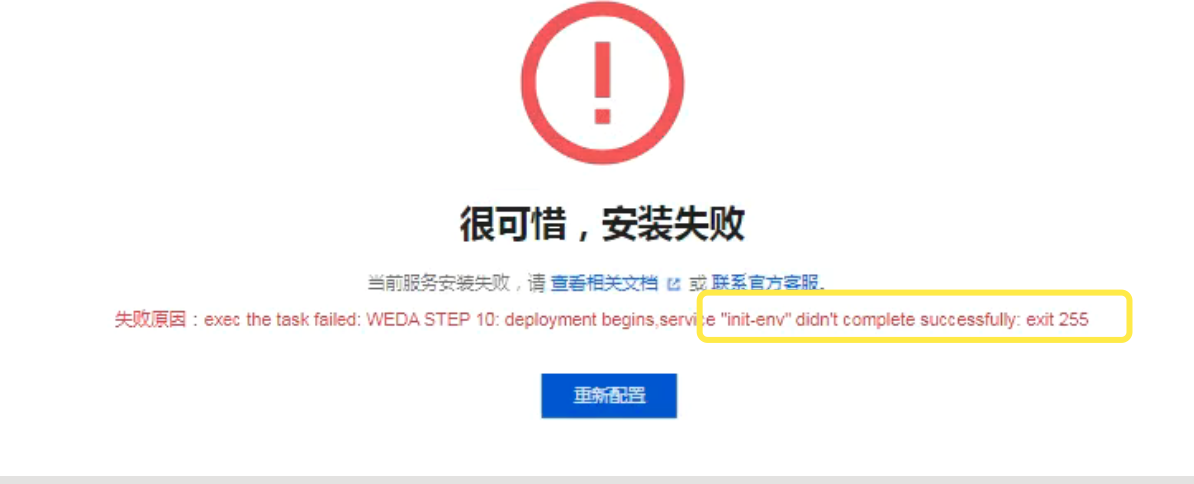
Analysis: Error caused by incompatibility with custom MySQL (version 8.0 and above).
You can view detailed logs with the following command:
docker logs -f init-env
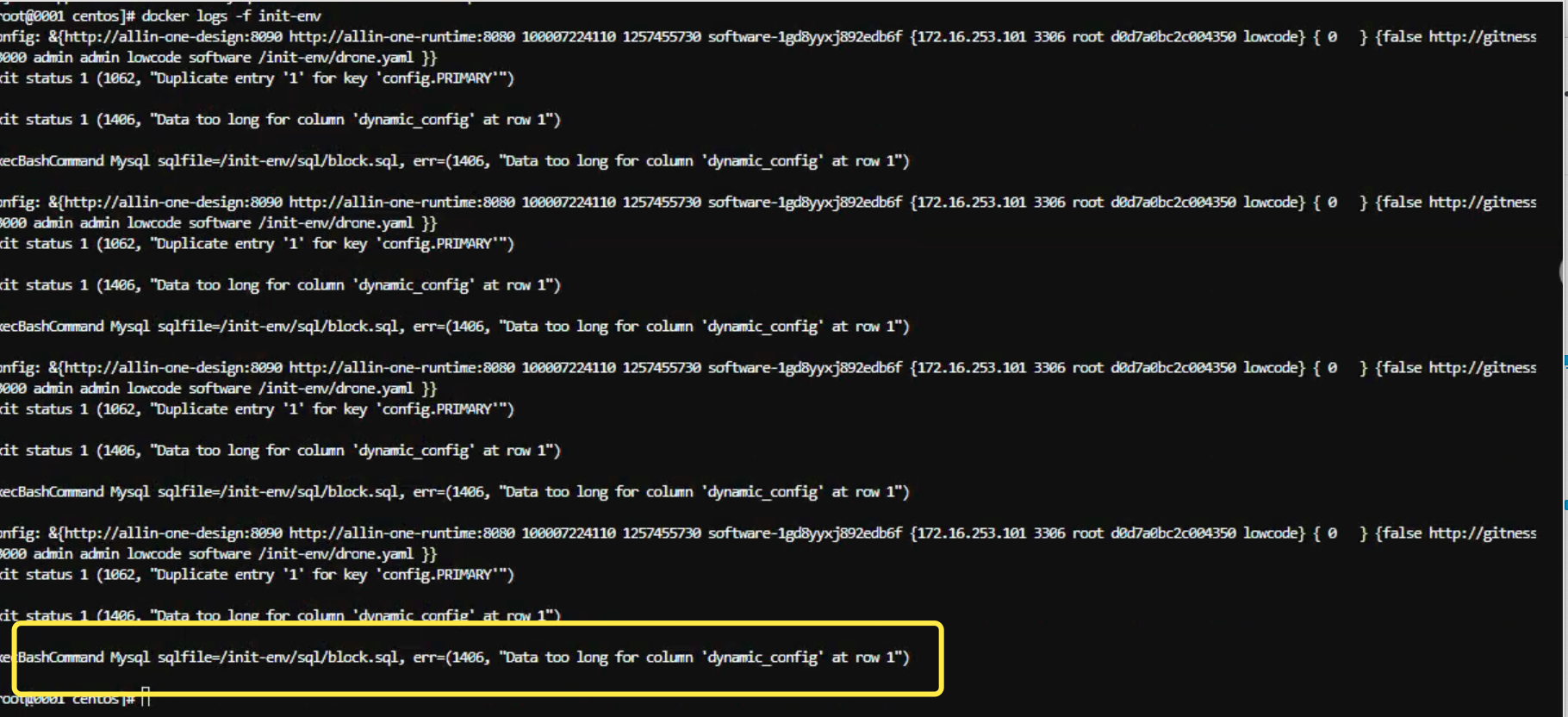
Solution: Add the following configuration to external MySQL:
[client]
default_character_set = utf8mb4

[mysql]
default-character-set=utf8mb4

[mysqld]
character-set-server=utf8mb4
collation-server=utf8mb4_unicode_ci
sql_mode = ALLOW_INVALID_DATES
explicit_defaults_for_timestamp = OFF
Q9: How to handle lcap-service constantly restarting with log errors?
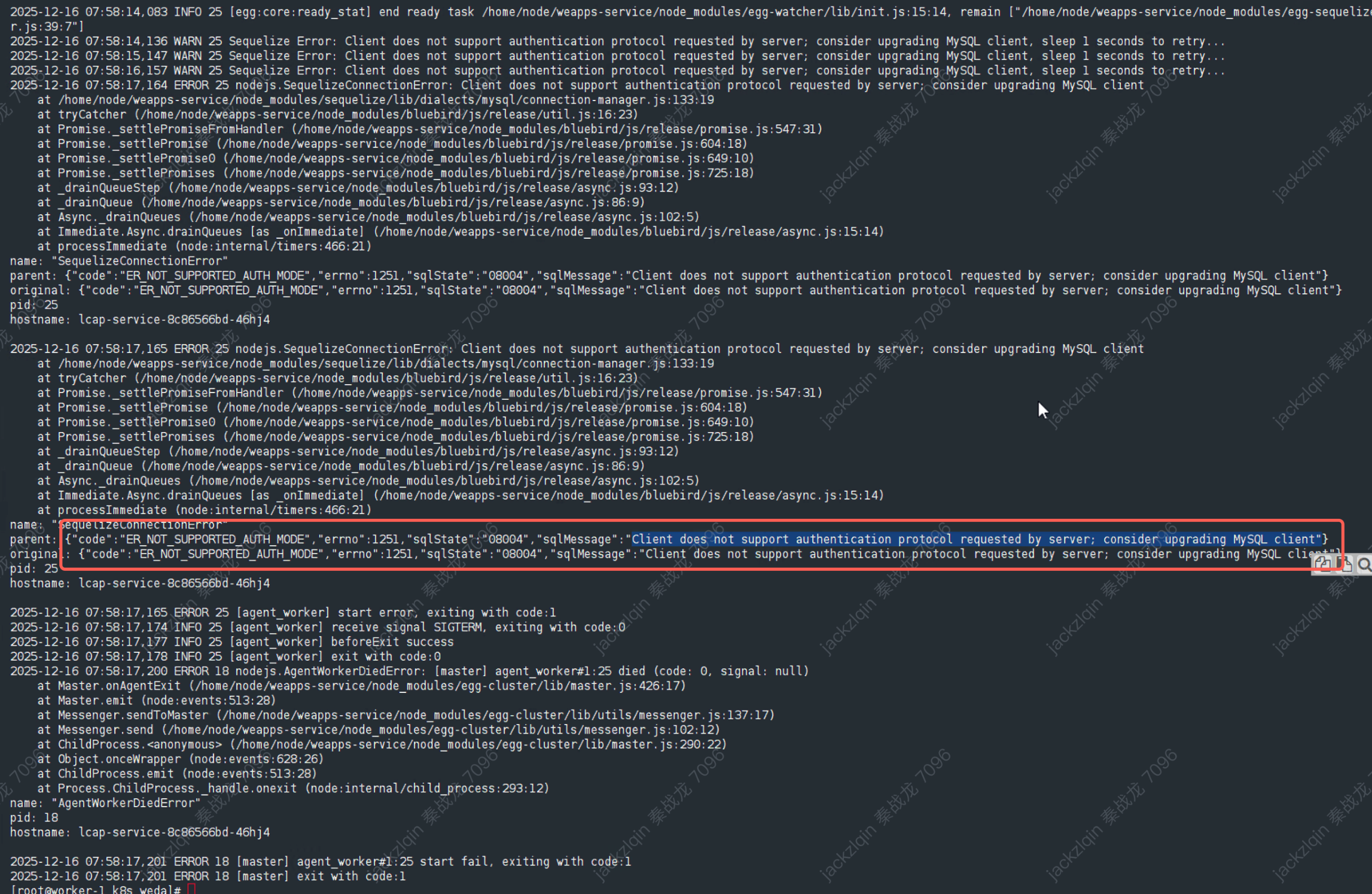
Analysis: Usually caused by external database configuration not meeting requirements.
Solution: Please modify MySQL configuration according to MySQL Server Configuration Requirements.
Container Services
Q10: How to resolve installation error "Container name conflict"?
Error Message:
Conflict. The container name "/mysql" is already in use by container
Analysis: A MySQL Docker container with the same name already exists on the current virtual machine.
Solutions:
- Solution 1: Stop the MySQL container with the same name
- Solution 2: Refer to Custom MySQL Configuration to use external MySQL
Q11: How to resolve installation error "Port occupied"?
Error Message:
Error starting userland proxy: listen tcp4 0.0.0.0:80: bind: address already in use
Analysis: Port 80 on the current virtual machine is already occupied by other services.
Solutions:
- Solution 1: Stop the service occupying port 80
- Solution 2: Fill in an unoccupied port in the access address on the installation configuration page
Q12: How to resolve installation failure due to Docker service not started?
Error Message:
Cannot connect to the Docker daemon at unix:///var/run/docker.sock. Is the docker daemon running?
Analysis: Docker is installed on the server but Docker service is not started.
Solution:
sudo systemctl start docker
sudo systemctl enable docker
Installation Environment
Q13: How to resolve Docker installation failure?
Error Message:
WEDA STEP 0: install docker Docker 未安装,开始安装 Docker 使用 yum 安装 Docker
Analysis: When the server uses yum for installation, download may fail due to yum source lacking corresponding resources.
Solution: Change mirror source and manually install Docker, refer to documentation: Docker Setup
Q14: How to handle cleanup task execution failure?
Error Message:
exec the task failed: WEDA STEP 5: clean up,Warning Configuration file /data/tencent/weda/docker-compose.yaml not found. Skipping docker-compose command.
Analysis: When executing cleanup tasks, some services are still not stopped.
Solution:
- Stop all running services:
docker ps -q | xargs -r docker stop - Re-execute installation
Cluster Deployment
Q15: How to resolve errors during cluster deployment?

A: Please check the License type. Cluster deployment functionality currently only supports Enterprise Edition License.
Application Publishing
Q16: What to do when application is stuck in publishing state or publishing fails without ending?
Analysis: Usually caused by CI/CD tasks being stuck.
Solution: Clean up stuck deployment records through database operations:
# xxx is the application ID
SELECT * FROM deploy_history WHERE appId="xxx" ORDER BY id DESC;

# After querying the problematic record, delete that record
Please backup relevant data before performing database operations to avoid data loss due to misoperations.
Feature Usage Issues
File Storage
Q17: Does the file/image upload component support uploading to custom storage buckets?
A: Yes. Please refer to Custom S3 Object Storage Configuration Guide for configuration.
Supported Storage Types:
- Tencent Cloud COS
- AWS S3
- Other object storage services compatible with S3 protocol
Feature Comparison
Q18: What are the functional differences between WeDa private deployment and public cloud versions?
A: For detailed functional difference comparison, please refer to Capability Comparison List.
Main Differences Include:
- Deployment methods and environment requirements
- Some cloud service integration features
- Data storage and backup strategies
- Technical support service scope
Service Lag
Q19: Application lag, system anomalies causing build errors, unable to enter the system, how to handle?
A: Please check system load conditions. It may be due to high load. When load is around 80%-90%, service lag may occur. Please expand system CPU/memory or disk capacity.
Getting More Help
If the above answers do not resolve your issue, you can:
- View Detailed Documentation: Visit WeDa Private Deployment Documentation Center for more information
- Contact Technical Support: Submit technical support requests through official channels
- Community Discussion: Participate in WeDa developer community discussions
To resolve issues more quickly, we recommend providing the following when submitting issues:
- Detailed error messages and screenshots
- System environment information (operating system, Docker version, etc.)
- Operation steps and reproduction methods
- Related log files