OpenAPI Interface Calling Methods
In the WeDa private deployment environment, the calling methods for OpenAPI interfaces differ from the public cloud version, mainly in domain configuration and authentication mechanisms. This document will provide detailed instructions on how to call OpenAPI interfaces in a private deployment environment.
1. Basic Configuration
1.1 Access Address Configuration
The OpenAPI interface access address for private deployment environment is the same as the WeDa platform access address, usually in the format http://ip:port
- Protocol Selection: If HTTPS is enabled, change the protocol to
https; if a domain is configured, replace the IP with the actual domain - Port Configuration: Fill in the actual port number used during deployment
- HTTP default port 80 can be omitted
- HTTPS default port 443 can be omitted
Environment ID Retrieval Method:
The Environment ID can be obtained from the browser address bar by looking for the URL parameter value starting with envId.
1.2 Authentication Mechanism
1.2.1 Obtaining Authentication Keys
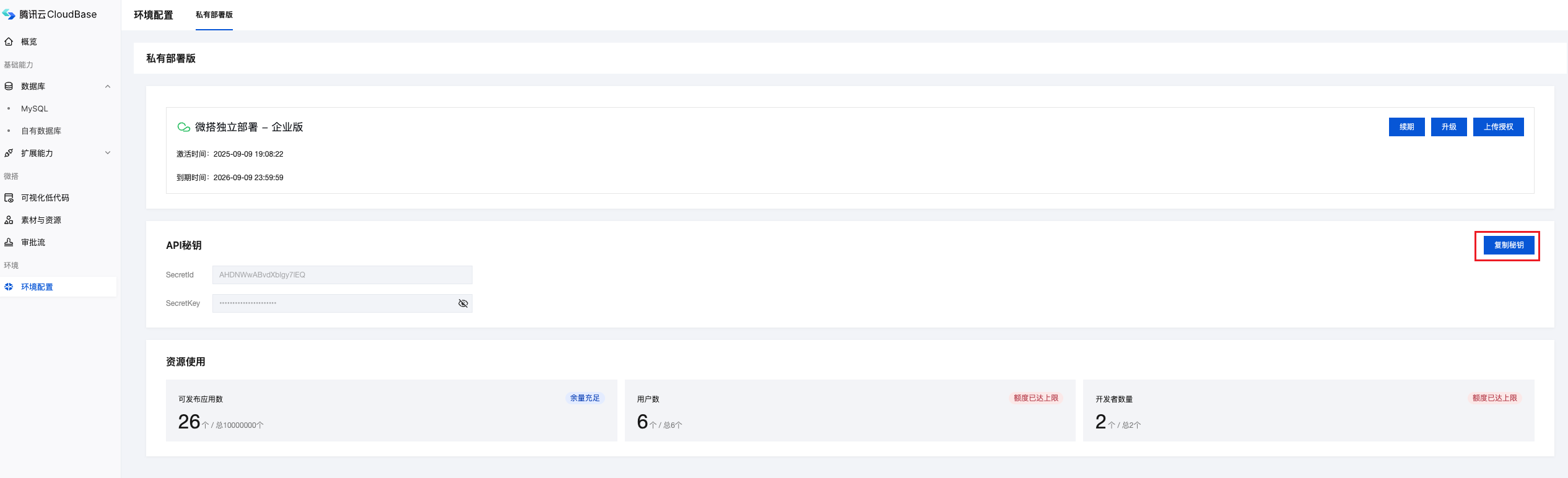
- Log in to the WeDa private deployment management backend
- Navigate to the Environment Configuration page
- Obtain
SecretIdandSecretKey
1.2.2 Obtaining Access Token
Use OAuth 2.0 client credentials mode to obtain an access token.
Token Retrieval Interface:
POST http://ip:port/auth/v1/token/clientCredential
# Please replace http://ip:port with the actual access address
Request Configuration:
- Request Method:
POST - Request Headers:
Content-Type: application/jsonAuthorization: Basic <Base64(SecretId:SecretKey)>
- Request Body:
{"grant_type": "client_credentials"}
Response Format:
{
  "token_type": "Bearer",
  "access_token": "xxxxyyyy",
  "expires_in": 259200
}
access_token: Access token for subsequent API callsexpires_in: Token validity period in seconds
1.2.3 Using Access Token for Interface Calls
Add the following to the request headers of all API requests:
Authorization: Bearer <access_token>
1.3 Interface Calling Specifications
- Communication Protocol: All interfaces use HTTP/HTTPS protocol with UTF-8 encoding
- Supported Request Methods:
POST,GET,PUT,DELETE - Content Type:
application/json;charset=utf-8
2. Practical Demonstration
This section demonstrates the complete calling process using the approval workflow OpenAPI interface as an example.
2.1 Node.js Implementation Example
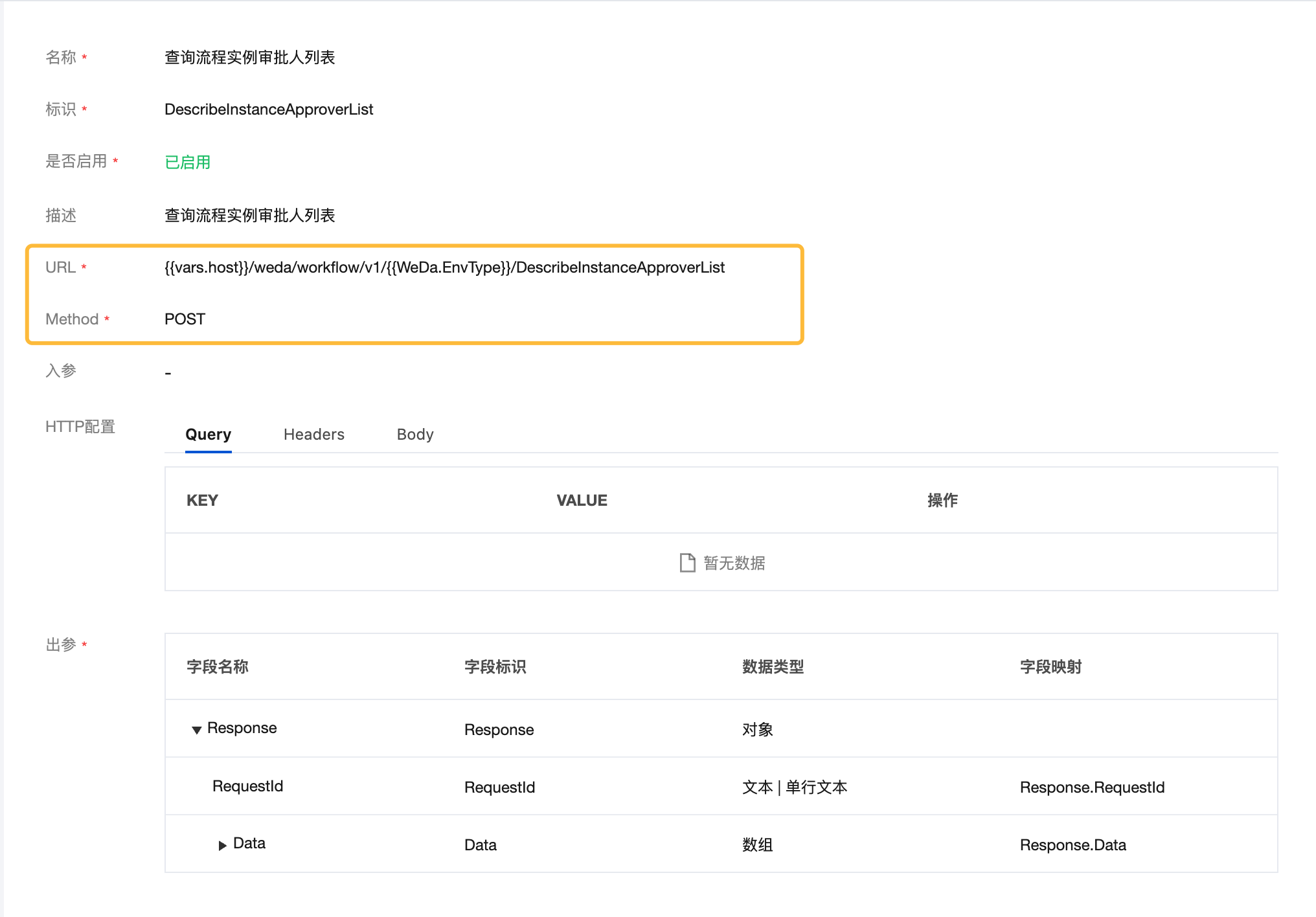
Detailed interface information can be viewed in APIs Connector → Workflow.
Taking the query of process instance approver list as an example:
{{vars.host}}/weda/workflow/v1/{{WeDa.EnvType}}/DescribeInstanceApproverList

Parameter Description:
1. {{vars.host}} - The access address mentioned above
2. {{WeDa.EnvType}} - Environment type: prod (production environment) or dev (experience environment)
Complete Code Example:
const Koa = require("koa");
const fetch = require("node-fetch");
const app = new Koa();

// Configuration parameters (please obtain from "Environment Configuration" page)
const SecretId = ""; // Obtain from private deployment management page
const SecretKey = ""; // Obtain from private deployment management page
const EnvType = "prod"; // prod: production environment, dev: experience environment

// Access address configuration
const domain = 'Please replace with actual access address';

app.use(async (ctx) => {
  try {
    // Step 1: Obtain access token
    const tokenResponse = await fetch(
      `${domain}/auth/v1/token/clientCredential`,
      {
        method: "POST",
        headers: {
          "Content-Type": "application/json",
          Authorization: `Basic ${Buffer.from(
            `${SecretId}:${SecretKey}`
          ).toString("base64")}`,
        },
        body: JSON.stringify({
          grant_type: "client_credentials",
        }),
      }
    );

    const { access_token } = await tokenResponse.json();

    // Step 2: Call business interface
    const queryResponse = await fetch(
      `${domain}/weda/workflow/v1/${EnvType}/DescribeInstanceApproverList`,
      {
        method: "POST",
        headers: {
          "Content-Type": "application/json",
          Authorization: `Bearer ${access_token}`,
        },
      }
    );

    ctx.body = await queryResponse.json();
  } catch (error) {
    ctx.status = 500;
    ctx.body = { error: error.message };
  }
});

app.listen(3000);
2.2 Postman Call Configuration
2.2.1 Create New Request
- Open Postman application
- Create a new request (request method can be viewed in APIs Connector → Workflow)
2.2.2 Configure Environment Variables
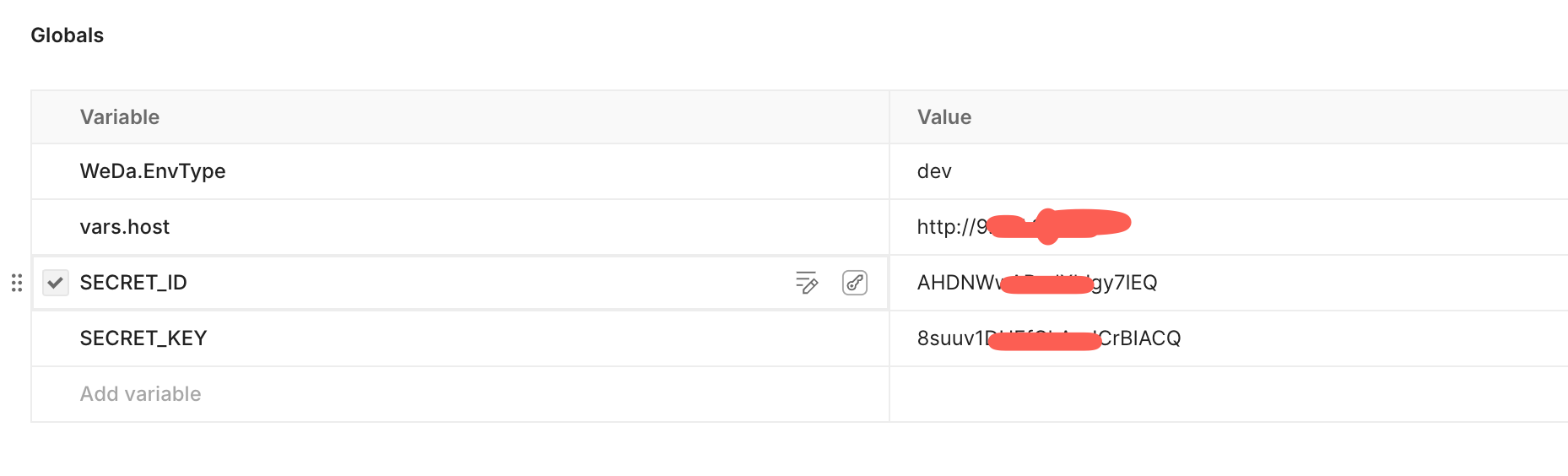
Set the following global environment variables:
vars.host- Private deployment access addressWeDa.EnvType- Environment type:prod(production environment) ordev(experience environment)SECRET_ID- SecretId obtained from environment configuration pageSECRET_KEY- SecretKey obtained from environment configuration page
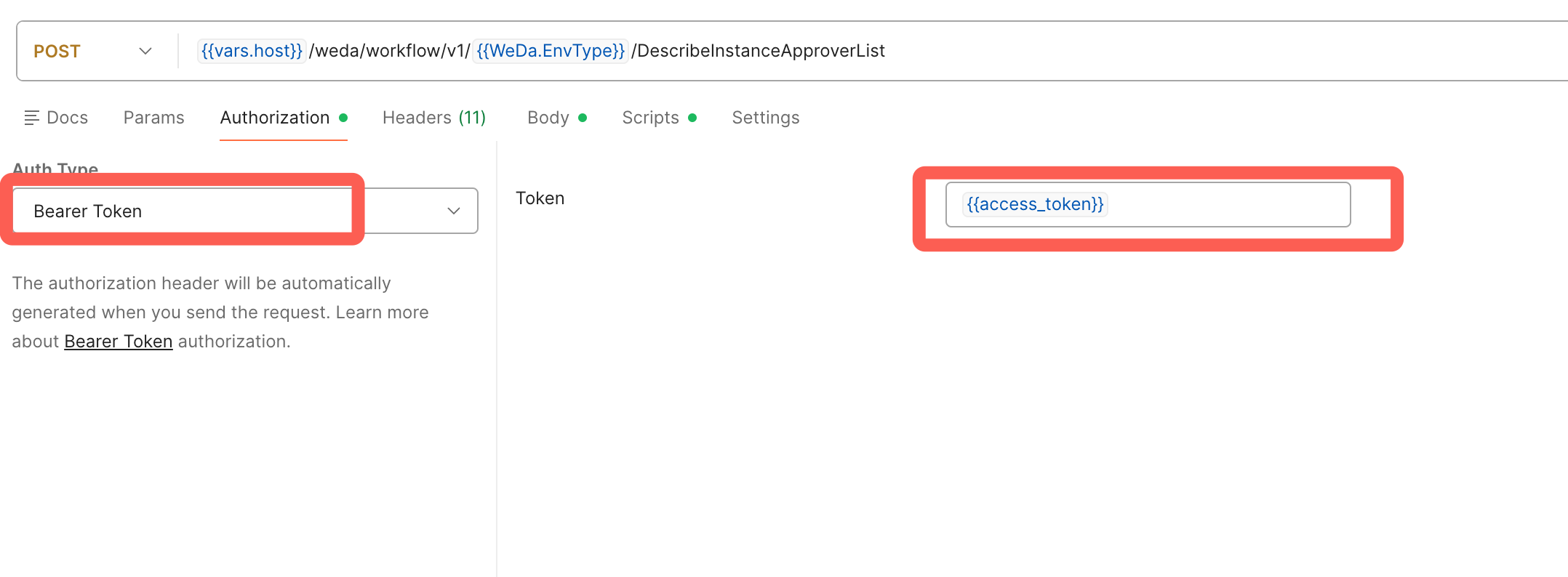
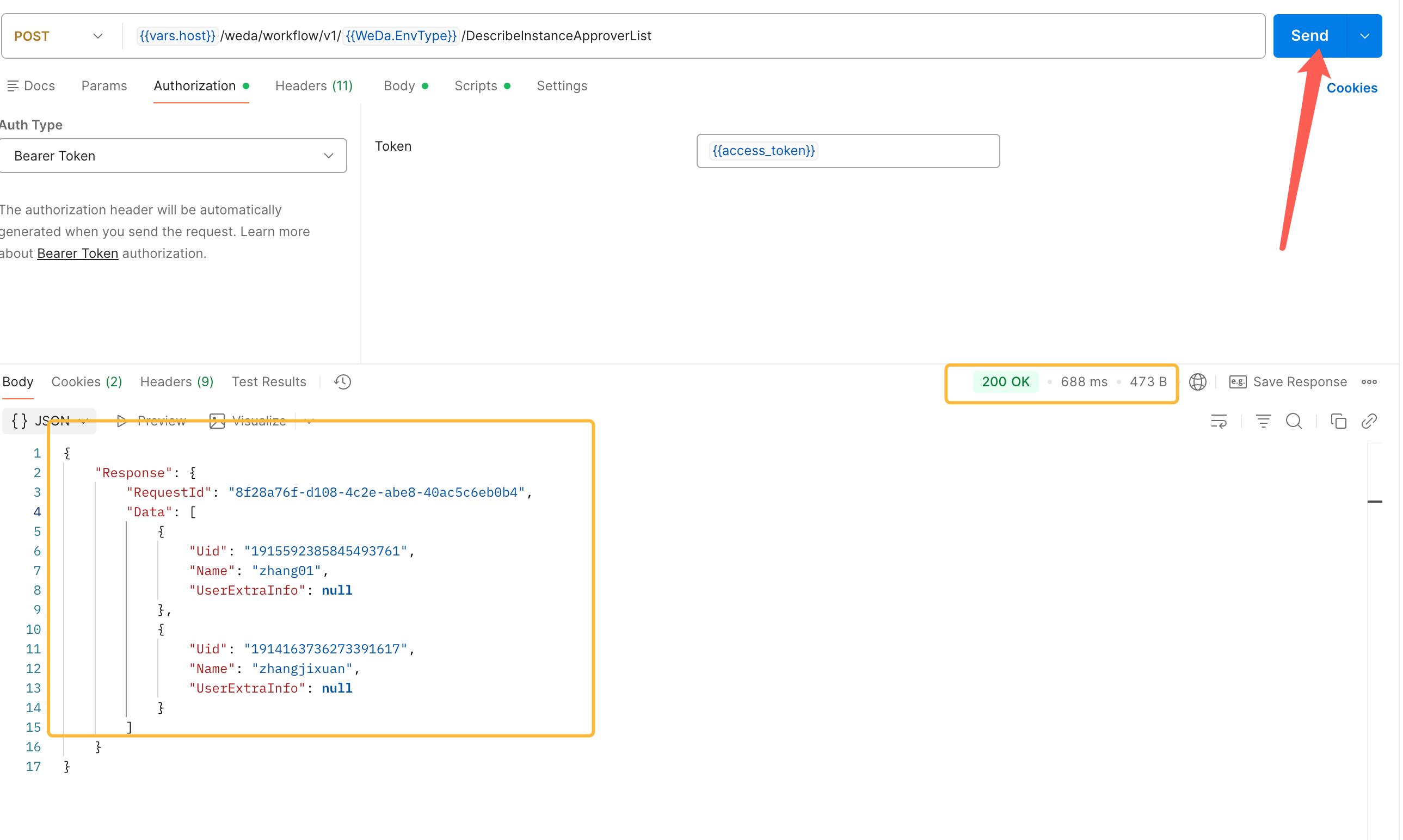
2.2.3 Configure Request Authentication
In the Authorization tab, set Bearer Token to {{access_token}}.
2.2.4 Configure Pre-request Script
Add the following code in the Pre-request section of the Scripts tab:
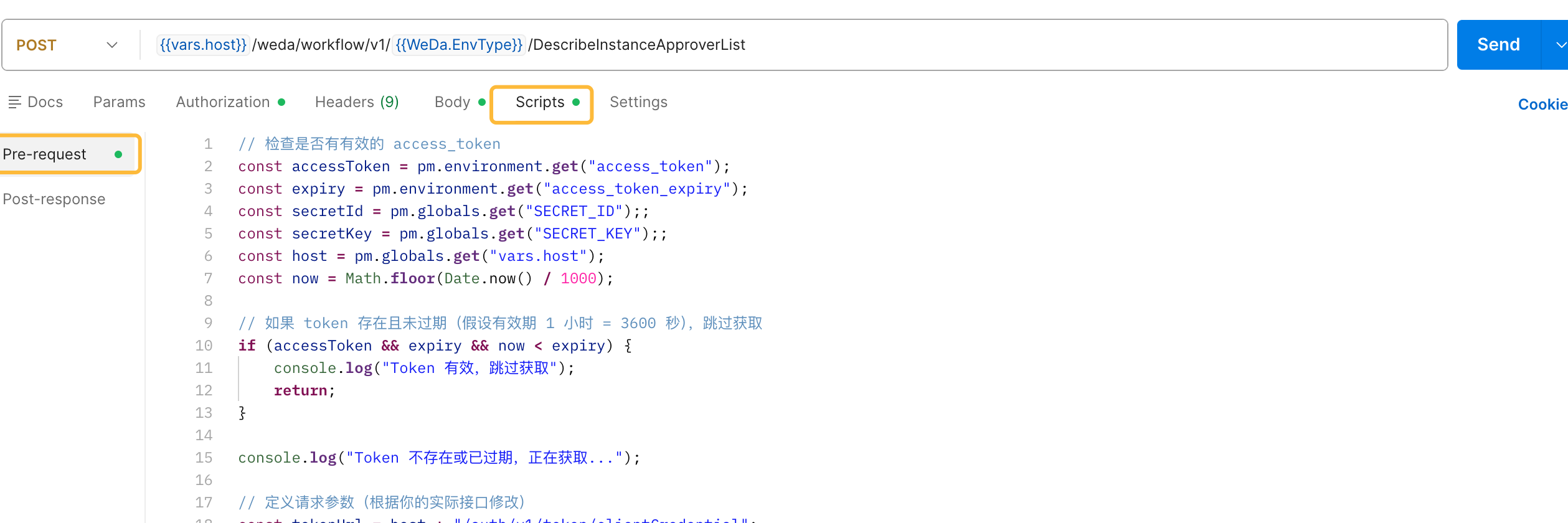
Script Code:
// Check if current access token is valid
const accessToken = pm.environment.get("access_token");
const expiry = pm.environment.get("access_token_expiry");
const secretId = pm.globals.get("SECRET_ID");
const secretKey = pm.globals.get("SECRET_KEY");
const host = pm.globals.get("vars.host");
const now = Math.floor(Date.now() / 1000);

// If token exists and is not expired, skip retrieval process
if (accessToken && expiry && now < expiry) {
    console.log("Access token is valid, skipping retrieval process");
    return;
}

console.log("Access token does not exist or has expired, retrieving new token...");

// Build token retrieval request
const tokenUrl = host + "/auth/v1/token/clientCredential";
console.log("Token retrieval address:", tokenUrl);

// Construct Basic authentication header
const credentials = btoa(`${secretId}:${secretKey}`);

// Send token retrieval request
pm.sendRequest({
    url: tokenUrl,
    method: 'POST',
    header: {
        'Content-Type': 'application/json',
        'Authorization': `Basic ${credentials}`
    },
    body: {
        mode: 'raw',
        raw: JSON.stringify({
            grant_type: "client_credentials"
        })
    }
}, function (err, res) {
    if (err) {
        console.error("Failed to obtain access token:", err);
        return;
    }

    if (res.status !== 'OK') {
        console.error("Token interface returned error:", res.status, res.text());
        return;
    }

    const jsonResponse = res.json();
    const newToken = jsonResponse.access_token;
    const expiresIn = jsonResponse.expires_in || 3600; // Default 1 hour

    if (!newToken) {
        console.error("Returned access token is empty");
        return;
    }

    // Save token and expiration time (expire 60 seconds early to avoid edge cases)
    const expiresAt = Math.floor(Date.now() / 1000) + expiresIn - 60;
    pm.environment.set("access_token", newToken);
    pm.environment.set("access_token_expiry", expiresAt);

    console.log("Access token obtained successfully and saved");
});
2.2.5 Configure Request Headers
Set necessary request headers in the Headers tab.

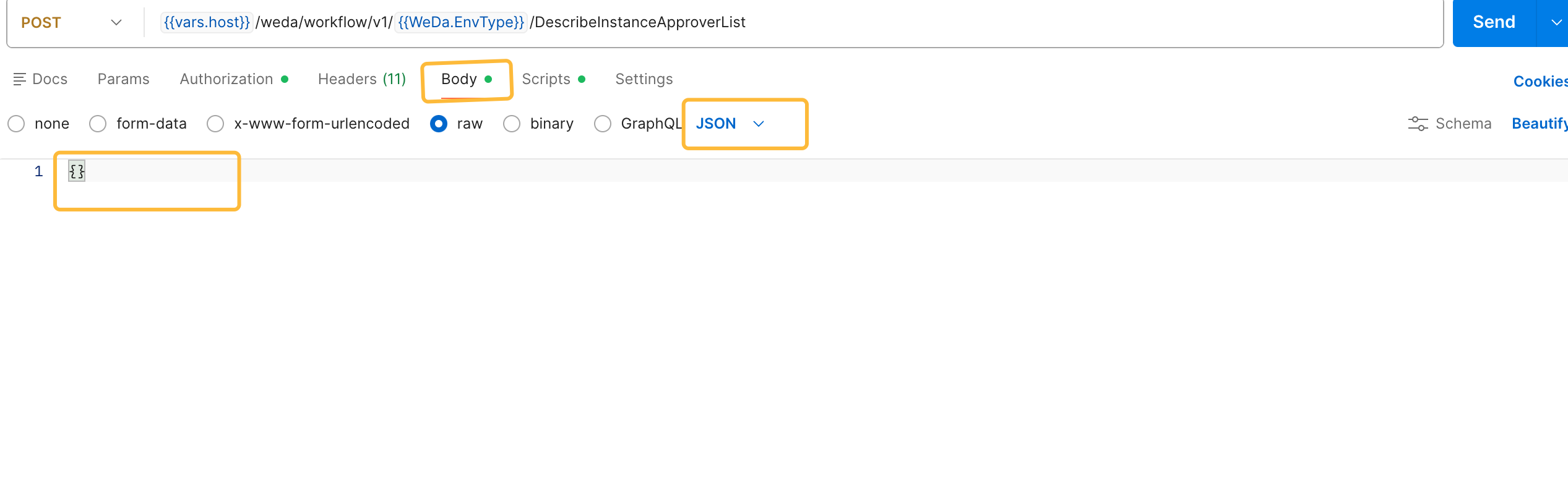
2.2.6 Configure Request Body
Set request data in the Body tab.
2.2.7 Send Request
Click the Send button to execute the request.
3. Error Handling
Two types of exception returns may be encountered during interface calls:
3.1 Authentication and Common Parameter Exceptions
Error Response Format:
{
  "code": "INVALID_ACCESS_TOKEN",
  "requestId": "79e7c0fc8286e",
  "message": "access token verify failed: jwt expired"
}
Common Error Codes:
| Error Code | Description |
|---|---|
INVALID_ACCESS_TOKEN | Access token is invalid or expired |
BAD_REQUEST | Request data format error |
INVALID_HOST | Access address is invalid |
INVALID_REGION | Region parameter mismatch |
INVALID_ENV | Environment parameter error or environment does not exist |
INVALID_ENV_STATUS | Environment status is abnormal, temporarily unavailable |
INVALID_COMMON_PARAM | Common parameter format error |
SIGN_PARAM_INVALID | Signature verification failed |
PERMISSION_DENIED | Insufficient permissions, access denied |
EXCEED_REQUEST_LIMIT | Exceeded resource usage limit |
EXCEED_RATELIMIT | Exceeded request frequency limit |
SYS_ERR | System internal error |
SERVER_TIMEOUT | Service response timeout |
3.2 Business Logic Exceptions
Error Response Format:
{
  "Response": {
    "RequestId": "12345678-1234-1234-1234-123456789012",
    "Error": {
      "Code": "InvalidParameter",
      "Message": "Parameter value does not meet requirements"
    }
  }
}
Handling Suggestions:
Please refer to the detailed descriptions in each interface documentation for specific business error codes and handling methods.
4. Supported OpenAPI Modules
In addition to the approval workflow interface demonstrated in this document, the following modules also support OpenAPI calls in private deployment environments:
- For access address configuration, please refer to 1.1 Access Address Configuration section
- For authentication configuration, please refer to 1.2 Authentication Mechanism section
4.1 Data Model Interface
Provides CRUD operations for data models.
The access_token retrieval method for data model interfaces and cloud storage interfaces differs from approval workflow interfaces:
- Approval workflow interfaces, permission-related interfaces: Use SecretId/SecretKey through client credentials mode (refer to 1.2 Authentication Mechanism)
- Data model interfaces, cloud storage interfaces: Use username and password to obtain access_token, access address still follows 1.1 section configuration
For specific retrieval methods, please refer to: CloudBase HTTP API - Access Token
Detailed documentation: Data Model OpenAPI
4.2 Cloud Storage Interface
Provides file upload, download, management and other cloud storage related interfaces.
The access_token retrieval method for cloud storage interfaces is the same as data model interfaces. Please refer to the authentication method description in 4.1 Data Model Interface above.
Detailed documentation: Cloud Storage OpenAPI
4.3 Permission-related Interface
Provides user permission management, role assignment and other interfaces.
Permission-related interfaces use standard SecretId/SecretKey client credentials mode to obtain access_token, same authentication method as approval workflow interfaces (refer to 1.2 Authentication Mechanism).
Detailed documentation: Permission-related OpenAPI
Summary
Through this document, you have learned the complete calling process for OpenAPI interfaces in WeDa private deployment environment:
- Configure Access Address: Use the actual access address of private deployment
- Obtain Authentication Keys: Get SecretId and SecretKey from environment configuration page
- Obtain Access Token: Get Access Token through OAuth 2.0 client credentials mode
- Call Business Interfaces: Carry Bearer Token in request headers for interface calls
- Handle Exceptions: Perform appropriate error handling based on error codes
It is recommended to implement an automatic access token refresh mechanism in actual use to ensure the stability and continuity of interface calls.