Foreign Key Configuration
Foreign Key is an important constraint in MySQL database used to establish and maintain relationships between two tables. Through foreign key constraints, you can ensure referential integrity of data and prevent insertion and update of invalid data.
Configuring Foreign Keys
When creating a new column in a MySQL database table, you can configure foreign key constraints for that column.
Configuration Steps
- Go to CloudBase Console/MySQL Database/Database Tables management page
- Select the target database table
- Click "Create Column" or edit an existing column
- Check "Set as Foreign Key" in the column configuration
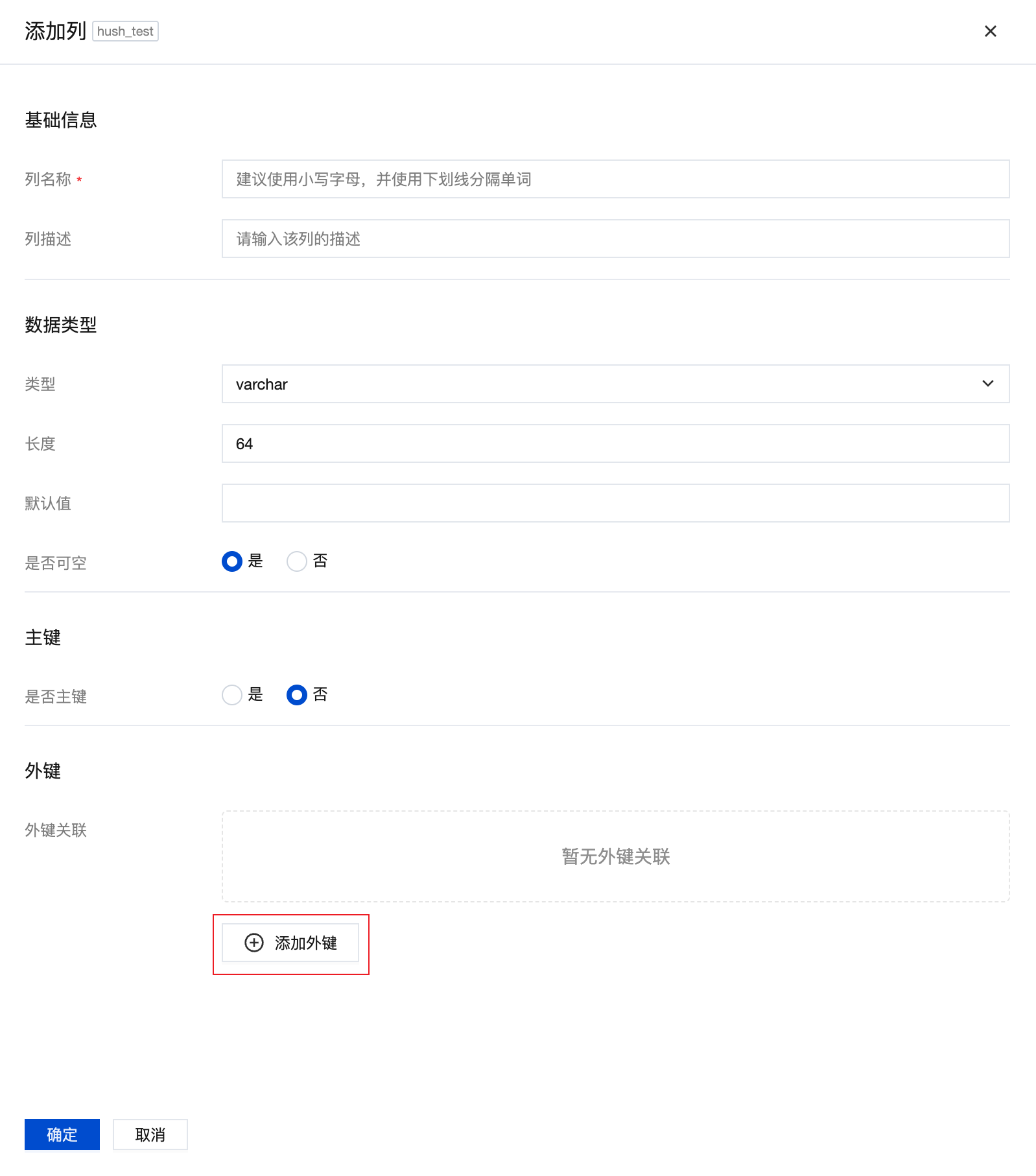
- Configure foreign key parameters
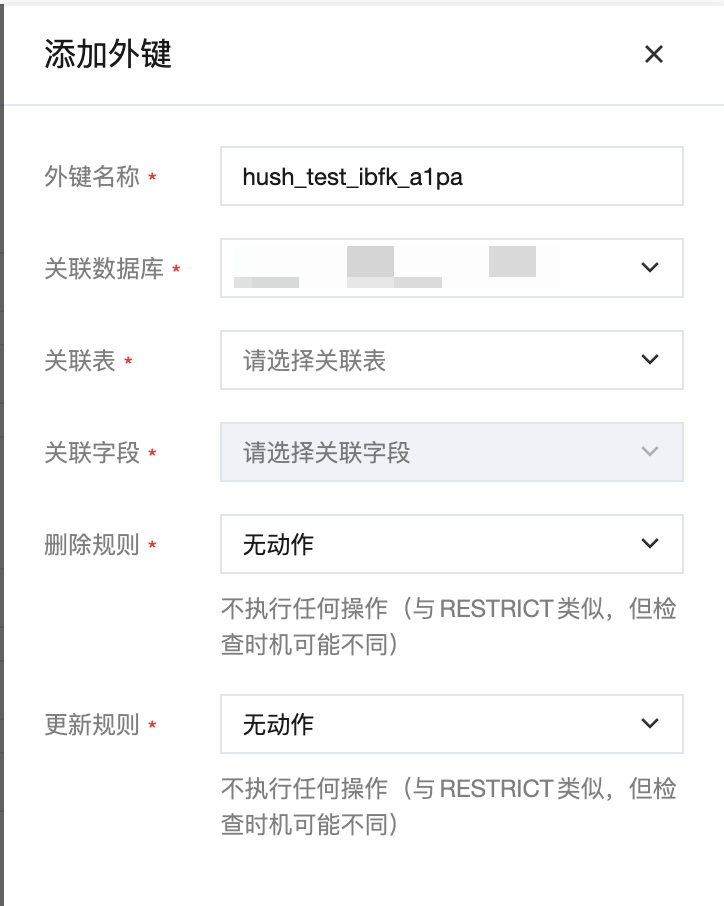
Foreign Key Configuration Parameters
| Parameter Name | Description | Required | Example |
|---|---|---|---|
| Foreign Key Name | Name of the foreign key constraint, used to identify the foreign key | Yes | fk_user_department |
| Referenced Table | Name of the parent table referenced by the foreign key | Yes | departments |
| Referenced Field | Name of the field in the parent table being referenced | Yes | id |
| Delete Rule | Handling method when parent table records are deleted | Yes | Cascade |
| Update Rule | Handling method when parent table referenced field is updated | Yes | No Action |
Delete Rules Explained
When a record in the parent table is deleted, the foreign key constraint will handle related records in the child table according to the delete rule:
| Rule Name | English Identifier | Behavior Description | Use Case |
|---|---|---|---|
| No Action | NO ACTION | Reject deletion of parent table record if referenced records exist in child table | Scenarios requiring strict control over data deletion |
| Restrict | RESTRICT | Same as NO ACTION, reject delete operation | Protect important related data from accidental deletion |
| Cascade | CASCADE | Automatically delete all data in child table that references this record | Clear master-slave relationship, requires synchronized deletion |
| Set NULL | SET NULL | Set the foreign key field in child table to NULL | Allow child table records to exist independently |
| Set Default | SET DEFAULT | Set the foreign key field in child table to default value | Business scenarios with reasonable default values |
Delete Rule Examples
Assume there is a users table and an orders table, where the user_id field in the orders table references the id field in the users table:
-- Users table
CREATE TABLE users (
    id INT PRIMARY KEY,
    name VARCHAR(50)
);

-- Orders table (with foreign key constraint)
CREATE TABLE orders (
    id INT PRIMARY KEY,
    user_id INT,
    amount DECIMAL(10,2),
    FOREIGN KEY (user_id) REFERENCES users(id) ON DELETE CASCADE
);
Effects of different delete rules:
- CASCADE: When deleting a user, all orders of that user will also be deleted
- SET NULL: When deleting a user, the
user_idof related orders will be set to NULL - RESTRICT: If a user has orders, that user cannot be deleted
- NO ACTION: Same as RESTRICT, reject delete operation
- SET DEFAULT: When deleting a user, the
user_idof related orders will be set to default value
Update Rules Explained
When the value of a referenced field in the parent table is updated, the foreign key constraint will handle related records in the child table according to the update rule:
| Rule Name | English Identifier | Behavior Description | Use Case |
|---|---|---|---|
| No Action | NO ACTION | Reject update of parent table field if referenced records exist in child table | Scenarios requiring strict control over primary key updates |
| Restrict | RESTRICT | Same as NO ACTION, reject update operation | Protect relationship from being broken |
| Cascade | CASCADE | Automatically update all fields in child table that reference this value | Scenarios requiring data synchronization |
| Set NULL | SET NULL | Set the foreign key field in child table to NULL | Allow temporarily disconnecting the relationship |
| Set Default | SET DEFAULT | Set the foreign key field in child table to default value | Business scenarios with reasonable default values |
Update Rule Examples
Continuing with the users and orders table example:
-- Orders table (with foreign key constraint with update rule)
CREATE TABLE orders (
    id INT PRIMARY KEY,
    user_id INT,
    amount DECIMAL(10,2),
    FOREIGN KEY (user_id) REFERENCES users(id)
        ON DELETE CASCADE
        ON UPDATE CASCADE
);
Effects of different update rules:
- CASCADE: When updating user ID, the
user_idof related orders will also be updated synchronously - SET NULL: When updating user ID, the
user_idof related orders will be set to NULL - RESTRICT: If a user has orders, that user's ID cannot be updated
- NO ACTION: Same as RESTRICT, reject update operation
- SET DEFAULT: When updating user ID, the
user_idof related orders will be set to default value
Practical Application Examples
Example 1: User and Order Relationship
-- Create users table
CREATE TABLE users (
    id INT AUTO_INCREMENT PRIMARY KEY,
    username VARCHAR(50) NOT NULL,
    email VARCHAR(100) UNIQUE
);

-- Create orders table (with foreign key constraint)
CREATE TABLE orders (
    id INT AUTO_INCREMENT PRIMARY KEY,
    user_id INT NOT NULL,
    order_date DATETIME DEFAULT CURRENT_TIMESTAMP,
    total_amount DECIMAL(10,2),
    -- Foreign key constraint: cascade delete, restrict update
    CONSTRAINT fk_order_user
        FOREIGN KEY (user_id) REFERENCES users(id)
        ON DELETE CASCADE
        ON UPDATE RESTRICT
);
Example 2: Category and Product Relationship
-- Create categories table
CREATE TABLE categories (
    id INT AUTO_INCREMENT PRIMARY KEY,
    name VARCHAR(50) NOT NULL,
    description TEXT
);

-- Create products table (with foreign key constraint)
CREATE TABLE products (
    id INT AUTO_INCREMENT PRIMARY KEY,
    name VARCHAR(100) NOT NULL,
    category_id INT,
    price DECIMAL(10,2),
    -- Foreign key constraint: set NULL on delete, cascade on update
    CONSTRAINT fk_product_category
        FOREIGN KEY (category_id) REFERENCES categories(id)
        ON DELETE SET NULL
        ON UPDATE CASCADE
);