Direct Connection Service
MySQL database provides connection string method, supporting external services to directly connect to CloudBase MySQL database, meeting developers' data access needs in various scenarios.
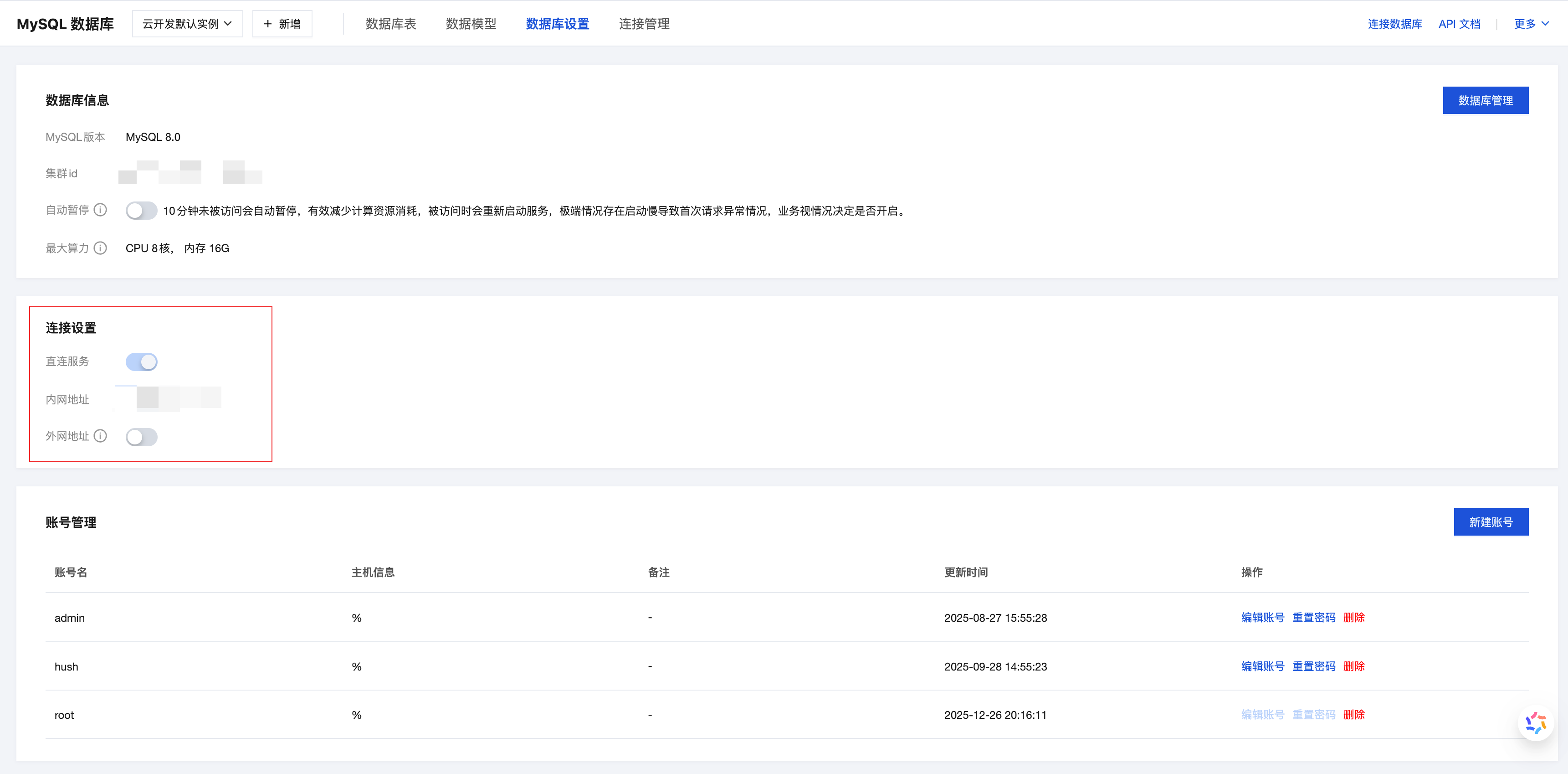
By enabling direct connection service, you can obtain the database connection address and directly connect to MySQL database for data operations in CloudRun environment or local development environment. Direct connection service provides the following two connection methods:
- Internal Address: Only accessible in CloudRun environment, providing high-speed and stable database connection
- External Address: Accessible in any network environment, suitable for local development and debugging scenarios
⚠️ Note: External connection address is only for development and debugging, please use internal connection for production environment business access to ensure performance and security.
Enable Direct Connection Service
Operation Steps
-
In the "Direct Connection Service" module, click the "Enable" button to activate the direct connection function
-
After enabling, the system will automatically generate internal address and external address
Connection Information Description
| Connection Type | Access Range | Use Case | Description |
|---|---|---|---|
| Internal Address | CloudRun environment,Cloud Function environment (requires VPC enabled) | Production environment business access | Provides high-performance, low-latency database connection |
| External Address | Any network environment | Local development, remote debugging | Convenient for development and debugging, can be optionally disabled |
Using Connection String
After obtaining the connection address, you can use the standard MySQL connection string format in your application code:
mysql://<username>:<password>@<host>:<port>/<database>
Parameter Description
| Parameter | Description |
|---|---|
username | Database username (needs to be created in "Account Management" module) |
password | Database password |
host | Database connection address (internal address or external address) |
port | Database port |
database | Database name |
💡 Tip: If you haven't created a database account yet, please go to the "Account Management" module to create an account and password first
Code Examples
- Node.js
- Python
- Java
- PHP
- Go
const mysql = require('mysql2/promise');

// Connect using internal address (recommended for production environment)
const connection = await mysql.createConnection({
  host: 'your-internal-host.mysql.tencentcdb.com',
  port: 3306,
  user: 'your-username',
  password: 'your-password',
  database: 'your-database'
});

// Execute query
const [rows] = await connection.execute('SELECT * FROM users WHERE id = ?', [1]);
console.log(rows);

// Close connection
await connection.end();
import pymysql

# Connect using internal address (recommended for production environment)
connection = pymysql.connect(
    host='your-internal-host.mysql.tencentcdb.com',
    port=3306,
    user='your-username',
    password='your-password',
    database='your-database',
    charset='utf8mb4'
)

try:
    with connection.cursor() as cursor:
        # Execute query
        cursor.execute('SELECT * FROM users WHERE id = %s', (1,))
        result = cursor.fetchone()
        print(result)
finally:
    connection.close()
import java.sql.*;

public class DatabaseConnection {
    public static void main(String[] args) {
        // Connect using internal address (recommended for production environment)
        String host = 'your-internal-host.mysql.tencentcdb.com';
        int port = 3306;
        String url = String.format("jdbc:mysql://%s:%d/%s", host, port, "your-database");
        String username = "your-username";
        String password = "your-password";

        try (Connection conn = DriverManager.getConnection(url, username, password)) {
            String sql = "SELECT * FROM users WHERE id = ?";
            PreparedStatement pstmt = conn.prepareStatement(sql);
            pstmt.setInt(1, 1);

            ResultSet rs = pstmt.executeQuery();
            while (rs.next()) {
                System.out.println(rs.getString("name"));
            }
        } catch (SQLException e) {
            e.printStackTrace();
        }
    }
}
<?php
// Connect using internal address (recommended for production environment)
$host = 'your-internal-host.mysql.tencentcdb.com';
$port = 3306;
$dbname = 'your-database';
$username = 'your-username';
$password = 'your-password';

try {
    $dsn = "mysql:host=$host;port=$port;dbname=$dbname;charset=utf8mb4";
    $pdo = new PDO($dsn, $username, $password);
    $pdo->setAttribute(PDO::ATTR_ERRMODE, PDO::ERRMODE_EXCEPTION);

    // Execute query
    $stmt = $pdo->prepare('SELECT * FROM users WHERE id = ?');
    $stmt->execute([1]);
    $result = $stmt->fetch(PDO::FETCH_ASSOC);
    print_r($result);

} catch (PDOException $e) {
    echo 'Connection failed: ' . $e->getMessage();
}
?>
package main

import (
    "database/sql"
    "fmt"
    "log"

    _ "github.com/go-sql-driver/mysql"
)

func main() {
    // Connect using internal address (recommended for production environment)
    dsn := "your-username:your-password@tcp(your-internal-host.mysql.tencentcdb.com:3306)/your-database"
    db, err := sql.Open("mysql", dsn)
    if err != nil {
        log.Fatal(err)
    }
    defer db.Close()

    // Execute query
    var name string
    err = db.QueryRow("SELECT name FROM users WHERE id = ?", 1).Scan(&name)
    if err != nil {
        log.Fatal(err)
    }
    fmt.Println(name)
}