Backup and Rollback
MySQL Database provides comprehensive data backup and rollback functionality to help you ensure data security and support rapid data recovery in case of data loss or misoperations. This document will detail backup types, operation procedures, and rollback methods.
Data Backup
MySQL Database supports both automatic backup and manual backup:
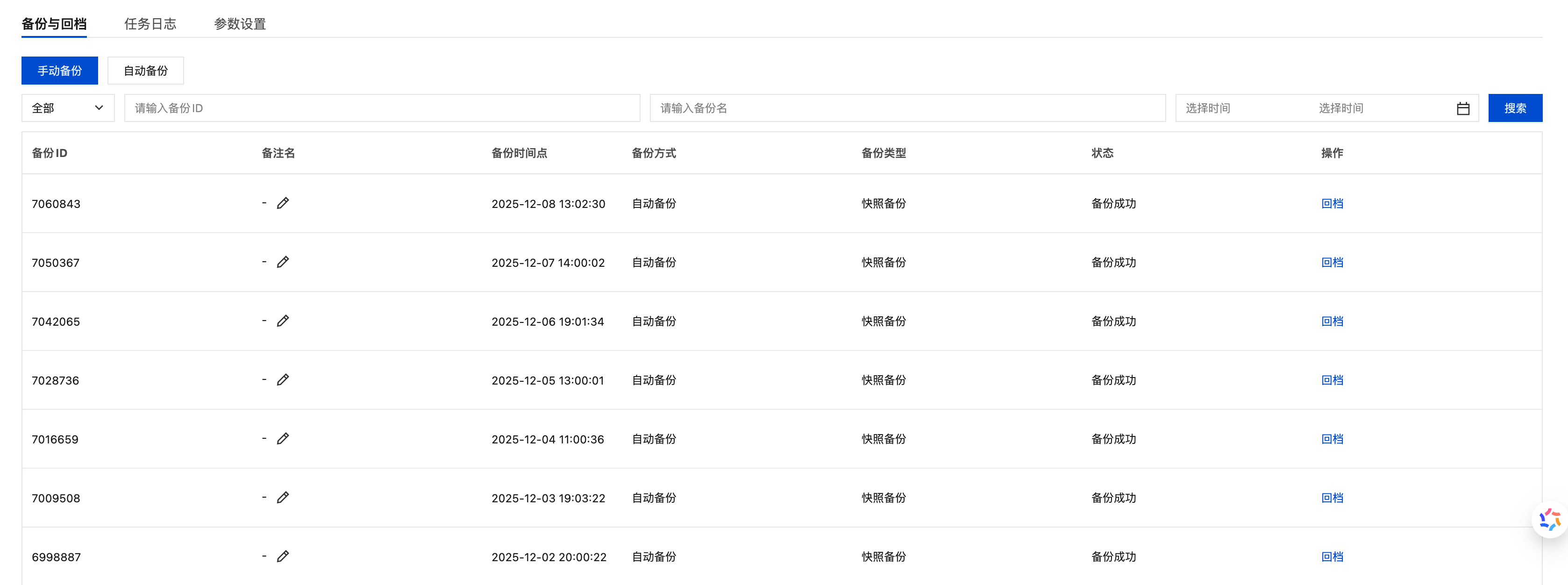
- Automatic Backup: The platform automatically performs backup once daily, with data backups retained for 7 days
- Manual Backup: Users can actively trigger backup operations based on business needs
- Automatic backup currently only supports "Snapshot Backup" for rapid rollback of the original cluster
- Both automatic backup and manual backup are limited to once per hour by default
Backup Types
MySQL Database provides two backup types. You can choose the appropriate backup method based on your business scenario:
| Backup Type | Technical Principle | Advantages | Disadvantages | Applicable Scenarios |
|---|---|---|---|---|
| Logical Backup | Saves database logical structure and content as SQL statements | • Supports fine-grained database/table-level backup • Minimal impact on database performance • Includes complete database objects | • Slower backup speed • Larger storage volume | Precise backup scope control or cross-version migration |
| Snapshot Backup | Uses redirect-on-write (ROW) technology to create storage layer snapshots | • Extremely fast backup speed (seconds) • Business-transparent • Relatively smaller volume | • Coarser backup granularity | Production environment rapid backup and recovery |
Operation Steps
-
In the "Backup and Rollback" section, click the "Manual Backup" button
-
In the backup panel that appears, select the backup type (Logical Backup or Snapshot Backup)
-
Click "Confirm" to start executing the backup task

Data Rollback
The data rollback function allows you to restore the database to a specified point-in-time state based on existing backups.
Rollback Features
- New Instance Generation: Rollback will generate a new database instance
- Custom Naming: Supports custom renaming of the rolled-back database
- Original Data Handling: Supports choosing whether to delete the original database and data tables
Operation Steps
-
In the backup record list, find the backup record you need to rollback
-
Click the "Rollback" button for the corresponding backup record