Doubao Setup Guide
Doubao is ByteDance's AI assistant. Both the desktop app and the web app support the CloudBase plugin.
Once configured, you can operate CloudBase services directly from the Doubao chat.
For example:
- "Build a WeChat mini-program ordering system with CloudBase" - AI scaffolds the pages, creates the document database, writes cloud functions and guides you through preview
- "Build a booking system where users place orders and the admin changes status" - AI models it on CloudBase PostgreSQL, configures permissions and wires up both ends
- "Add phone-number sign-in to a web app" - AI enables the auth method and wires in the CloudBase SDK
No switching to the cloud console - everything can be done in Doubao with natural language.
Prerequisites
A Tencent Cloud account and a CloudBase environment
Doubao: Desktop app or web app, both work. Keep it up to date.
Tencent Cloud account: Authorization reads the Tencent Cloud account you are signed in with. Make sure CloudBase is activated for that account.
CloudBase environment: See Create an environment. New users on the domestic site can activate one for free.
This client ships CloudBase built in. Setup follows its own marketplace or connectors, and the site follows your login state — nothing to pick here.
Configure your AI tool to connect with CloudBase capabilities. Supports local and remote connection. See connection modes.
Step 1: Install / Configure CloudBase
Install from the plugin marketplace
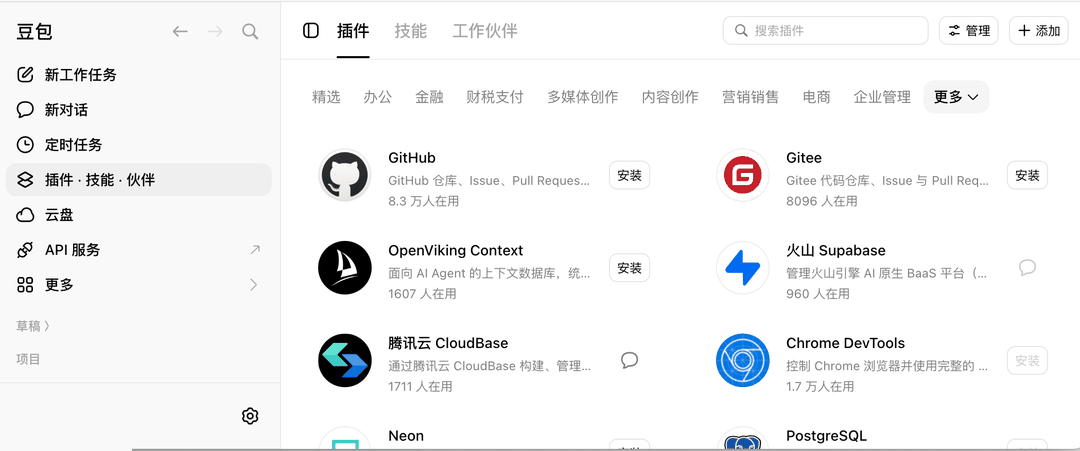
1. Click 插件·技能·伙伴 (Plugins · Skills · Partners) in the left navigation 2. Switch to the 插件 (Plugins) tab at the top and pick the 精选 (Featured) category 3. Find the 腾讯云 CloudBase card and install it from the button on the right 4. Click 管理 (Manage) in the top right and confirm the plugin switch is on
On first use it opens the CloudBase authorization page: pick an environment and click 授权访问 (Authorize). No keys to paste.
Step 2: Chat with AI
Enter the following in your AI chat in order:
Read https://docs.cloudbase.net/skill.md and tell me what it can doUse CloudBase Skills: 帮我实现一个 Web 登录页面,使用 CloudBase AuthInstall from the plugin marketplace
Doubao ships a plugin marketplace, and CloudBase is listed in the 精选 (Featured) category:
- Open Doubao and click 插件·技能·伙伴 (Plugins · Skills · Partners) in the left navigation
- Switch to the 插件 (Plugins) tab at the top and pick the 精选 (Featured) category
- Find the 腾讯云 CloudBase card and complete the install from the button on its right
- Click 管理 (Manage) in the top right and confirm the 腾讯云 CloudBase switch is on
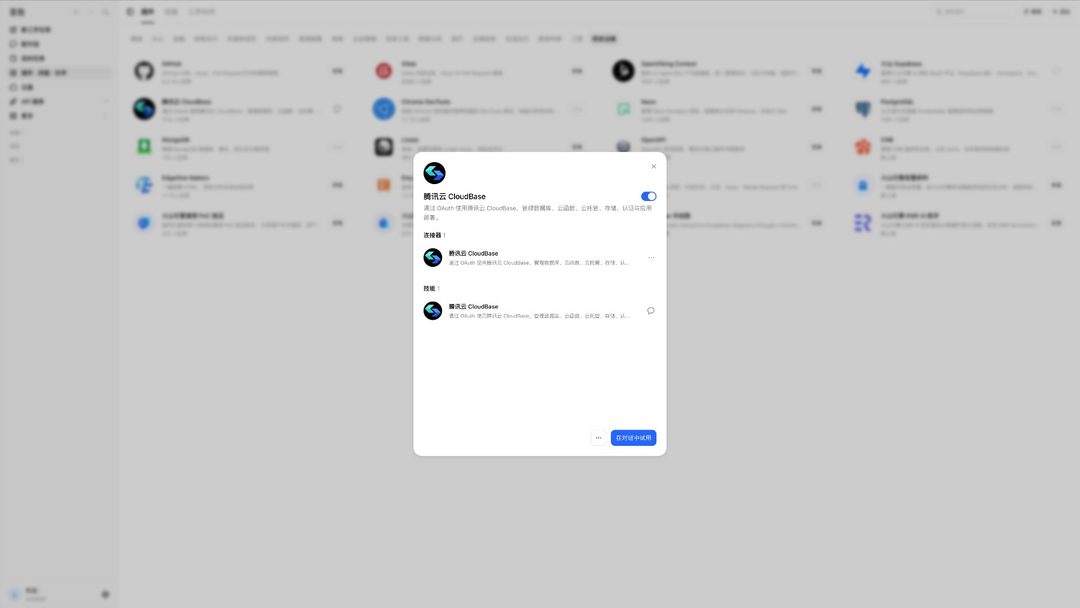
The plugin consists of 1 connector (Tencent CloudBase) plus a skill of the same name.
The web app (doubao.com) exposes its plugin entry from the left navigation, and installs the same way.
First-time authorization
On first use, Doubao redirects to the CloudBase authorization page:
- The top of the page shows the UIN of the Tencent Cloud account currently signed in
- The authorization scope reads "读取和操作您选中的 CloudBase 环境内的所有资源" (read and operate all resources in the CloudBase environment you select)
- Pick the environment to authorize from the dropdown
- Click 授权访问 (Authorize)
After authorization succeeds, the page redirects back to api.doubao-dev.com.
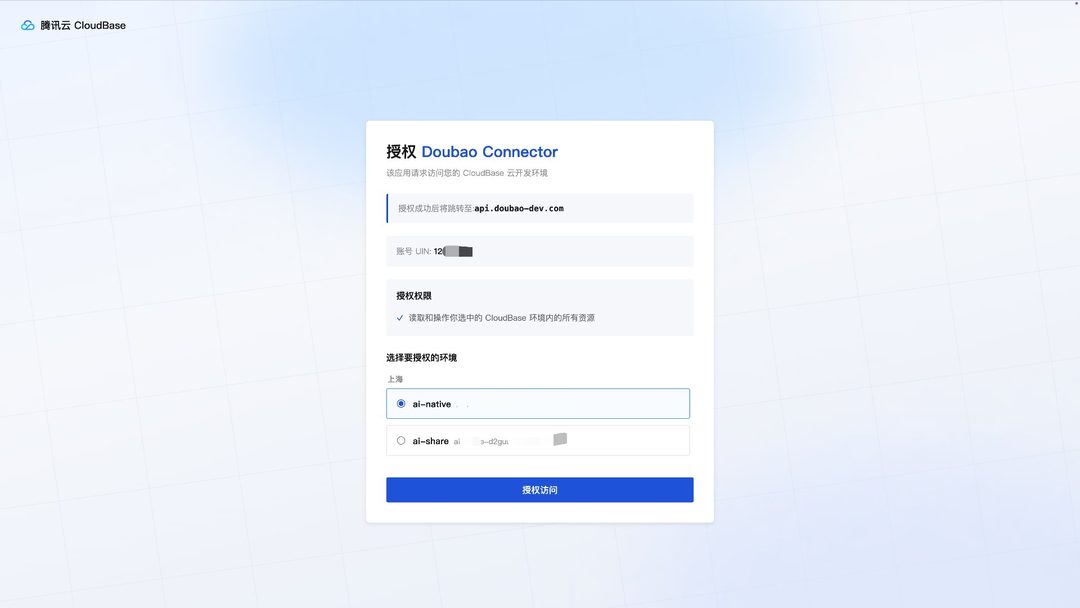
The whole flow never asks you for a SecretId or an API Key.
If the account has no environment yet, the authorization page asks you to create one first:
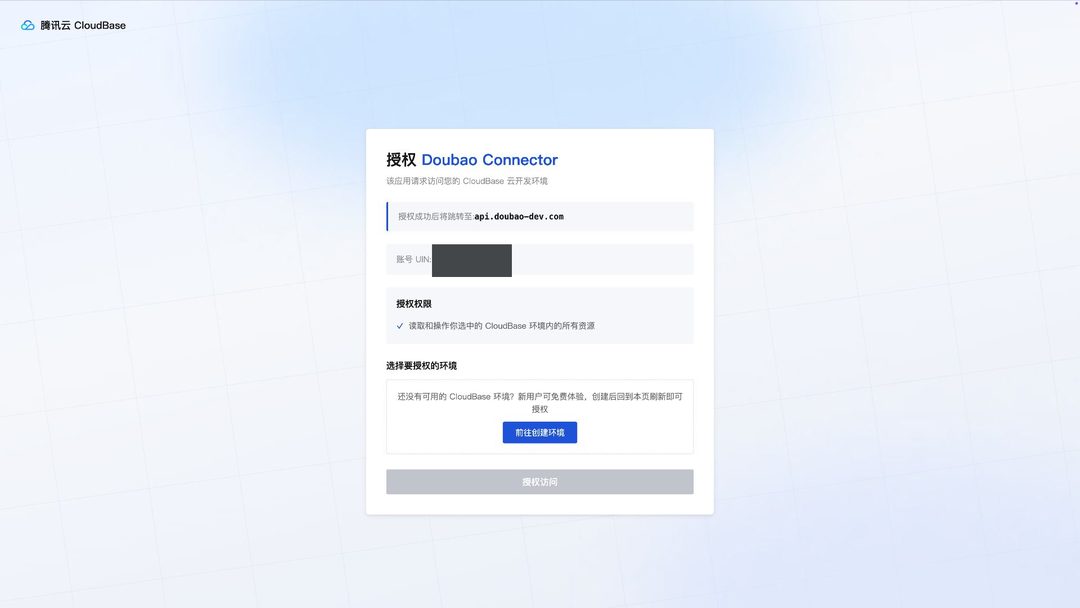
New users on the domestic site can activate a CloudBase environment for free. Once it is created, refresh the authorization page and the new environment becomes selectable.
Switching environments
To move to a different environment, authorize again and pick another environment on the authorization page. No configuration changes are needed.
Note: If you are building a WeChat Mini Program, choose 微信公众平台登录 (WeChat Official Account Platform login) when signing in to CloudBase.
Verify the connection
After authorization, type this in the chat:
检查 CloudBase 工具是否可用
Or ask for something concrete:
帮我查一下当前 CloudBase 环境的状态
FAQ
Q: I cannot find 腾讯云 CloudBase in the Featured category.
A: Search for CloudBase in the search box at the top of the plugin page. If it is still missing, update Doubao to the latest version.
Q: The card does not show an Install button. A: That slot switches to a chat entry once the plugin is installed. To check the install state, open 管理 (Manage) in the top right and look at the switch.
Q: No environment is selectable on the authorization page. A: The signed-in Tencent Cloud account has no CloudBase environment yet. Activate one for free from the link on the authorization page, then refresh it.
Q: The tool count shows 0. A: See FAQ.
More questions: full FAQ