DeepSeek Harness Setup Guide
DeepSeek Harness (DSH) is DeepSeek's desktop agent app. Installing @cloudbase/dsh-plugin lets you create tables, upload files and deploy both ends straight from the chat.
Once configured, you can operate CloudBase services directly from the DSH chat.
For example:
- "Build a WeChat mini-program ordering system with CloudBase" - AI scaffolds the pages, creates the document database, writes cloud functions and guides you through preview
- "Build a booking system where users place orders and the admin changes status" - AI models it on CloudBase PostgreSQL, configures permissions and wires up both ends
- "Add phone-number sign-in to a web app" - AI enables the auth method and wires in the CloudBase SDK
No switching to the cloud console - everything can be done in DSH with natural language.
Prerequisites
DSH and Node.js
DSH version: compatible with >=0.1.0-rc.6 <0.3.0 (verified on 0.2.0-rc.2). Run dsh --version to check.
Node.js: make sure Node.js v18 or later is installed:
node --version
If it is missing, download it from nodejs.org.
CloudBase environment: See Create an environment. New users on the domestic site can activate one for free.
This client ships CloudBase built in. Setup follows its own marketplace or connectors, and the site follows your login state — nothing to pick here.
Configure your AI tool to connect with CloudBase capabilities. Supports local and remote connection. See connection modes.
Step 1: Install / Configure CloudBase
One-shot script (recommended)
curl -fsSL https://raw.githubusercontent.com/TencentCloudBase/CloudBase-AI-Toolkit/main/dsh-plugin/scripts/install.sh | bashManual install (Web UI)
dsh plugin --profile web add @cloudbase/dsh-pluginMCP tools only (Headless)
dsh plugin --profile headless add @cloudbase/dsh-pluginStep 2: Chat with AI
Enter the following in your AI chat in order:
Read https://docs.cloudbase.net/skill.md and tell me what it can doUse CloudBase Skills: 在 Web 应用中创建一个使用 CloudBase Auth 的手机号注册和登录功能Install
The plugin comes in two forms. Pick the one you need:
| Form | What you get | When to use it |
|---|---|---|
| Web UI | MCP tools plus in-session result tables, deploy previews and other UI | Day-to-day use |
| Headless | MCP tools only, no frontend build | Tool access only, or machines that cannot run the frontend build |
Web UI (recommended)
The one-shot script handles the install and its dependencies:
curl -fsSL https://raw.githubusercontent.com/TencentCloudBase/CloudBase-AI-Toolkit/main/dsh-plugin/scripts/install.sh | bash
To do it by hand instead, the equivalent steps are:
dsh plugin --profile web add @cloudbase/dsh-plugin
# pnpm ≥9 blocks dependency install scripts by default (protobufjs fails); the one-shot script already covers this
echo "enable-scripts=true" >> ~/.dsh/profiles/web/.npmrc
(cd ~/.dsh/profiles/web && pnpm install)
dsh --profile web
Headless
When you only need the MCP tools and no UI:
dsh plugin --profile headless add @cloudbase/dsh-plugin
dsh --profile headless "列出所有 mcp__cloudbase__ 工具"
Using it after install
Open the plugin page in DSH. @cloudbase/dsh-plugin is listed with its components showing as running. Two components work together:
| Component | Role |
|---|---|
@deepseek-ai/dsh-mcp-client | DSH's built-in MCP client bridge, which registers the tools exposed by MCP services |
@cloudbase/dsh-plugin | The CloudBase plugin itself: 31 skills plus the MCP tools |
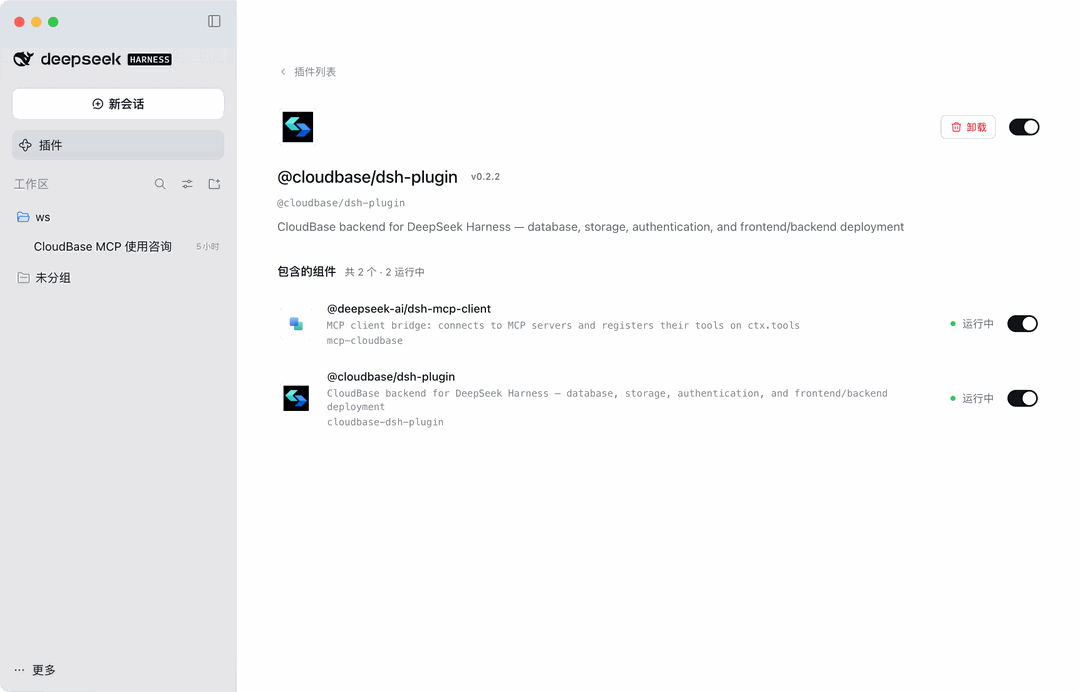
You sign in once on first use (see the next section); after that, start a new session and just describe what you want.
Write operations (running SQL, uploading files, deleting data) are never executed silently - they come back to the session for your confirmation.
Sign-in (device code, no API Key)
The plugin forwards no CloudBase environment and no API Key. Sign-in goes through cloudbase-mcp's own device-code flow. If tcb login state exists locally, it is reused.
Without sign-in state, tell the model:
调用 mcp__cloudbase__auth,action=start_auth,authMode=device,把 verification URL 给我。
Authorize once in the browser and the sign-in state persists. Then call mcp__cloudbase__auth with action=set_env to pick an environment; later tools use it automatically.
Note: Do not configure
CLOUDBASE_API_KEYfor the plugin. An invalid key blocks device-code sign-in, and both sign-in and environment selection go throughmcp__cloudbase__auth.
Things to know
- Web UI plugins need a DSH frontend rebuild: if the plugin card is missing from the UI after install, run
pnpm run build:webfrom the DSH install directory and restart DSH. Headless does not. - The first package fetch can take 10–90 seconds: the first headless tool listing may come back empty - retry.
- Skills are registered by the plugin, not copied into
~/.dsh/skills; bind an environment withauthset_envand inspect it withaction=status. - Credentials stay local (tcb sign-in state or
~/.dsh/.credentials.yaml, mode 600). The plugin does not upload secrets, and read operations only touch your own CloudBase environment.
Verify the connection
Type this in the chat:
检查 CloudBase 工具是否可用
Or ask for something concrete:
帮我查一下当前 CloudBase 环境的状态
FAQ
Q: The CloudBase plugin is missing from the plugin page. A: The Web UI form needs a DSH frontend rebuild (see item 1 above), then restart DSH.
Q: The tool list is empty. A: The first install downloads dependencies - wait 10–90 seconds and retry. Make sure Node.js works and the network connection is fine.
Q: It keeps saying I am not signed in, or sign-in fails.
A: Check whether CLOUDBASE_API_KEY is configured for the plugin. If so, remove it and run the device-code sign-in again.
Q: The tool count shows 0. A: See FAQ.
More questions: full FAQ