Gateway Permission Control
"Gateway Permission" is the first line of defense for CloudBase resource access control. When requests with CloudBase user identity access CloudBase resources (cloud functions, CloudRun, cloud storage, AI capabilities, etc.) through HTTP API domains, HTTP Gateway domains, or CloudRun domains, the requests first reach the gateway layer, where the gateway decides based on configured policies:
- Allow: The request passes through the gateway and enters the resource layer for further authentication
- Deny: The request is blocked by the gateway and will not reach the resource layer
Authentication Order
Gateway authentication occurs before resource authentication. Taking cloud functions as an example:
| Gateway Policy | Execution Status | Result |
|---|---|---|
| Not Allowed | Gateway rejects directly (403/No Permission) | Function will not be executed |
| Allowed | Request reaches cloud function | Continue resource layer/business layer authentication |
Gateway permissions only control "whether access is allowed", not "what can be done". Fine-grained data permissions should be implemented at the resource layer (such as database security rules) or business layer.
Default Policies
The platform associates default preset policies with each role, giving different roles different access permissions when accessing through different channels. Details are as follows:
- HTTP API
- HTTP Gateway
| Resource Type | Resource Identifier | Administrator | Organization Member | Registered User | Anonymous User |
|---|---|---|---|---|---|
| Storage API | storages | ✅ | ❌ | ❌ | ❌ |
| Functions API | functions | ✅ | ❌ | ❌ | ❌ |
| CloudRun API | cloudrun | ✅ | ❌ | ❌ | ❌ |
| AI Model API | ai | ✅ | ✅ | ✅ | ❌ |
| AI Agent API | aibot | ✅ | ✅ | ✅ | ✅ |
| Data Model API | model | ✅ | ✅ | ✅ | ✅ |
| MySQL API | rdb | ✅ | ✅ | ✅ | ✅ |
- ✅ indicates the role has default permissions for this feature, ❌ indicates the role does not have default permissions. To adjust permissions, refer to the methods below to associate policies with corresponding roles.
- For Data Model API, refer to Data Permission Management for permission control. For MySQL API, refer to MySQL Permission Management.
- Default platform policies may be adjusted based on actual circumstances.
For gateway permissions of anonymous users to actually take effect, please first confirm that the Anonymous Login method is enabled in the environment. Otherwise, clients cannot obtain anonymous identity and the corresponding permissions will not be triggered. See Anonymous Login for how to enable it.
When you configure access paths for cloud resources through HTTP Gateway, and the path has authentication enabled, accessing resources with CloudBase user identity will be subject to gateway permission control.
Default permissions after enabling authentication:
| Resource Type | Resource Identifier | Super Admin | Organization Member | Registered User | Anonymous User |
|---|---|---|---|---|---|
| Cloud Functions | functions | ✅ | ✅ | ✅ | ❌ |
| Static Hosting Storage | storages | ✅ | ✅ | ✅ | ❌ |
| CloudRun | cloudrun | ✅ | ✅ | ✅ | ❌ |
- ✅ indicates the role has default permissions for this feature, ❌ indicates the role does not have default permissions. To adjust permissions, refer to the methods below to associate policies with corresponding roles.
- Default platform policies may be adjusted based on actual circumstances.
For gateway permissions of anonymous users to actually take effect, please first confirm that the Anonymous Login method is enabled in the environment. Otherwise, clients cannot obtain anonymous identity and the corresponding permissions will not be triggered. See Anonymous Login for how to enable it.
Configuration Entry
Go to CloudBase Console/Permission Control, select the target role → Enter role details page → Click "Add Custom Policy" → Select "Gateway" as the resource type.
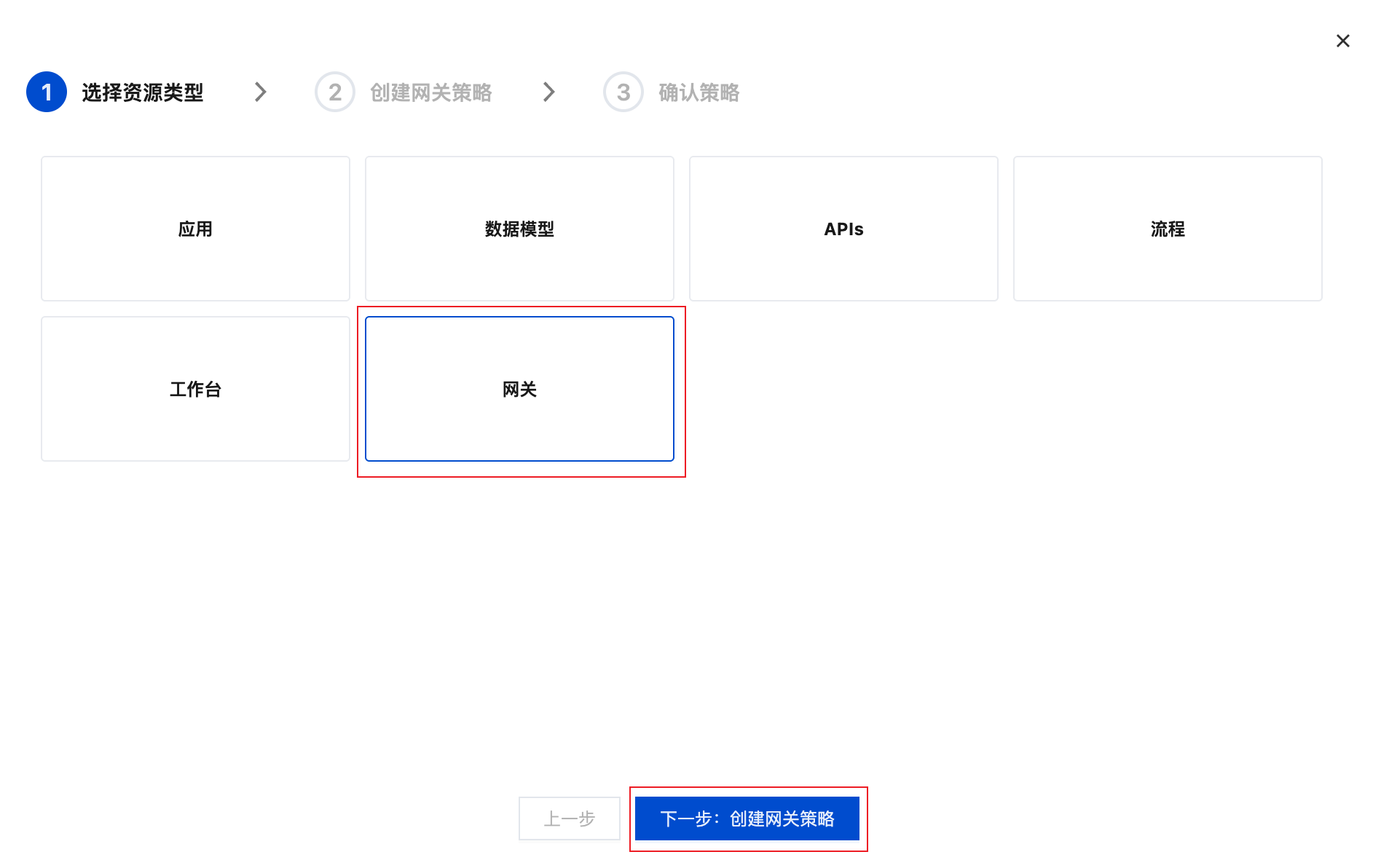
Policy Configuration
Gateway permissions support two types of policy configuration: preset policies and custom policies. Preset policies are a series of policy authentication templates that can be directly associated with user roles to give roles corresponding permissions. If preset policies do not meet requirements, you can write custom policies based on syntax to achieve more flexible permission control.
Preset Policies
The system provides commonly used preset policies that are ready to use out of the box, suitable for most scenarios.
Scenario 1: Development and Testing Phase - Full Administrator Access
- Use Case: Individual development, quick feature verification
- Recommended Policy:
AdministratorAccess - Advantages: No permission blocking, rapid iteration
- Precautions: ⚠️ Do not bind this policy to public-facing application identities in production environments
Scenario 2: Team Collaboration - Split by Resource Type
- Use Case: Multi-person collaborative development, division of labor by resource domain
- Recommended Policies:
StoragesAccess: Cloud storage access permissionFunctionsAccess: Cloud function access permissionCloudrunAccess: CloudRun access permission
- Advantages: Isolate permissions by resource, reduce risk of misoperation
Scenario 3: External Services - HTTP Access Control
- Use Case: Providing services externally via HTTP API
- Recommended Policies:
FunctionsHttpApiAllow/FunctionsHttpServiceAllowCloudrunHttpApiAllowStoragesHttpServiceAllow
- Best Practice: ⚡ First open the minimum permission set, then gradually expand according to needs
Custom Policies
When preset policies cannot meet requirements, you can customize policies to achieve fine-grained permission control.
Policy Syntax Description
A policy policy consists of a version version and statements statement. Each statement statement contains the following fields:
| Field | Required | Description |
|---|---|---|
effect | Required | Policy effect: allow (allow) or deny (deny) |
action | Required | Operation type uses four-segment format: resource_identifier:domain:HTTP_method:request_pathFormat Description: 1. Resource Identifier (required): Refer to resource identifiers below, such as functions, storages, cloudrun, etc.2. Domain (optional): The actual access domain, defaults to * (all domains) when omitted3. HTTP Method (optional): Uppercase HTTP request method (e.g., GET, POST, PUT, DELETE), defaults to * (all methods) when omitted4. Request Path (required): HTTP request path, uses * wildcard matching. * means all paths, /path/* means all paths under /path/Examples: - functions:* → Allow all cloud function access (domain and method omitted)- functions:/hello → Only allow access to path /hello- functions:/api/* → Allow access to all paths under /api/ (e.g., /api/users, /api/orders)- cloudrun:env-xxxx.api.tcloudbasegateway.com:POST:/v1/cloudrun/* → Allow POST method access to all paths under CloudRun API via specified domain- storages:*.tcloudbaseapp.com:GET:* → Allow GET all storage resources via static hosting domain |
resource | Required | Resource scope: Fixed fill * (representing all resources), fine-grained control is achieved through the action field |
Resource Identifiers
- HTTP API Resources
- HTTP Gateway Resources
Resource types and identifiers accessed through Open API:
| Resource Identifier | Identifier | Description |
|---|---|---|
| Cloud Storage | storages | Object storage operations |
| Cloud Functions | functions | Cloud function invocation |
| CloudRun | cloudrun | CloudRun service access |
| AI Model | ai | AI model integration |
| AI Agent | aibot | AI agent service |
| Data Model | model | Data model management |
| MySQL Access | rdb | MySQL database access |
Resource types and identifiers accessed through HTTP Gateway:
| Resource Identifier | Identifier | Description |
|---|---|---|
| Cloud Functions | functions | Access cloud functions via HTTP paths |
| Static Hosting Storage | storages | Static website hosting, file access |
| CloudRun | cloudrun | Container service access |
Policy Structure Example (Allow Access to All Cloud Functions)
{
  "version": "1.0",
  "statement": [
    {
      "effect": "allow",
      "action": "functions:*",
      "resource": "*"
    }
  ]
}
Policy Priority Rules
When the same request matches multiple policies:
- ❌
denytakes priority over ✅allow - When no policy is matched, access is denied by default
When both allow statements and deny statements exist, the deny priority principle applies.
Common Custom Policy Examples
- Allow Specific Cloud Function
- Deny Dangerous Operations
- Cloud Storage Access
- AI Model Access
- Mixed Policy
Allow HTTP access to the cloud function with path /hello:
{
  "version": "1.0",
  "statement": [
    {
      "effect": "allow",
      "action": "functions:/hello",
      "resource": "*"
    }
  ]
}
Deny access to specific sensitive cloud functions:
{
  "version": "1.0",
  "statement": [
    {
      "effect": "deny",
      "action": "functions:/dangerousFunction",
      "resource": "*"
    }
  ]
}
Allow access to all cloud storage resources:
{
  "version": "1.0",
  "statement": [
    {
      "effect": "allow",
      "action": "storages:*",
      "resource": "*"
    }
  ]
}
Allow access to all AI model resources:
{
  "version": "1.0",
  "statement": [
    {
      "effect": "allow",
      "action": "ai:*",
      "resource": "*"
    }
  ]
}
Allow access to all cloud functions, but deny access to specific sensitive functions (deny has higher priority):
{
  "version": "1.0",
  "statement": [
    {
      "effect": "allow",
      "action": "functions:*",
      "resource": "*"
    },
    {
      "effect": "deny",
      "action": "functions:/admin",
      "resource": "*"
    }
  ]
}
Best Practices
Least Privilege Principle
Follow the "Least Privilege" principle and grant permissions according to actual needs:
| Identity Type | Recommended Policy | Description |
|---|---|---|
| Developer/Administrator | AdministratorAccess | High permissions can be used during development phase to improve efficiency |
| Production Environment Application | Custom Policy | Only grant necessary action |
| Automation Service | Minimum Permission Set | CI/CD, scheduled tasks, etc. only open required interfaces |
Layered Defense Strategy
Security protection should be implemented at multiple levels, rather than relying on a single mechanism:
┌─────────────────────────────────────────┐
│  Gateway Layer (Gateway Permission)      │  ← Controls "whether access is allowed"
│  • Determines whether requests can        │
│    enter the resource layer               │
└─────────────────────────────────────────┘
              ↓ Allow
┌─────────────────────────────────────────┐
│  Resource Layer (Security Rules)         │  ← Controls "what can be done"
│  • Database security rules                │
│  • Cloud storage access control           │
│  • Cloud function authentication config   │
└─────────────────────────────────────────┘
              ↓ Pass
┌─────────────────────────────────────────┐
│  Business Layer (Application Auth)       │  ← Controls "fine-grained permissions"
│  • User role verification                 │
│  • Data permission filtering              │
│  • Business rule restrictions (quotas,    │
│    risk control, etc.)                    │
└─────────────────────────────────────────┘
Policy Configuration Recommendations
1. Prioritize Using Preset Policies
- ✅ Preset policies have been thoroughly tested, more standardized and less error-prone
- ⚠️ Custom policies need to be thoroughly tested before production use
2. Use deny for Global Fallback
When you need to "globally prohibit certain dangerous operations", use deny policy (because deny has higher priority than allow):
{
  "effect": "deny",
  "action": "functions:*",
  "resource": "*"
}
3. Regularly Review Permission Configuration
- Regularly check whether the permission configuration of each role is reasonable
- Promptly revoke permissions that are no longer needed
- Monitor abnormal access logs and adjust policies
Troubleshooting Path
When encountering permission issues, troubleshoot in the following order:
| Symptom | Investigation Focus | Handling Direction |
|---|---|---|
| Request returns 403, error code ACTION_FORBIDDEN in response body | Gateway policy | Check gateway permission configuration, confirm whether policy allows |
| Request enters resource but execution fails | Resource layer security rules | Check database security rules, cloud storage permissions, etc. |
| Resource layer passes, business logic error | Business layer authentication | Check permission verification logic in application code |
You can temporarily change the role policy to AdministratorAccess. If the problem disappears, it indicates a gateway permission configuration issue; if the problem persists, you need to check the resource layer or business layer.