Grant Admin Permission to Registered Users
User Type and Role Description
Important Concept Clarification:
- User Type (Organization Member, Registered User): Determines user's belonging in organizational structure
- User Role (Admin, Custom Role): Determines user's permissions
Only Organization Members can be granted admin permissions or custom roles. If you need to grant admin permissions to Registered Users, you need to convert them to organization members first.
Method 1: Directly Assign Admin Role to Organization Members in Organization Structure
If the user is already an organization member, you can directly assign admin role to them:
- Visit CloudBase Platform/Authentication/Organization
- Find the target user in the organization structure tree
- Click the "Edit" button on the right side of the user
- Select "Admin" role in the "Role" option
- Click "Confirm" to save the configuration
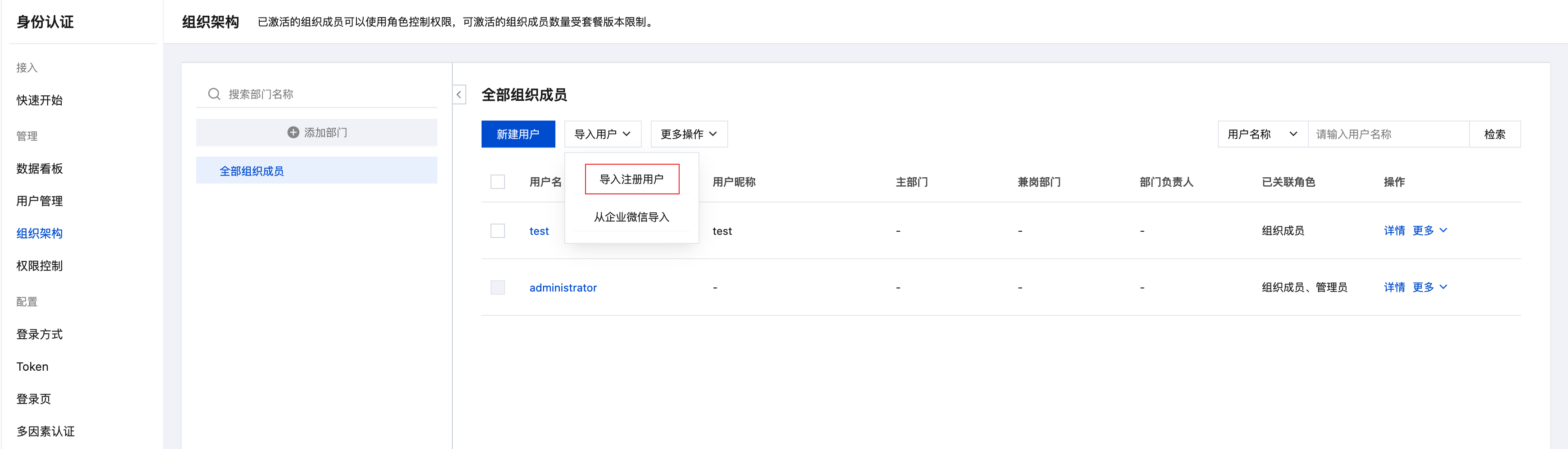
Method 2: Import Registered Users into Organization Structure (Convert to Organization Members)
If you need to bring registered users into enterprise organizational structure management and grant admin permissions, you can convert them to organization members:
- Visit CloudBase Platform/Authentication/Organization
- Click the "Import Users" button
- Select "Import Registered Users"
- Select the registered users to import from the list
- After confirmation, the user will be converted to organization member and added to the organization structure
- Assign admin role or other custom roles to the user
💡 Tip: Organization members are limited by plan. Please confirm the current plan's user quota before conversion. Refer to Billing Documentation
Verify Admin Permissions
After a user is granted admin permissions, they can:
- Access all features of CloudBase console
- Manage environment configuration, resources, and members
- Execute all database, cloud function, and cloud storage operations
- View and manage other users
It's recommended that users log out and log back in to immediately apply new permissions.
Notes
- User Type Conversion: After registered users are converted to organization members, they will be subject to plan user limits
- Permission Effective Time: It's recommended that users re-login after role assignment to take effect immediately
- Plan Quota: Please confirm that the current plan has sufficient organization member quota before conversion
- Permission Scope: Admin role has complete management permissions for the environment, please assign carefully
Related Documentation
- User Management - User type description and basic management
- Permission Control - Role system and permission configuration details
- Best Practices - Best practices for authentication and permission management