Basic Configuration
Go to the Cloud Function details page to configure basic settings for cloud functions, including memory configuration, timeout settings, network configuration, etc.
Memory Configuration
Allocates available computing resources for function runtime based on the specified memory. CPU is automatically allocated proportionally according to memory size.
- Description: Maximum memory limit for cloud function runtime
- Default: 256MB
- Available Range: 64MB - 3072MB
Timeout Settings
Limits the maximum execution time for function code when invoked. If execution is not completed within this time, the code will be forcibly interrupted. Different cloud function types support different timeout ranges:
| Function Type | Default | Available Range |
|---|---|---|
| Regular cloud function (event-triggered) | 3 seconds | 1 second - 900 seconds |
| HTTP cloud function | 3 seconds | 1 second - 7200 seconds |
Network Configuration
Public Network Access
Cloud functions have public network access enabled by default. You can choose to disable it based on security requirements. After disabling, the function will not be able to access public network resources.
Fixed Outbound IP
After enabling this feature, the cloud function will obtain a fixed public network outbound IP, which will be shared with other functions in the same namespace that have this feature enabled.
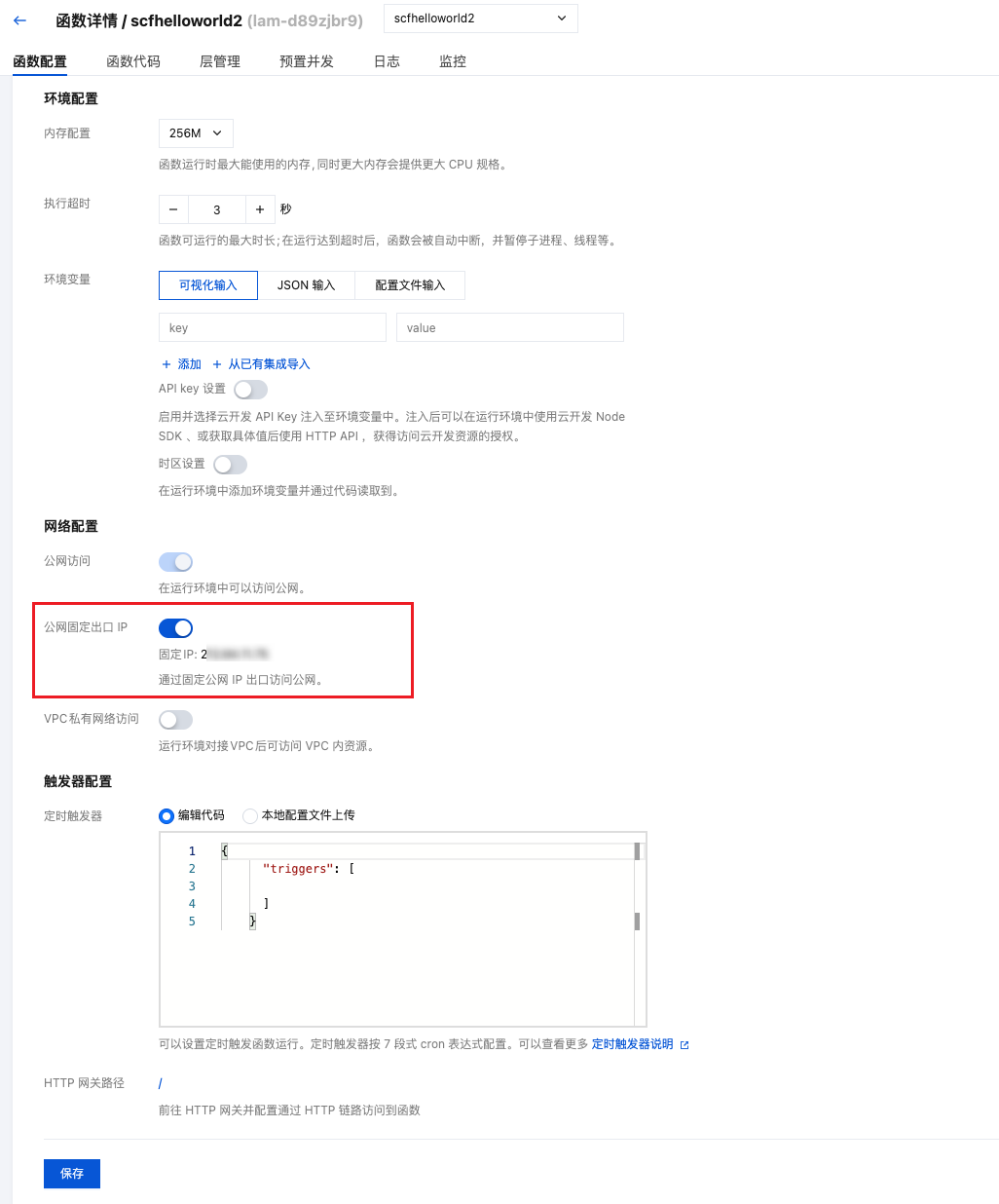
The fixed outbound IP feature only takes effect when the cloud function has public network access enabled.
Private Network Access (VPC Configuration)
By default, cloud function services cannot communicate with other resources under your Tencent Cloud account (such as CVM, MySQL, Redis, etc.) through the private network. If you need to access other resources, you need to enable the private network interconnection feature for the service.
Prerequisites:
- You need to create a VPC CIDR block in Tencent Cloud Virtual Private Cloud.
- Select the
Shanghai Region. - VPC CIDR block
subnet maskshould preferably be >= 22. - Subnet
subnet maskshould preferably be<=28. This subnet will be occupied by the cloud function service. Please try not to create other resources in this subnet to avoid affecting the cloud function service.
- If you need public network access capability after configuring VPC, please confirm that the VPC network is configured with Public Network Gateway or NAT Gateway
- For more information about VPC network configuration, please refer to VPC Private Network Documentation
- For detailed instructions on cloud function network configuration, please refer to Network Configuration Details
Request Concurrency
This configuration only applies to HTTP cloud function type.
HTTP cloud functions support the "Request Concurrency" feature, allowing a single instance to handle multiple requests simultaneously, which can bring significant benefits in the following scenarios:
Applicable Scenarios
- IO-Intensive Scenarios: For WebSocket persistent connection services, it can reduce billable execution duration and save costs
- Connection Pool Reuse: Multiple concurrent requests in the same instance can reuse database connection pools, reducing pressure on downstream services
- Cold Start Reduction: When requests are densely concurrent, multiple requests only need one instance for processing without launching multiple instances, thereby reducing cold start probability and response latency
Configuration Instructions
- Default Status: Disabled
- Concurrency Range: 2 - 100 concurrent requests
- Configuration Method: Go to CloudBase Platform/Cloud Functions/Function Configuration page to enable and set maximum concurrency
Properly configuring concurrency can effectively improve function performance and resource utilization. For IO-intensive workloads, it is recommended to enable this feature to optimize costs.
WebSocket Protocol
This configuration only applies to HTTP cloud function type.
HTTP cloud functions support "WebSocket Protocol" for bidirectional real-time communication between server and client. After enabling, you can configure the timeout period for WebSocket connections.
Configuration Instructions
- Default Status: Disabled
- Timeout Range: 10 - 7200 seconds
- Configuration Method: Go to CloudBase Platform/Cloud Functions/Function Configuration page to enable and set timeout period
Code Implementation
After enabling WebSocket protocol, you need to implement WebSocket handling logic in your cloud function code:
// Main function: Handle WebSocket messages
exports.main = async function (event, context) {
  const { ws } = context;

  if (ws) {
    ws.on("message", (msg) => {
      console.log("Received message:", msg);
      ws.send(`Server reply: ${msg}`);
    });

    ws.on("close", () => {
      console.log("Connection closed");
    });
  }
};

// Handle WebSocket protocol upgrade
exports.main.handleUpgrade = async function (context) {
  // You can perform authentication and permission checks here
  return {
    allowWebSocket: true,
  };
};
- WebSocket connections occupy resources for extended periods, please configure timeout appropriately based on actual business scenarios
- For detailed WebSocket development guide, please refer to Using WebSocket
- To learn more about HTTP cloud function features, please refer to Writing HTTP Cloud Functions
Rate Limiting Configuration
Cloud functions support access rate limiting configuration to help you control function invocation frequency and prevent malicious calls and resource abuse:
- Rate Limiting Rules: You can set maximum invocation times per second, per minute, or per hour
- Rate Limiting Policy: Supports rate limiting control based on dimensions such as IP, user ID, etc.
- Over-limit Handling: When the invocation frequency exceeds the limit, the system will return corresponding error messages
Properly configuring rate limiting rules can effectively protect your cloud functions from malicious attacks while controlling costs. For detailed configuration methods, please refer to Rate Limiting Feature Configuration Guide.