PERMISSION_DENIED
Encountering an error? Get help with AI tools
Error Cause
This error indicates that the current operation was denied due to insufficient permissions. It typically occurs in the following two scenarios:
- Incorrect Permission Configuration: The current user or client does not have permission to perform the operation, and the security rules for the corresponding module need to be checked
- Unauthenticated Access Restriction: Calling CloudBase resources in an unauthenticated state, but the environment has not enabled unauthenticated access permissions
Solutions
Cloud Function Invocation Error
When a PERMISSION_DENIED error occurs while calling a cloud function, please check the permission configuration following these steps:
Check in CloudBase Console
- Go to CloudBase Console / Cloud Functions
- Click the "Permission Control" button to enter the configuration page
- Check the security rule configuration of the target cloud function, ensure the
invokerule meets one of the following conditions:- Set to
true(allow anyone to invoke) - Set to
"auth != null"(only allow authenticated users to invoke) - Set other expressions that meet business requirements
- Set to
💡 Tip: For detailed information on cloud function security rules, please refer to the Cloud Function Security Rules documentation.
Check in WeChat DevTools
If you are developing a Mini Program, you can check permissions through the following path:
- Open WeChat DevTools
- Enter "CloudBase Console"
- Click "Cloud Functions" → "Cloud Function Permissions"
- Check and configure the permission settings for the corresponding function
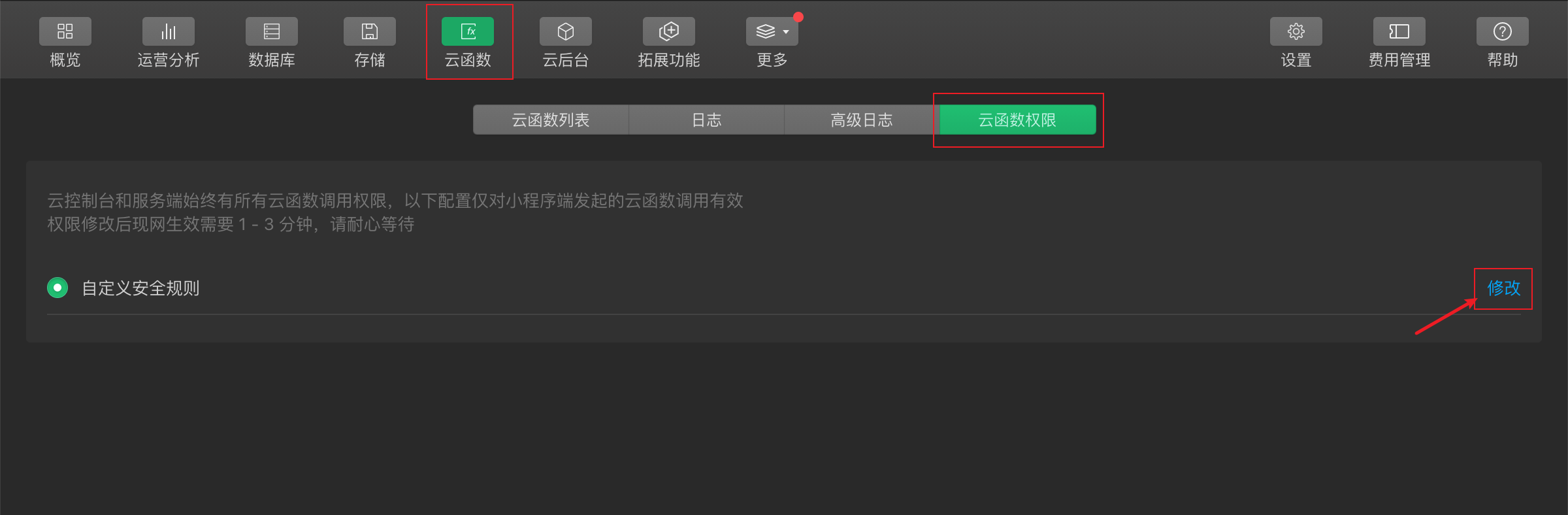
Unauthenticated Access Error
Unauthenticated mode refers to accessing CloudBase resources without user authentication (no openid), mainly including the following scenarios:
- Single Page Mode: Mini Programs or Mini Games opened after being shared to Moments
- Web Unauthenticated Mode: Access in web applications without performing login operations
Enable Unauthenticated Access Permissions
By default, CloudBase resources do not allow unauthenticated access. If your business needs to support unauthenticated access, you need to configure the following:
Step 1: Enable Environment-level Unauthenticated Access
- Open WeChat DevTools
- Enter "CloudBase Console" → "Settings" → "Permission Settings"
- Enable the "Allow Unauthenticated Access" option

Step 2: Configure Resource Security Rules
⚠️ Note: After enabling environment-level unauthenticated access, you still need to configure security rules for each resource (cloud functions, database, file storage) separately for it to take effect.
In unauthenticated mode, client-side permission control must use security rules, with specific requirements:
- Cloud Functions: Select "Security Rules" in permission settings and configure appropriate access rules
- Database: Select "Security Rules" in permission settings and configure data access rules
- File Storage: Select "Security Rules" in permission settings and configure file access rules
Security Rule Configuration Instructions
In security rules, the auth field for unauthenticated users is null. You can use this characteristic to identify and control unauthenticated user access:
{
  "*": {
    "invoke": "auth == null"  // Only allow unauthenticated users to access
  }
}
Or allow both authenticated and unauthenticated users:
{
  "*": {
    "invoke": true  // Allow all users to access
  }
}
💡 Tip: For security reasons, it is recommended to set the principle of least privilege based on actual business needs to avoid excessive exposure of resource access permissions.