OPA Authorization Policy
Overview
OPA Authorization Policy is an environment-level request authorization capability provided by CloudBase, built on top of the open-source policy engine Open Policy Agent (OPA) and the policy language Rego. By writing a piece of policy code in the CloudBase console, you can define unified access control rules for all HTTP API and HTTP Gateway requests in the entire environment.
CloudBase executes the policy on every incoming request, makes an "allow / deny" decision based on three categories of information — user identity, HTTP request, and environment context — and then forwards the request to the actual target resource.
User request
  ↓
CloudBase
  ↓
Build input (subject + request + cloudbase)
  ↓
Evaluate OPA policy
  ├─ allow = true and deny = false → allow → access actual resource
  └─ deny = true → reject, return 403 + reason
By default, CloudBase ships a platform default policy for HTTP API and HTTP Gateway, covering the default allow / deny rules for various resources under different identities. See Appendix A: Platform Default Policy for the detailed rules.
User policies can be layered on top of the platform default policy:
- An
allowdefined in the user policy can open up requests denied by the platform default - A
denydefined in the user policy can reject requests allowed by the platform default (denytakes precedence overallow)
By tuning the user policy, you can flexibly and granularly define authorization rules based on HTTP requests, user identity, accessed resources, or any combination of conditions, achieving highly customizable permission control. With OPA policies, you can implement requirements such as:
- IP allowlist access control
- Read/write permissions by user identity
- Protection of admin backend APIs
- Different rules per access entry point
- ...
For complete examples, see Practical Cases.
Core Capabilities
| Capability | Description |
|---|---|
| Multi-condition authorization | Flexibly combine multiple dimensions such as user identity, request features, and environment information to achieve fine-grained access control |
| Unified policy entry | A single policy covers both HTTP API and HTTP Gateway (Cloud Function / CloudBase Run / Static Hosting, etc.) entry points, unifying public traffic governance |
| Traceable rejection reasons | When a request is denied, a human-readable reason can be returned to the caller for quick troubleshooting |
| Customize on top of platform defaults | The platform has built-in default allow/deny rules for each resource type; you only need to write rules to override what you want, no need to start from scratch |
| Standard Rego syntax | Built on the OPA open-source policy engine, using the widely adopted Rego policy language with a low learning curve and rich community resources |
Relationship with Other Security Capabilities
CloudBase provides multiple layers of security capabilities. The OPA Authorization Policy sits at the access control layer at the request entry, and works together with other capabilities to form a defense-in-depth system:
| Capability | Scope | Control Dimension | When to Use |
|---|---|---|---|
| OPA Authorization Policy | All HTTP API and HTTP Gateway requests in the environment | User + request + environment context | When you need complex condition combinations, request-level, programmable access control |
| Rate Limiting | Cloud Function, CloudBase Run | QPS (resource dimension / client dimension) | Anti-abuse, anti-overload |
| Static Hosting Security | Static Hosting resources | Referer / IP / QPS | Static resource hotlink protection |
| Trusted Origins | Client SDK calls | Domain allowlist | Restrict the source of SDK calls |
Configuring OPA Policies in the Console
The CloudBase console wraps the OPA policy configuration process, so you don't need to touch the underlying configuration directly — just complete the setup with visual operations. The console provides Form Mode and Syntax Mode:
| Mode | Use Case | Description |
|---|---|---|
| Form Mode | Allowing access to a specific resource — the most common scenario | Configure entries one by one via form dropdowns, no coding required |
| Syntax Mode | Complex scenarios that forms cannot express, such as combined control of custom domains, request paths, HTTP methods, etc. | Switch to the syntax view and write Rego policies directly |
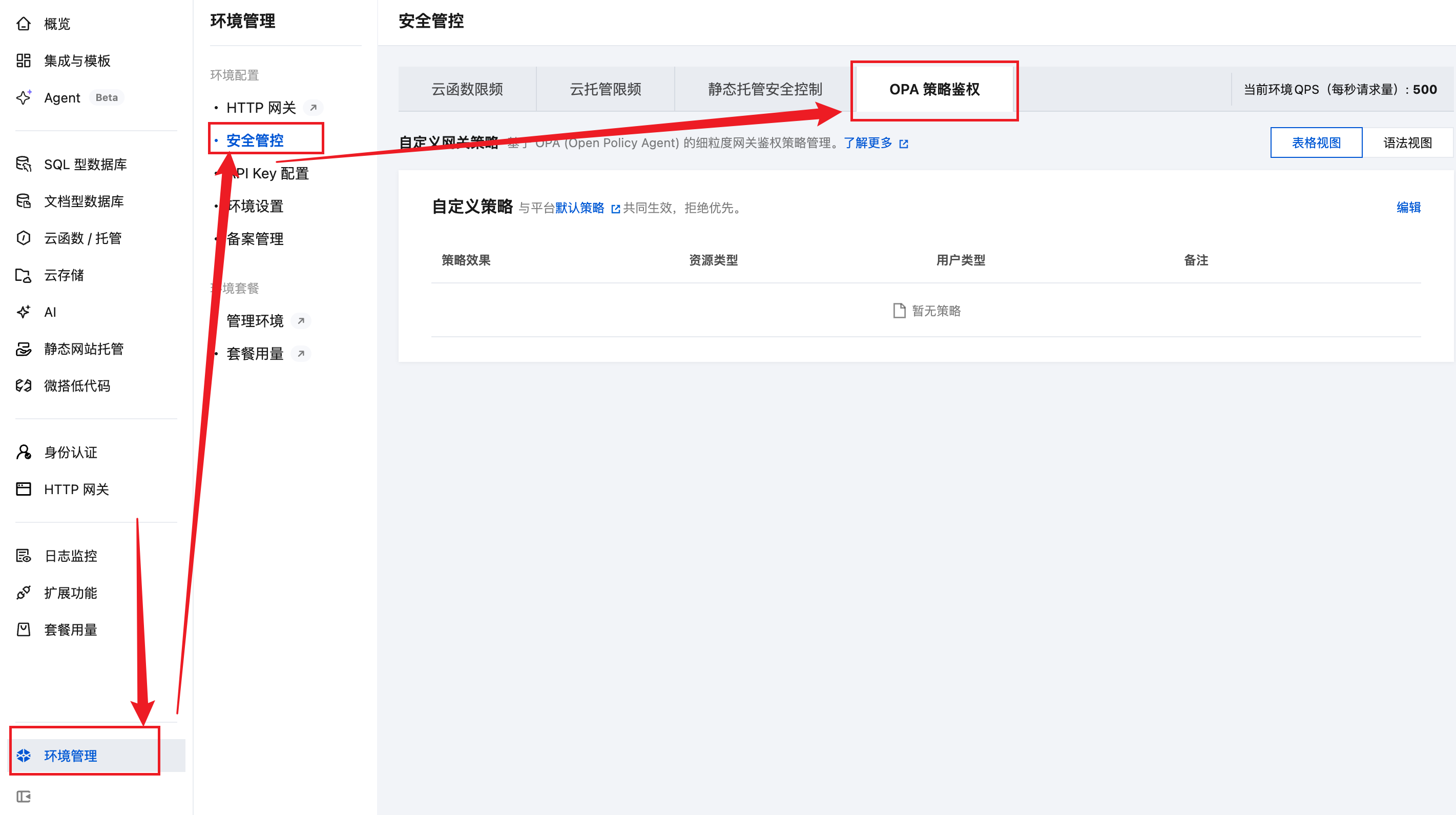
Accessing the Entry
- Log in to the CloudBase console and enter your target environment.
- In the left menu, find Authorization Policy (path example: Environment → Authorization Policy).
- Click New Policy to open the configuration page.
Form Mode (Recommended)
For common needs such as "allowing access to a certain resource", we recommend Form Mode. You can complete the configuration with dropdowns, no code required:
- On the configuration page, select Form Mode.
- Use the dropdown to select the resource type to allow access to (e.g. Cloud Function, Cloud Storage, CloudBase Run, etc.).
- Select the roles / user identities allowed to access.
- Click Save to complete the configuration.
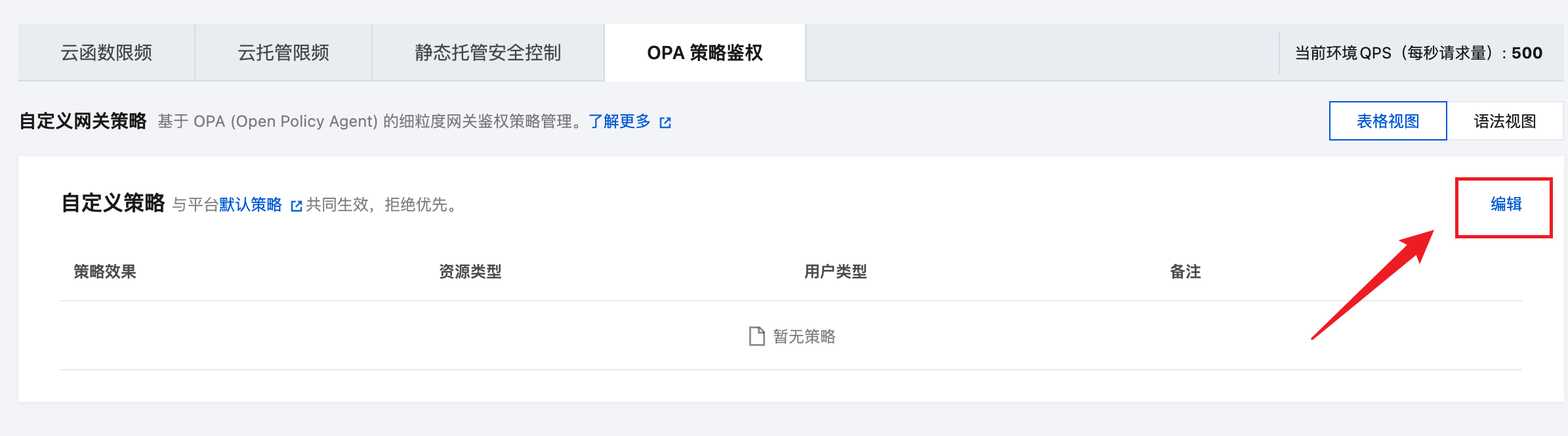
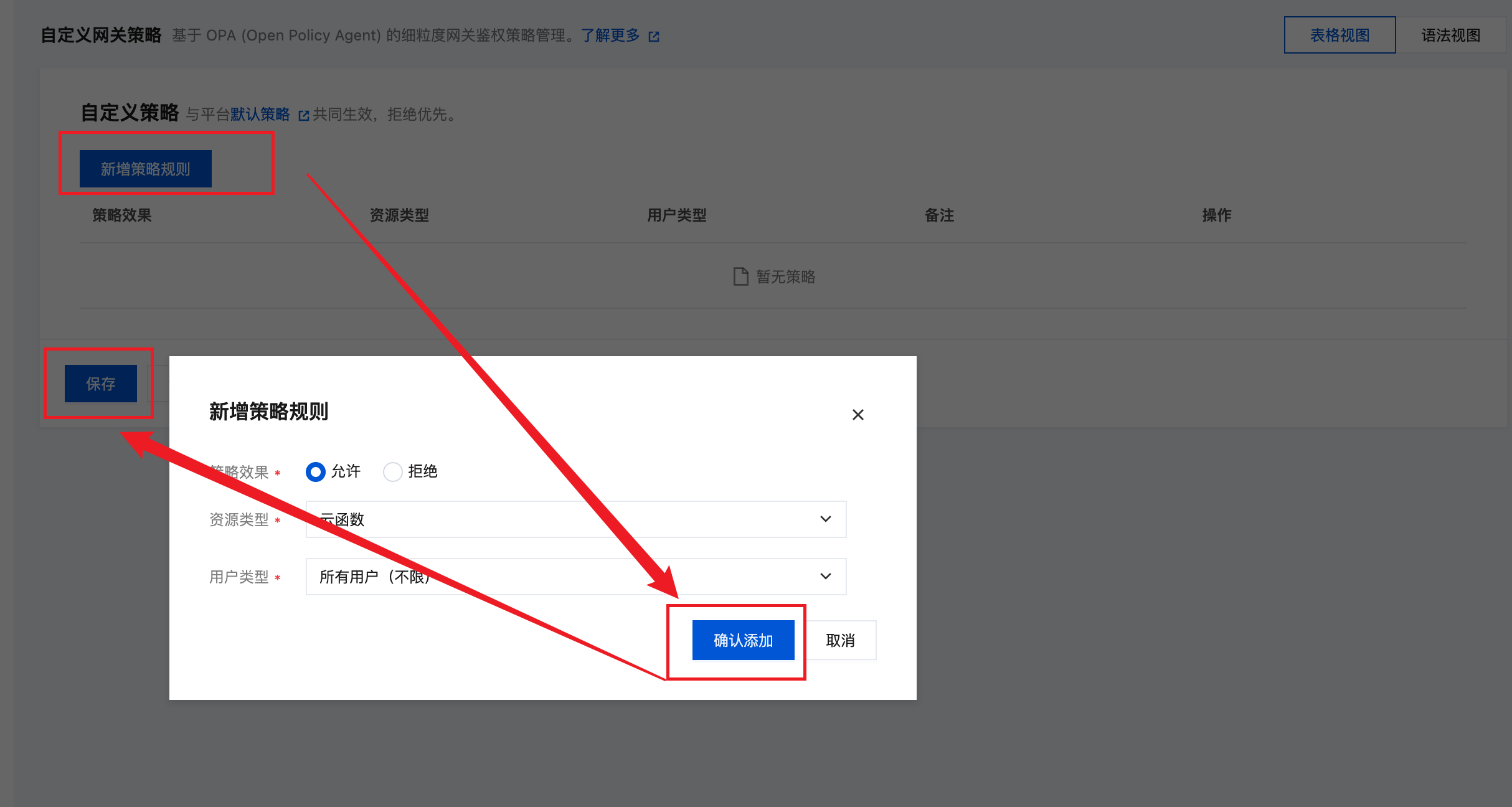
Form Mode covers most "allow access by resource and role" scenarios. We recommend using Form Mode first, and only switch to Syntax Mode when the requirement goes beyond what forms can express.
Syntax Mode
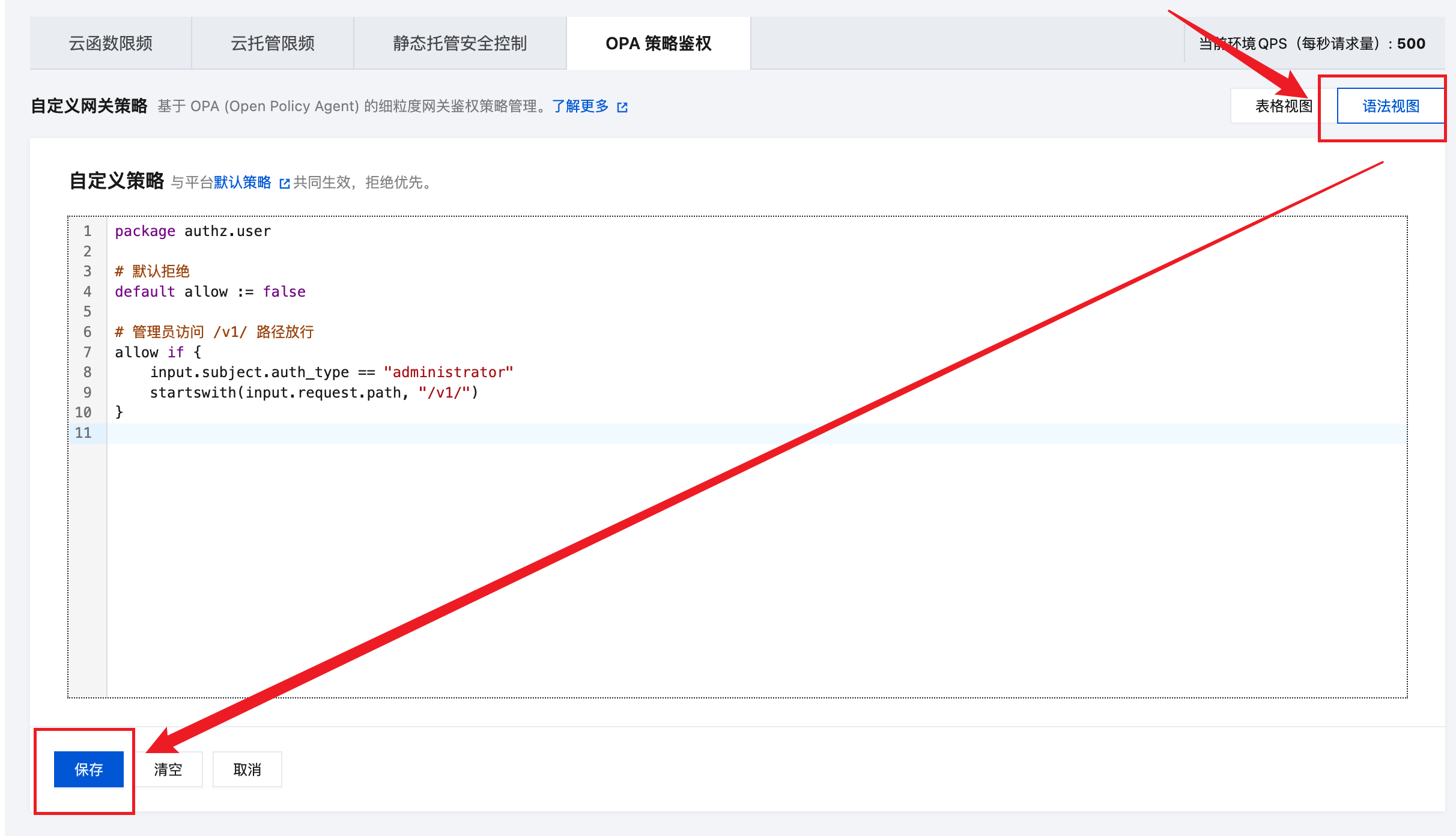
When you need fine-grained combined control based on request paths, HTTP methods, or custom domains, forms cannot express it, so you need to switch to Syntax Mode and write Rego policies directly:
- On the configuration page, switch to the syntax view.
- Paste / write the Rego policy in the editor (see Policy Context (
input) and Output:allow/denyfor the full syntax). - Click Save; validation runs on save (mandatory Rego v1, package must be
authz.user, size and rule-count limits, etc. — see Notes on Writing Policies).
Effect and Validation
- The policy takes effect immediately after saving — no restart or redeployment needed.
- The policy covers all HTTP API and HTTP Access Service requests in the current environment.
- Validation runs on save; invalid policies (e.g. Rego v0 syntax, non-compliant package name) are rejected with a reason.
The platform ships a built-in default policy for HTTP API and HTTP Access Service. The rules you configure in the console are adjustments on top of it. See Appendix A: Platform Default Policy for details.
Quick Start
The following is a minimal usable policy:
package authz.user

# Default deny
default allow := false

# Allow administrators to access /v1/ paths
allow if {
    input.subject.auth_type == "administrator"
    startswith(input.request.path, "/v1/")
}

# Forbid unauthenticated users from issuing DELETE
deny contains "DELETE requires authentication" if {
    input.request.method == "DELETE"
    input.subject.auth_type == "unauthenticated"
}
The startswith in the example is a Rego built-in function. For the full syntax and built-in function list, see the Rego language reference and the Rego built-in function reference. For security reasons, CloudBase only enables a whitelisted subset of these. See Appendix B for commonly disabled functions.
The policy input input is constructed by CloudBase on every request. Its full structure is shown below; for detailed field definitions, see Policy Context:
{
  "subject": {
    "user_id": "c-user-123",
    "auth_type": "administrator",
    "groups": ["developer"]
  },
  "request": {
    "method": "GET",
    "raw_host": "env-xxx.api.tcloudbasegateway.com",
    "host": "env-xxx.api.tcloudbasegateway.com",
    "path": "/v1/functions/foo",
    "query": {"page": "1"},
    "client_ip": "10.1.2.3",
    "header": {"X-Env-Id": ["env-xxx"]},
    "header_map": {"X-Env-Id": "env-xxx"}
  },
  "cloudbase": {
    "env_id": "env-xxx",
    "region": "ap-shanghai",
    "entrypoint_type": "tcbopenapi",
    "resource_type": "functions"
  }
}
Decision matrix at a glance (in the table below, both allow / deny refer to rules in the user policy):
User deny | User allow | Platform default policy | Final result |
|---|---|---|---|
| Hit | any | any | Deny (deny has the highest priority) |
| Not hit | true | any | Allow |
| Not hit | false / undefined | Allow | Allow (a false user allow does not constitute a denial) |
| Not hit | false / undefined | Deny | Deny |
The platform default policy's allow / deny rules can be found in Appendix A: Platform Default Policy.
Policy Context (input)
input is the only external data the policy can read. It always contains three top-level fields:
input.subject     # Request subject (user)
input.request     # Current HTTP request
input.cloudbase   # CloudBase environment context
User Information (subject)
| Field | Type | Description |
|---|---|---|
user_id | string | C-end user ID; "" when not logged in |
auth_type | string | Built-in identity authentication type, see the table below; case-sensitive |
groups | []string | User roles associated with the request, corresponding to the groups field in the request JWT |
All possible values of auth_type:
| Value | Meaning |
|---|---|
administrator | Administrator |
internal | Internal user |
external | External user |
anonymous | Anonymously logged-in user |
unauthenticated | Not logged in / no AccessToken |
service_role | (Only present in PostgreSQL environments) service_role, super privileges |
anon | (Only present in PostgreSQL environments) anonymous role |
authenticated | (Only present in PostgreSQL environments) authenticated role |
Request Information (request)
| Field | Type | Description |
|---|---|---|
method | string | HTTP method, normalized to uppercase |
raw_host | string | Original Host header, not normalized |
host | string | Normalized Host (port removed, lower-cased) |
path | string | Request path, URL encoding preserved |
query | object<string, string> | URL query parameters; multi-value parameters joined by & |
client_ip | string | Client IP, may be "" / IPv4 / IPv6 |
header | object<string, array<string>> | Request headers, preserving multiple values |
header_map | object<string, string> | Request headers |
Difference between header and header_map:
header | header_map | |
|---|---|---|
| Value type | array<string> | string |
| Read as | input.request.header["X-Foo"][0] | input.request.header_map["X-Env-Id"] |
Header keys must be in HTTP Canonical form (e.g. X-Env-Id, Content-Type); lower-cased or all-uppercased keys are not readable. Sensitive headers such as Authorization / Cookie have been stripped by CloudBase and cannot be accessed by the policy.
Environment Information (cloudbase)
| Field | Type | Description |
|---|---|---|
env_id | string | Current environment ID |
region | string | Region of the environment, e.g. "ap-shanghai" |
entrypoint_type | string | Entry point type, see below |
resource_type | string | Resource type matched by the current request, see below |
Possible values of entrypoint_type:
| Value | Meaning |
|---|---|
tcbopenapi | HTTP API path, with domain {envid}.api.tcloudbasegateway.com |
tcbgateway | HTTP Gateway / CloudBase Run / Static Hosting / Cloud Storage and other HTTP access services. Default domains include .app.tcloudbase.com / .service.tcloudbase.com (HTTP Gateway), .tcloudbaseapp.com (Static Hosting), .tcb.qcloud.la (Cloud Storage), .run.tcloudbase.com (CloudBase Run), etc.; also includes custom domains bound to the above paths |
Possible values of resource_type:
| Resource | Identifier | Description |
|---|---|---|
| Cloud Storage | storages | Object storage operations |
| Cloud Function | functions | Cloud function invocation |
| CloudBase Run | cloudrun | CloudBase Run service access |
| Large Models | ai | AI large model access |
| AI Agent | aibot | AI agent service |
| Data Model | model | Data model management |
| MySQL Access | rdb | MySQL database access |
Output: allow / deny
The policy must declare allow or deny (at least one) under package authz.user:
| Rule | Type | Form |
|---|---|---|
allow | bool | default allow := falseallow if { ... } |
deny | bool or set of string | deny if { ... } or deny contains "rejection reason" if { ... } |
deny supports two forms:
- Boolean form
deny if { ... }— block the request without returning a reason. - Set form
deny contains "msg" if { ... }— block the request and surface the message to the end user as:Access denied by policy. Reason: msg.
allow can only open up requests denied by the platform default policy — it cannot tighten access: default allow := false will not block any requests. To restrict access (IP allowlist, path control, HTTP method restrictions, etc.), you must write deny.
The engine evaluates each rule independently, and ultimately decides whether to allow the request based on the combined results of allow and deny.
Notes on Writing Policies
- Rego v1 is mandatory: there is no need to write
import rego.v1; deprecated v0 syntax (such asallow { ... }) will be rejected on save. - The package must be exactly
authz.user: any other package name will be rejected on save. - Policy size ≤ 2 KiB (including comments and blank lines).
- No more than 20 non-
defaultrules: eachallow if {...},deny if {...}, anddeny contains "msg" if {...}counts as one;defaultdeclarations do not count. denyreasons should not contain sensitive information: messages in thedenyset are returned to the end user, so avoid concatenating internal userIDs, SQL, tokens, etc.- Strict mode: OPA strict mode is enabled when saving policies; unused
imports and unused function parameters (other than wildcards) will be rejected. - Restricted built-in functions: this engine uses an allowlist; for commonly disabled functions, see Appendix B.
- Requests not evaluated by the OPA policy: internal CloudBase platform requests and Integration Center callback requests are not evaluated by the policy.
Practical Cases
Read/Write Permissions by User Identity
Requirement: unauthenticated users are read-only; logged-in C-end users can read and write but cannot delete.
Since the platform allows unauthenticated requests by default, restrictions such as "read-only" must be expressed through deny:
package authz.user

write_methods := {"POST", "PUT", "PATCH", "DELETE"}

# Tighten: unauthenticated users cannot perform write operations
deny contains "unauthenticated user cannot perform write operations" if {
    input.subject.auth_type == "unauthenticated"
    input.request.method in write_methods
}

# Tighten: logged-in C-end users cannot delete
deny contains "regular user cannot perform delete operations" if {
    input.subject.auth_type in {"internal", "external", "anonymous"}
    input.request.method == "DELETE"
}

# Open up: visitors (anonymous login) are denied by the platform by default under the
# HTTP Access Service path; here we allow their read operations
allow if {
    input.subject.auth_type == "anonymous"
    input.request.method in {"GET", "HEAD", "OPTIONS"}
}
Restrict Admin APIs to Administrators Only
Requirement: only administrators can access interfaces under the /admin/ path.
The platform default policy is not aware of request paths, so path-level control must use deny:
package authz.user

# Tighten: non-administrators accessing /admin/ are always rejected
deny contains "admin endpoints require administrator identity" if {
    startswith(input.request.path, "/admin/")
    input.subject.auth_type != "administrator"
}
IP Allowlist
Requirement: only office-network IPs are allowed; all other sources are rejected.
package authz.user

office_cidrs := ["10.0.0.0/8", "192.168.0.0/16"]

in_office if {
    some cidr in office_cidrs
    net.cidr_contains(cidr, input.request.client_ip)
}

# Tighten: sources not in the allowlist are always rejected
deny contains "access source is not in the ip allowlist" if {
    input.request.client_ip != ""
    not in_office
}
Role-based Control via JWT groups
Requirement: only the ops and dev groups are allowed, and the dev group cannot delete.
package authz.user

allowed_groups := {"ops", "dev"}

has_allowed_group if {
    some g in input.subject.groups
    g in allowed_groups
}

# Tighten: requests not in any allowed role are always rejected
# (the groups of an unauthenticated request is empty, so it is also rejected)
deny contains "user group is not authorized in this env" if not has_allowed_group

# Tighten: the dev group cannot delete
deny contains "dev group cannot perform delete operations" if {
    "dev" in input.subject.groups
    input.request.method == "DELETE"
}
Appendix A: Platform Default Policy
The platform default policy makes decisions along three dimensions: path, resource type, and identity. User policies are layered on top: the user's allow can open up requests denied by default, and the user's deny can reject requests allowed by default (deny takes precedence over allow). In the tables below, ✅ means allowed by default, ❌ means denied by default.
The following identities are allowed by default for all paths and all resources, and are not repeated in the tables below:
- Not logged in (
unauthenticated): you must add adenyin the user policy to block them - PostgreSQL environment identities:
service_role,anon,authenticated
Resource types not listed in the tables below are allowed by default for all four identities: super-admin / internal user / external user / visitor.
HTTP API Default Policy
The HTTP API path is identified by: entrypoint_type == "tcbopenapi"
Module (resource_type) | Super-admin (administrator) | Internal (internal) | External (external) | Visitor (anonymous) |
|---|---|---|---|---|
CloudBase Run (cloudrun), Knowledge Base (knowledge) | ✅ | ❌ | ❌ | ❌ |
Large Models (ai) | ✅ | ✅ | ✅ | ❌ |
HTTP Gateway Default Policy
The HTTP Gateway path is identified by: entrypoint_type == "tcbgateway"
Module (resource_type) | Super-admin (administrator) | Internal (internal) | External (external) | Visitor (anonymous) |
|---|---|---|---|---|
Cloud Function (functions), Cloud Storage (storages), CloudBase Run (cloudrun) | ✅ | ✅ | ✅ | ❌ |
Appendix B: Disabled Built-in Functions
This engine uses an allowlist for built-in functions. Commonly disabled functions are listed below; for functions not in the table, refer to the validation result returned on save.
| Category | Disabled Functions |
|---|---|
| Outbound network | http.send, net.lookup_ip_addr, providers.aws.sign_req |
| Time | time.* |
| Regex | regex.*, re_match (use startswith / endswith / contains / glob.match instead) |
| JWT parsing | io.jwt.* |
| Encoding / decoding | base64.*, base64url.*, hex.*, urlquery.* |
| YAML | yaml.* (use json.* instead) |
| Reflection / metadata | opa.runtime, rego.metadata.*, rego.parse_module |
| Debugging | trace, print |
| Resource consumption | walk, net.cidr_expand, numbers.range, numbers.range_step, graph.*, graphql.*, strings.render_template |
| Certificates / keys | crypto.x509.*, crypto.parse_private_keys |
| Others | uuid.*, rand.intn, semver.*, units.*, json.patch, json.match_schema, json.verify_schema |
Next Steps
- Rate Limiting: QPS rate limiting for Cloud Function and CloudBase Run
- Static Hosting Security: Hotlink protection and IP allow/deny lists