Multi-Conversation
An Agent allows each user to hold multiple independent conversations, and context never leaks between them: what you tell the Agent in conversation A is invisible in conversation B.
In OpenAgentKernel (OAK), conversations are a built-in capability: each conversation maps to a session, transcripts are persisted automatically, and sessions can be resumed across requests and instances. Creating and resuming conversations requires no code changes; to offer users a conversation list / switch / delete UI (like the sidebar in typical AI chat products), you need to add three routes to the template.
This guide follows the actual workflow: understand the session mechanism → pull the code → add conversation routes → deploy → verify.
Prerequisites
- An Agent created in the CloudBase console from the official
cloudbase-agenttemplate (an OpenAgentKernel project) - CloudBase CLI installed locally with
tcb logincompleted - Node.js ≥ 20
Out of the box: creating and resuming conversations
All chat goes through a single session/prompt entry point, with one rule: omit sessionId to start a new conversation, pass it to resume one.
- When a new conversation starts, the server returns the conversation ID (
conversationId) at the beginning of the event stream — store it; - Include this ID in subsequent messages, and the Agent continues with the previous context.
Sending a message from a Mini Program:
const res = await wx.cloud.extend.AI.bot.sendMessage({
  data: {
    botId: "agt-xxx",
    jsonrpc: "2.0",
    id: 1,
    method: "session/prompt",
    params: {
      sessionId: currentConversationId || undefined, // omit = new conversation
      prompt: [{ type: "text", text: message }],
    },
  },
});

for await (const ev of res.eventStream) {
  // The first event of a new conversation carries conversationId — store it for resuming
  // Render the streamed reply from subsequent events
}
When the user clicks "New conversation", the front end only needs to clear the stored sessionId, so the user's next message naturally creates a new conversation. Do not create an empty conversation when the button is clicked — a conversation without any messages cannot be resumed.
Step 1: Pull the Agent code
The OAK SDK provides methods for listing conversations, fetching history, and deleting conversations, but the template does not expose routes for them by default — pull the code and add them.
Pull the code from the "Local Development" page of the Agent detail view in the console:
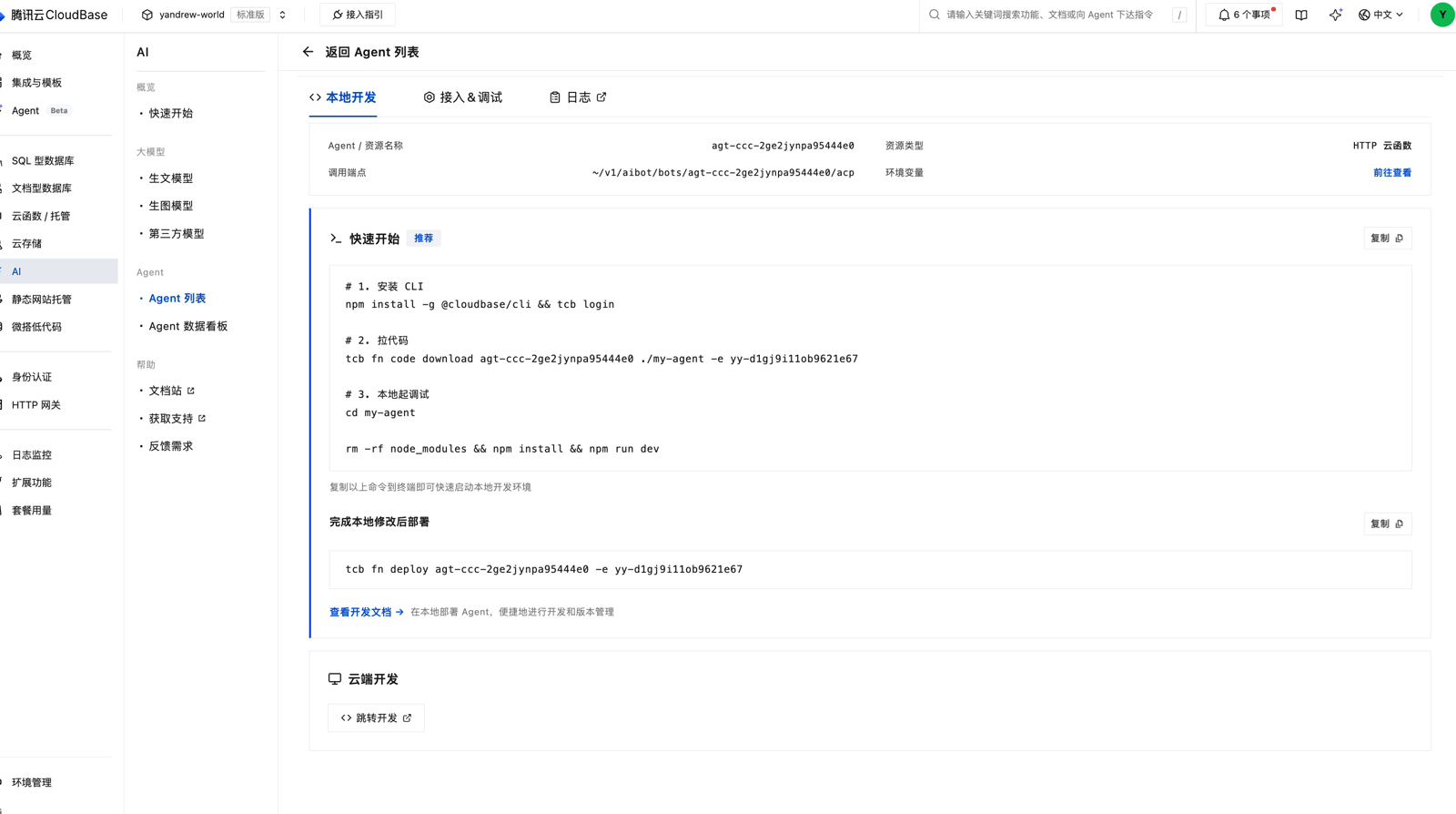
Or pull it directly with the CLI, where <function-name> is the cloud function backing the Agent:
tcb fn code download <function-name> ./agent-code -e <env-id>
Step 2: Add conversation management routes
The SDK calls for the three actions:
| Action | SDK call |
|---|---|
| List conversations | agent.sessions.list() |
| Fetch history | session.getHistory({ limit, before }) |
| Delete a conversation | agent.sessions.delete(sessionId) |
Where the service entry (src/index.ts) handles /acp requests, dispatch on the JSON-RPC method. First, do one thing that is mandatory for security — override the client-supplied userId with the trusted identity injected by the gateway, so users cannot access other people's conversations:
import { gunzipSync } from "node:zlib";

function callerFromContext(req) {
  const raw = req.headers["x-cloudbase-context"];
  if (!raw) return null;
  try {
    return JSON.parse(gunzipSync(Buffer.from(raw, "base64")).toString("utf8"));
  } catch {
    return null;
  }
}

// Before dispatching:
const caller = callerFromContext(req);
if (caller?.userId) params.userId = String(caller.userId);
Then add the routes one by one. List the current user's conversations:
case "session/list": {
  const all = await agent.sessions.list({});
  const mine = all
    .filter((s) => s.userId === params.userId)
    .sort((a, b) => b.updatedAt - a.updatedAt)
    .slice(0, params.limit ?? 20);
  return json(res, 200, { jsonrpc: "2.0", id, result: { sessions: mine } });
}
Fetch the message history of a conversation:
case "session/load": {
  const session = await agent.resumeSession(params.sessionId);
  const history = await session.getHistory({ limit: 50 });
  return json(res, 200, { jsonrpc: "2.0", id, result: { history } });
}
Delete a conversation:
case "session/delete": {
  await agent.sessions.delete(params.sessionId);
  return json(res, 200, { jsonrpc: "2.0", id, result: { deleted: params.sessionId } });
}
For display attributes like conversation titles and pinning, and for efficient per-user pagination at larger scale, we recommend maintaining your own conversation index table (userId / conversationId / title / timestamps): write a row when a conversation is created, and query this table for the list view.
Step 3: Deploy back to the cloud
cd ./agent-code
tcb fn code update <function-name> --dir . -e <env-id>
When prompted, choose Update with current config.
Step 4: Verify
On the console "Integration & Debugging" page, send messages in this order to verify memory and isolation:
- Send a message with some information, e.g. "My cat is called Ginger" — the Agent acknowledges it;
- In the same conversation, ask "What is my cat's name?" — the Agent should answer "Ginger", confirming resuming works;
- Open a new conversation and ask the same question — the Agent should not know, confirming conversations are isolated.
Then verify the three new routes from the client (reuse the sendMessage entry above, changing only method):
session/list: the returned list should contain the conversation just created, and only the current user's own;session/load: retrieves the full "Ginger" dialog above;session/delete: after deleting,session/listno longer returns that conversation.
Rendering history messages
Each message returned by getHistory() looks like:
{
  id: "...",
  role: "user" | "assistant",
  status: "done",
  createdAt: 1756350000000,
  parts: [
    { type: "text", text: "..." },
    // may also contain thinking / tool_call / tool_result
  ],
}
Tool calls and results are already paired, and internal protocol messages are filtered out — render the parts sequentially on the front end.
FAQ
Why can't I create an empty conversation first
Persistence starts from the first message. An empty conversation has no recoverable context, so resuming it fails. That is why "New conversation" is a pure front-end action: clear the current sessionId, and the conversation is actually created when the user sends the first message.
Clear the chat history but keep the Agent's memory
Call session.clearHistory(): it only clears the message index used for display, without touching the conversation context — the Agent still remembers what was discussed.
Where do conversation titles come from
OAK sessions do not manage titles. A common approach is your own conversation index table: when the user sends the first message, write the first few characters (or a model-generated summary) as the title, and read titles from the index table on the list page.