Adapter Development Guide
@cloudbase/js-sdk only supports developing general web applications (browser environment) and is incompatible with other Web Platforms such as WeChat mini program, Quick App, and Cocos. Although these platforms mostly support JavaScript runtime environment, they differ significantly from the browser environment in features like network request, local storage, and platform identifier. To address these differences, @cloudbase/js-sdk provides a complete scaling scheme. Following this solution, you can develop adapters for corresponding platforms and then combine @cloudbase/js-sdk with the adapters to achieve platform compatibility.
Adapter Specification
Before developing an adapter, the official API declaration module @cloudbase/adapter-interface needs to be installed.
# npm
npm i @cloudbase/adapter-interface
# yarn
yarn add @cloudbase/adapter-interface
The adapter module must export an adapter object:
const adapter = {
  genAdapter,
  isMatch,
// tag the uniqueness on the platform at runtime
runtime: 'platform name'
};

export adapter;
export default adapter;
must contain the following three fields:
runtime:string, the name of the platform, used to tag uniqueness on the platform;isMatch:Function, judges whether the current runtime environment is the platform, returns abooleanvalue;genAdapter:Function, creates anadapterentity.
runtime
runtime is used to tag the uniqueness of the platform. It is advisable to name it with the English name or abbreviation of the platform as much as possible, such as baidu_miniapp for Baidu Mini Program, qq_miniapp for QQ Mini Program.
isMatch
The isMatch function is used to judge whether the current runtime environment is consistent with the adapter, usually by judging some global variables and APIs specific to the platform. For example, the following code checks whether the runtime environment is the Cocos native platform:
function isMatch(): boolean {
  if (typeof cc === "undefined") {
    return false;
  }
  if (typeof WebSocket === "undefined") {
    return false;
  }
  if (typeof XMLHttpRequest === "undefined") {
    return false;
  }

  if (!cc.game) {
    return false;
  }
  if (typeof cc.game.on !== "function") {
    return false;
  }
  if (!cc.game.EVENT_HIDE) {
    return false;
  }
  if (!cc.game.EVENT_SHOW) {
    return false;
  }

  if (!cc.sys) {
    return false;
  }
  if (!cc.sys.isNative) {
    return false;
  }

  return true;
}
genAdapter
The genAdapter function returns the entity object of the adapter, with the structure as follows:
interface SDKAdapterInterface {
// Global root variable, which is window in browser environment
  root: any;
// WebSocket Class
  wsClass: WebSocketContructor;
// request Class
  reqClass: SDKRequestConstructor;
// When localstorage is not available, persistence=local is downgraded to none
  localStorage?: StorageInterface;
When sessionStorage is not available, persistence=session is downgraded to none
  sessionStorage?: StorageInterface;
// preferred storage mode, priority is higher than persistence
  primaryStorage?: StorageType;
// Captcha configuration
  captchaOptions?: {
// Open web page and obtain CaptchaToken via URL callback. The function can customize implementation targeting different platforms.
    openURIWithCallback?: (url: string) => Promise<CaptchaToken>;
  };
// api to get the unique appid on the platform
  getAppSign?(): string;
}
Example
import {
  AbstractSDKRequest,
  IRequestOptions,
  IUploadRequestOptions,
  StorageInterface,
  WebSocketInterface,
  WebSocketContructor,
  SDKAdapterInterface,
  StorageType,
  formatUrl,
} from "@cloudbase/adapter-interface";

// The isMatch function judges whether the current platform matches
function isMatch(): boolean {
  // ...
  return true;
}

// The Request class is a platform-specific network request and must implement three public APIs: post, upload, and download.
export class Request extends AbstractSDKRequest {
// Implement the post API
  public post(options: IRequestOptions) {
    return new Promise((resolve) => {
      // ...
      resolve();
    });
  }
// Implement the upload API
  public upload(options: IUploadRequestOptions) {
    return new Promise((resolve) => {
      // ...
      resolve();
    });
  }
// Implement the download API
  public download(options: IRequestOptions) {
    return new Promise((resolve) => {
      // ...
      resolve();
    });
  }
}
// Storage is the platform-specific local storage and must implement four APIs: setItem, getItem, removeItem, and clear
export const Storage: StorageInterface = {
  setItem(key: string, value: any) {
    // ...
  },
  getItem(key: string): any {
    // ...
  },
  removeItem(key: string) {
    // ...
  },
  clear() {
    // ...
  },
};
// WebSocket is the platform-specific WebSocket, consistent with HTML5 standards
export class WebSocket {
  constructor(url: string, options: object = {}) {
    const socketTask: WebSocketInterface = {
      set onopen(cb) {
        // ...
      },
      set onmessage(cb) {
        // ...
      },
      set onclose(cb) {
        // ...
      },
      set onerror(cb) {
        // ...
      },
      send: (data) => {
        // ...
      },
      close: (code?: number, reason?: string) => {
        // ...
      },
      get readyState() {
        // ...
        return readyState;
      },
      CONNECTING: 0,
      OPEN: 1,
      CLOSING: 2,
      CLOSED: 3,
    };
    return socketTask;
  }
}

// The genAdapter function creates an adapter entity
// options are the passed parameters of cloudbase.useAdapters(adapter, options)
function genAdapter(options) {
  const adapter: SDKAdapterInterface = {
// The root object is the global root object. Fill with an empty object {} if no root object exists
    root: window,
    reqClass: Request,
    wsClass: WebSocket as WebSocketContructor,
    localStorage: Storage,
// First cache the storage policy, recommend always keeping localstorage
    primaryStorage: StorageType.local,
// sessionStorage is optional. If the platform does not support it, it can be left blank.
    sessionStorage: sessionStorage,
  };
  return adapter;
}

// All three are indispensable
const adapter = {
  genAdapter,
  isMatch,
// tag the runtime as unique on the platform
runtime: "platform name",
};

export default adapter;
Access Process
Step 1: Install and introduce the adapter
Install @cloudbase/js-sdk and the adapter for the desired platform, such as the QQ Mini Game Platform.
# Install @cloudbase/js-sdk
npm i @cloudbase/js-sdk
# Install the QQ Mini Game Adapter
npm i cloudbase-adapter-qq_game
Then introduce the adapter in the business code.
import cloudbase from "@cloudbase/js-sdk";
import adapter from "cloudbase-adapter-qq_game";

// After options are input, you can obtain this parameter in the genAdapter of the adapter
cloudbase.useAdapters(adapter, options);
Step 2: Initialize Cloud Development
Initialize cloud development in the business code
import cloudbase from '@cloudbase/js-sdk';
import adapter from 'cloudbase-adapter-qq_game';

cloudbase.useAdapters(adapter);

cloudbase.init({
env: 'environment ID',
})
One Codebase for Multiple Platforms
@cloudbase/js-sdk has built-in adapters for Web and mini program side, which can be used on these two platforms without configuration.
If you need to make one codebase compatible with multiple platforms, @cloudbase/js-sdk can incorporate multiple adapters. At runtime, the platform type is determined by the isMatch function of each adapter, and then the corresponding compatibility logic is introduced. For example, the following code is compatible with QQ Mini Games, Cocos native, and Baidu Mini Games:
import cloudbase from '@cloudbase/js-sdk';
import adapter as adapterOfQQGame from 'cloudbase-adapter-qq_game';
import adapter as adapterOfCocosNative from 'cloudbase-adapter-cocos_native';
import adapter as adapterOfBDGame from 'cloudbase-adapter-bd_game';

cloudbase.useAdapters([
  adapterOfQQGame,
  adapterOfCocosNative,
  adapterOfBDGame
]);
Captcha handling guide
1. Overview
Detailed explanation of the complete process for handling Captcha, including trigger scenario, adapter modification, event handling, and user interaction.
2. Captcha trigger scenario
Captcha will be required in the following scenarios:
-Login with username and password fails 5 times. -The frequency limit is reached when sending verification codes to mobile numbers or mailboxes.
When Captcha is required, the API will return the following error message
{
  // ...
  data: {
    error: "captcha_required",
    error_code: 4001,
    error_description: "captcha_token required"
  }
}
3. Complete Workflow
Adapter Refactoring
// options are input through the second parameter of useAdapters
// For example: cloudbase.useAdapters(adapter, options);
function genAdapter(options) {
  const adapter: SDKAdapterInterface = {
// Other adapter configurations...

    captchaOptions: {
// If Captcha is detected, auto-trigger this function
// url is a string containing parameters such as Captcha image, token and state
      openURIWithCallback: async (url: string) => {
// Parse the Captcha parameter in the URL
        const { captchaData, state, token } = cloudbase.parseCaptcha(url);

// Send Captcha data via EventBridge, cache and show it on the frontend
        options.EVENT_BUS.emit("CAPTCHA_DATA_CHANGE", {
captchaData, // Base64 encoded Captcha image
state, // Captcha status identifier
token, // Captcha token
        });

listen for Captcha verification result
        return new Promise((resolve) => {
console.log("waiting for Captcha verification result...");
          options.EVENT_BUS.once("RESOLVE_CAPTCHA_DATA", (res) => {
Verification result of auth.verifyCaptchaData
            resolve(res);
          });
        });
      },
    },
  };
  return adapter;
}
Initialization and Adapter Configuration
// Create an EventBridge instance
const EVENT_BUS = new EventBus();

Configure and use the adapter, and inject EVENT_BUS to genAdapter
cloudbase.useAdapters(adapter, { EVENT_BUS });
const app = cloudbase.init({
env: 'environment ID',
appSign: 'appid',
  appSecret: {
appAccessKeyId: 'application credentials version number'
appAccessKey: 'application credentials'
  }
});
const auth = app.auth();
Captcha interface implementation
// Store the current Captcha status
let captchaState = {
captchaData: "", // Base64 encoded Captcha image
state: "", // Captcha status identifier
token: "", // Captcha token
};

listen for Captcha data change
EVENT_BUS.on("CAPTCHA_DATA_CHANGE", ({ captchaData, state, token }) => {
console.log("received verification code data", { captchaData, state, token });

// Update the local Captcha status
  captchaState = { captchaData, state, token };

Display the Captcha image on the page, for example, use the img tag as follows
  document.getElementById('captcha-image').src = captchaData;
});

// The user clicks refresh to trigger the function
const refreshCaptcha = async () => {
  try {
// Get the latest Captcha info
    const result = await auth.createCaptchaData({ state: captchaState.state });

// Refresh the local Captcha status
    captchaState = {
      ...captchaState
      captchaData: result.data,
      token: result.token,
    };

Update the displayed verification code, for example in web usage with img tag display method as follows
    document.getElementById('captcha-image').src = result.data;
  } catch (error) {
console.error("Failed to refresh Captcha", error);
  }
};

// The user-submitted verification code triggers the function
const verifyCaptchaData = async (userCaptcha) => {
  try {
    // Verify the Captcha.
    const verifyResult = await auth.verifyCaptchaData({
      token: captchaState.token,
      key: userCaptcha
    });

// Notify the adapter of the verification result
    EVENT_BUS.emit("RESOLVE_CAPTCHA_DATA", verifyResult);

// Verification succeeds, proceed with the login process
console.log("Captcha verified successfully");
  } catch (error) {
console.error("Captcha verification failed", error);
// Choose to refresh the Captcha
    await refreshCaptcha()
  }
};
Complete Process
- User tries to log in or send Captcha
- If Captcha verification is triggered, the SDK throws a captcha_required error.
- The adapter captures the error and calls openURIWithCallback
- The system parses the Captcha parameter and sends it via EVENT_BUS
- The verification code image is displayed on the front-end and waits for user input
- The user enters the Captcha and submits
- The system verifies and returns the result
- Determine whether to retry the original operation based on the verification result
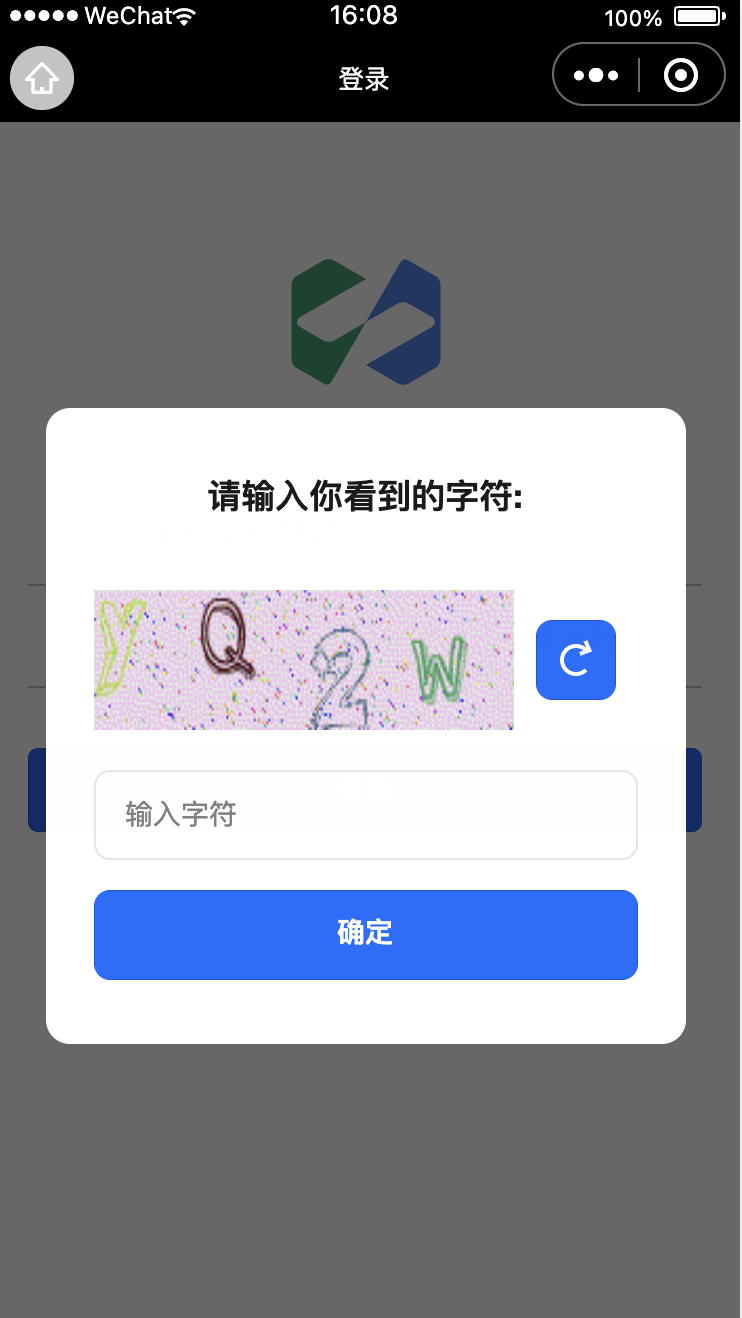
Captcha display effect