Overview
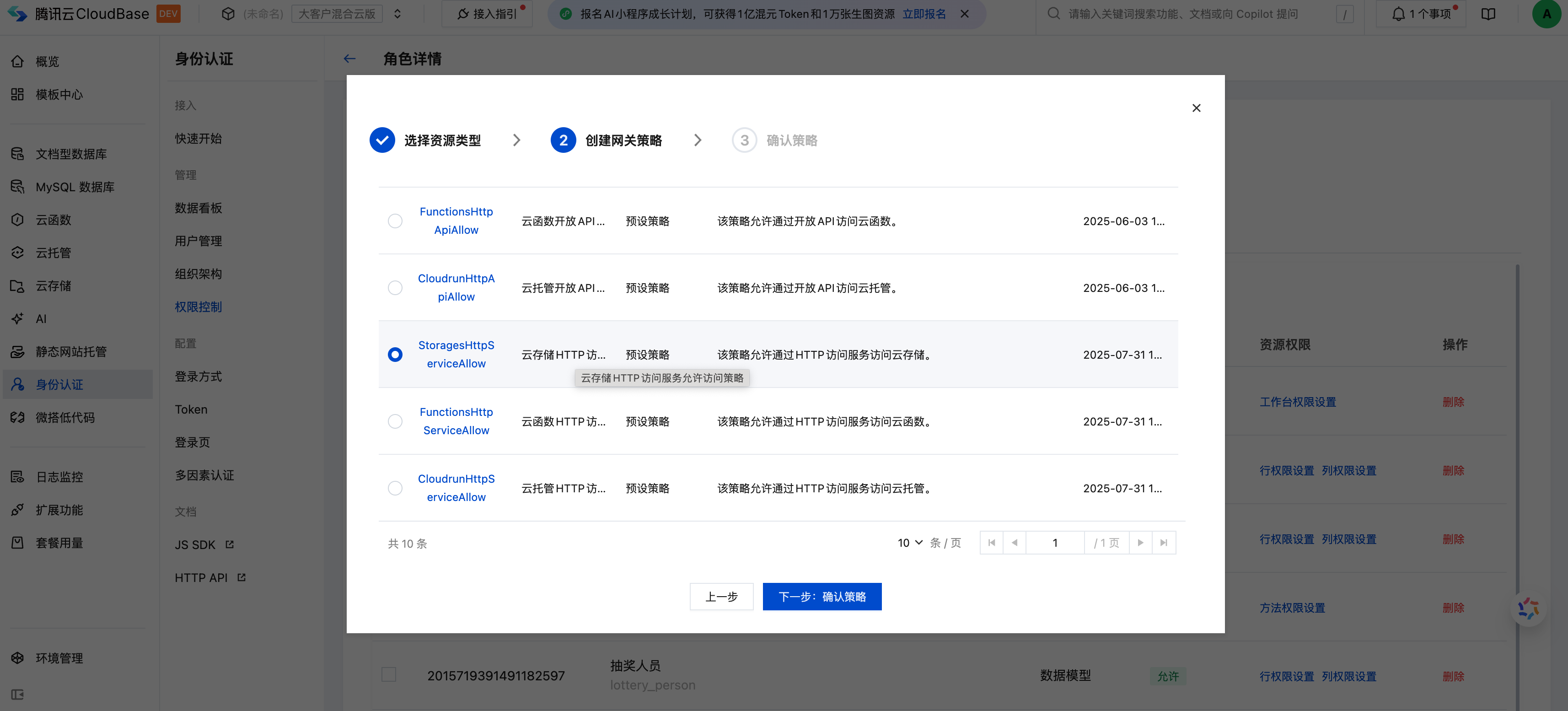
When calling cloud storage-related APIs, version v3 uses the open capabilities of [cloud storage HTTP API](/HTTP-API/storage/cloud storage). Before using, please go to [cloud Development Platform/identity Authentication/Permission control](tcb.cloud.tencent.com/dev? envId=#/identity/auth-control/detail? roleIdentity=registerUser&tab=strategy) Verify that the policy management configuration for StoragesHttpApiAllow is as expected. For more information, see Policy Management Documentation.
Quick Start
import cloudbase from "@cloudbase/js-sdk";

const app = cloudbase.init({
  env: "your-env-id",
});

// Use Supabase-style API
const storage = app.storage.from();

// Upload documents.
const { data, error } = await storage.upload("images/photo.jpg", file);

// Downloading file
const { data: blob } = await storage.download(
  "cloud://envId.xxx/images/photo.jpg"
);

// Create a signature URL
const {
  data: { signedUrl },
} = await storage.createSignedUrl(
  "[images/photo.jpg](cloud://envId.xxx/images/photo.jpg)",
  3600
);

// Delete the document.
await storage.remove([
  "[images/photo.jpg](cloud://envId.xxx/images/photo.jpg)",
]);
API method
Chained call
- from() - Specify the bucket
- throwOnError() - throws an exception on error
File operations
- upload() - Upload files
- update() - Update file
- download() - Download file
- remove() - Remove a file
- move() - Move file
- copy() - Copy file
URL Management
- createSignedUrl() - Create a signature URL
- createSignedUrls() - Batch create signature URLs
- getPublicUrl() - Get public URL
- createSignedUploadUrl() - Create an upload signature URL
File Information
from
from(bucket?: string): this
Specify the bucket to operate, chosen by default the cloud bucket in the environment.
Example:
const storage = app.storage.from();
throwOnError
throwOnError(): this
Set to throw an exception when an error occurs rather than return an error object.
Example:
const storage = app.storage.from().throwOnError();

try {
  const { data } = await storage.upload("file.txt", file);
  console.log("upload succeeded:", data);
} catch (error) {
  console.error("Failed to upload:", error);
}
upload
upload(
  path: string,
  fileBody: FileBody,
  fileOptions?: FileOptions
): Promise<{ data: { id: string; path: string; fullPath: string }; error: null } | { data: null; error: StorageError }>
Upload files to cloud storage.
参数
File path, for example 'images/photo.jpg'
File content, supporting File, Blob, ArrayBuffer, Buffer, Stream and other types
Upload options
返回
示例
update
update(
  path: string,
  fileBody: FileBody,
  fileOptions?: FileOptions
): Promise<{ data: { id: string; path: string; fullPath: string }; error: null } | { data: null; error: StorageError }>
Update the existing file.
参数
File path
New File Content
Upload options
返回
示例
download
download(
  fileId: string,
  options?: TransformOptions
): Promise<{ data: Blob; error: null } | { data: null; error: StorageError }>
Download a file and return the Blob object. Support the image transformation feature.
参数
File ID
Image conversion options (only applicable to images)
返回
示例
remove
remove(
  fileIds: string[]
): Promise<{ data: { id: string }[]; error: null } | { data: null; error: StorageError }>
Delete one or more files.
参数
File ID array to be deleted
返回
示例
move
move(
  fromPath: string,
  toPath: string
): Promise<{ data: { message: string }; error: null } | { data: null; error: StorageError }>
Move files to the new location.
参数
Source file path
Target file path
返回
示例
copy
copy(
  fromPath: string,
  toPath: string
): Promise<{ data: { path: string }; error: null } | { data: null; error: StorageError }>
Copy the file to the new location.
参数
Source file path
Target file path
返回
示例
createSignedUrl
createSignedUrl(
  fileId: string,
  expiresIn: number,
  options?: TransformOptions
): Promise<{ data: { signedUrl: string }; error: null } | { data: null; error: StorageError }>
Create a signed temporary access URL.
参数
File ID
URL validity period (seconds)
Image conversion options
返回
示例
createSignedUrls
createSignedUrls(
  fileIds: string[],
  expiresIn: number,
): Promise<{ data: Array<{ path: string; signedUrl: string }>; error: null } | { data: null; error: StorageError }>
Batch create signed temporary access URLs.
参数
File ID array
URL validity period (seconds)
返回
示例
getPublicUrl
getPublicUrl(
  fileId: string,
  options?: TransformOptions
): Promise<{ data: { publicUrl: string } }>
Get the public access URL of the file (unsigned).
参数
File ID
Image conversion options
返回
示例
info
info(
  fileId: string
): Promise<{ data: FileInfo; error: null } | { data: null; error: StorageError }>
Get detailed file information.
参数
File ID
返回
示例
exists
exists(
  fileId: string
): Promise<{ data: boolean; error: null } | { data: null; error: StorageError }>
Check whether the file exists.
参数
File ID
返回
示例
createSignedUploadUrl
createSignedUploadUrl(
  fileId: string,
  options?: { upsert?: boolean }
): Promise<{ data: { signedUrl: string; path: string; token: string }; error: null } | { data: null; error: StorageError }>
Create a pre-signed URL for uploading, allowing clients to directly upload files to cloud storage.
参数
File ID
Upload options
返回
示例
Type definition
FileBody
type FileBody = File | Blob | ArrayBuffer | Buffer | ReadableStream | string;
Supported file content types.
FileOptions
interface FileOptions {
  cacheControl?: string; // Cache control, for example 'max-age=3600'
  contentType?: string; // File MIME type, such as 'image/jpeg'
  metadata?: Record<string, any>; // custom metadata
  upsert?: boolean; // whether to overwrite existing file
}
File upload options.
TransformOptions
interface TransformOptions {
  width?: number; // Target width
  height?: number; // Target height
  quality?: number; // Image quality (1-100)
  format?: "jpg" | "png" | "webp"; // Output format
}
Image conversion options (only applicable to images).
FileInfo
interface FileInfo {
  name: string; // File name
  id: string; // File ID
  size: number; // File size (bytes)
  created_at: string; // creation time
  updated_at: string; // update time
  metadata?: Record<string, any>; // custom metadata
}
File information object.
StorageError
interface StorageError {
  message: string; // error message
  statusCode?: number; // HTTP Status Code
}
Store error object.
Migration Guide
If you are using the traditional CloudBase cloud storage API, it is advisable to migrate to the Supabase style API. The following is the migration comparison table:
API Comparison Table
| Traditional API | Supabase-style API | Description |
|---|---|---|
app.uploadFile() | app.storage.from().upload() | Upload files |
app.getTempFileURL() | app.storage.from().createSignedUrl() | Get temporary link |
app.deleteFile() | app.storage.from().remove() | Delete a file |
app.downloadFile() | app.storage.from().download() | Download a file |
Migration Example
Upload files
- Traditional API
- Supabase style
// Traditional method
const result = await app.uploadFile({
  cloudPath: "images/photo.jpg",
  filePath: file,
});

console.log("file ID:", result.fileID);
// Supabase-style
const { data, error } = await app.storage
  .from()
  .upload("images/photo.jpg", file);

if (error) {
  console.error("Failed to upload:", error);
} else {
  console.log("file ID:", data.id);
}
Obtain a temporary link
- Traditional API
- Supabase style
// Traditional method
const res = await app.getTempFileURL({
  fileList: [
    {
      fileID: "cloud://envId.xxx/images/photo.jpg",
      maxAge: 3600,
    },
  ],
});

const url = res.fileList[0].tempFileURL;
// Supabase-style
const { data, error } = await app.storage
  .from()
  .createSignedUrl("cloud://envId.xxx/images/photo.jpg", 3600);

if (data) {
  const url = data.signedUrl;
}
Delete files
- Traditional API
- Supabase style
// Traditional method
const result = await app.deleteFile({
  fileList: ["cloud://xxx.jpg"],
});
// Supabase-style
const { data, error } = await app.storage
  .from()
  .remove(["cloud://envId.xxx/images/photo.jpg"]);
Download a file
- Traditional API
- Supabase style
// Traditional method
const result = await app.downloadFile({
  fileID: "cloud://xxx.jpg",
});
// Supabase-style
const { data: blob, error } = await app.storage
  .from()
  .download("cloud://envId.xxx/images/photo.jpg");

if (blob) {
Use Blob object
  const url = URL.createObjectURL(blob);
}
Best Practices
1. Error Handling
Always check the error object:
const { data, error } = await app.storage.from().upload("file.txt", file);

if (error) {
  console.error("Operation failed:", error.message);
  // Handle error
  return;
}

// Use data
console.log("operation succeeded:", data);
or use the throwOnError() method:
try {
  const { data } = await app.storage
    .from()
    .throwOnError()
    .upload("file.txt", file);

  console.log("operation succeeded:", data);
} catch (error) {
  console.error("Operation failed:", error);
}
2. File path format specification
-Use / to separate directories
-Do not start with /
-Use meaningful directory structure
Recommendation;
("images/avatars/user-123.jpg");
("documents/reports/2024/report.pdf");
("uploads/temp/file-abc.txt");

// ❌ not recommended
("/images/photo.jpg"); // Do not start with /
("photo.jpg"); // lack of directory structure
3. Image Optimization
Use images switch option to optimize loading speed:
// Get thumbnail
const { data } = await app.storage
  .from()
  .createSignedUrl("images/large-photo.jpg", 3600, {
    width: 300,
    height: 300,
    quality: 80,
    format: "webp", // Use WebP format to reduce file size
  });
4. Operating in Batches
For multiple files, use batch methods to improve efficiency:
// ✅ Recommended: Batch create pre-signed URLs
const { data } = await app.storage
  .from()
  .createSignedUrls(["image1.jpg", "image2.jpg", "image3.jpg"], 3600);

// ❌ not recommended: create one by one
for (const path of paths) {
  await app.storage.from().createSignedUrl(path, 3600);
}
5. Cache Control
Reasonably set cache control headers.
// Static resource: long-term cache
await app.storage.from().upload("images/logo.png", file, {
  cacheControl: "max-age=31536000", // 1 year
});

// Dynamic content: short-term cache
await app.storage.from().upload("data/report.json", file, {
  cacheControl: "max-age=300", // 5 minutes
});

// No cache
await app.storage.from().upload("temp/data.txt", file, {
  cacheControl: "no-cache",
});
FAQs
How to handle large file upload
For large files, recommend using createSignedUploadUrl() to implement direct upload:
const { data } = await app.storage
  .from()
  .createSignedUploadUrl("large-file.zip");

Use fetch to upload large files
await fetch(data.signedUrl, {
  method: "PUT",
  body: largeFile,
});
2. How to achieve breakpoint resume
CloudBase cloud storage temporarily does not directly support breakpoint resumption. It is advisable to upload large files in shards.
async function uploadLargeFile(file, chunkSize = 5 * 1024 * 1024) {
  const chunks = Math.ceil(file.size / chunkSize);

  for (let i = 0; i < chunks; i++) {
    const start = i * chunkSize;
    const end = Math.min(start + chunkSize, file.size);
    const chunk = file.slice(start, end);

    await app.storage.from().upload(`temp/file-${i}`, chunk);
  }

  // Merge shards (SCF support is required)
}
3. How to set file access permission
File access permission need to be configured in the TCB console under "Permission control/Policy management".
4. Which image format conversion are supported
Support converting between JPG, PNG, and WebP formats.
5. How long is the maximum validity period of a temporary link?
It is advisable not to exceed 7 days (604800 seconds).