Development Environment Error Log Notification
@cloudbase/js-sdk will print API invocation error information in a more friendly way to console in development environment:
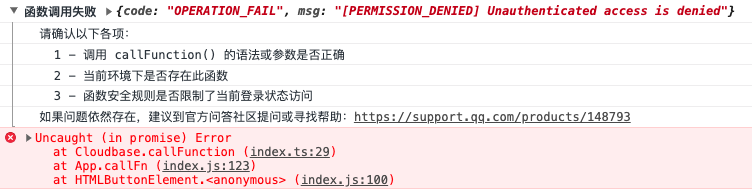
The error printed in figure is due to the current login type being subject to the security rule of function, which leads to no permission to call. Error information is divided into two parts:
- The black font in the upper part contains the returned error information from the backend API and solution tips for this error.
- The red font in the lower part is the error stack after optimization. Since the original error stack has too many levels, making debug difficult, the first entry of the error stack printed here directly locates the SDK source code, and the second entry locates the business source code calling the API.
The optimized error prompt is only for use in the development environment. Determine whether it is the development environment based on process.env.NODE_ENV. Locating the SDK source code requires the aid of SourceMap.
The above feature depends on part of the building tool feature and currently only supports Webpack and Rollup.
- Webpack
- Rollup
Webpack 4+ version configuration:
module.exports = {
  mode: "development",
};
Previous version Webpack configuration:
const webpack = require("webpack");

module.exports = {
  plugins: [
    new webpack.DefinePlugin({
      "process.env.NODE_ENV": JSON.stringify("development"),
    }),
// ...other plug-ins
  ],
// ...other configuration
};
Add sourcemap pre-processing:
module.exports = {
  module: {
    rules: [
      {
        test: /\.js$/,
        enforce: "pre",
        use: ["source-map-loader"],
      },
// ...other rules
    ],
  },
// ...other configuration
};
Once configured, just start up webpack-dev-server.
Rollup requires two plug-ins:
-rollup-plugin-replace is used to inject process.env.NODE_ENV
- rollup-plugin-sourcemaps is used to load sourcemap
import sourcemaps from "rollup-plugin-sourcemaps";
import replace from "rollup-plugin-replace";

export default {
  plugins: [
    sourcemaps(),
    replace({
      "process.env.NODE_ENV": JSON.stringify("development"),
    }),
// ...other plug-ins
  ],
// ...other configuration
};
Once configured, just use rollup-plugin-serve to start up the dev server.