QPS Control
QPS Control manages the maximum queries per second (QPS) for an environment, helping meet access demands during peak traffic.
Use Cases
QPS overage pay-as-you-go is suitable for workloads expected to exceed the package QPS quota temporarily or periodically. Before enabling it, set an appropriate QPS limit based on peak demand and expected costs.
- Marketing campaigns and traffic spikes: Promotions, content launches, or trending events can generate high traffic in a short period. With QPS overage pay-as-you-go enabled, you can set the QPS limit to the estimated peak to meet demand during the event.
- Workloads with significant traffic fluctuations: When traffic varies substantially across time periods and may exceed the package quota during peaks, use QPS overage pay-as-you-go to handle peak requests.
- Production workloads requiring higher QPS limits: When the package quota cannot meet peak demand in a production environment, enable QPS overage pay-as-you-go and set an appropriate QPS limit. Submit a support ticket for requirements above
9999 QPS.
Configuration Instructions
QPS Overage Pay-as-You-Go Switch
The QPS overage pay-as-you-go switch controls whether QPS overage pay-as-you-go is enabled. When enabled, the environment QPS can exceed the package quota and is subject to the QPS limit you configure.
QPS Limit Configuration
QPS Limit Configuration displays the maximum QPS currently available for the environment.
- When the QPS overage pay-as-you-go switch is disabled, the maximum QPS is the package quota.
- When the QPS overage pay-as-you-go switch is enabled, you can set an appropriate QPS limit based on your business requirements, up to
9999. - To set a higher QPS limit, submit a support ticket.
Note: QPS overage pay-as-you-go and QPS limit configuration are available only for specific packages. See the pricing documentation for details.
QPS Overage Measurement Method
After QPS overage pay-as-you-go is enabled, the portion exceeding the package quota is measured using the same 95th-percentile method as bandwidth billing. Each one-hour measurement period is calculated independently, as follows.
Collect One Hour of QPS Data
The system collects the environment QPS once per second. During a one-hour measurement period, it collects 3600 QPS data points to represent changes in request volume during that period.
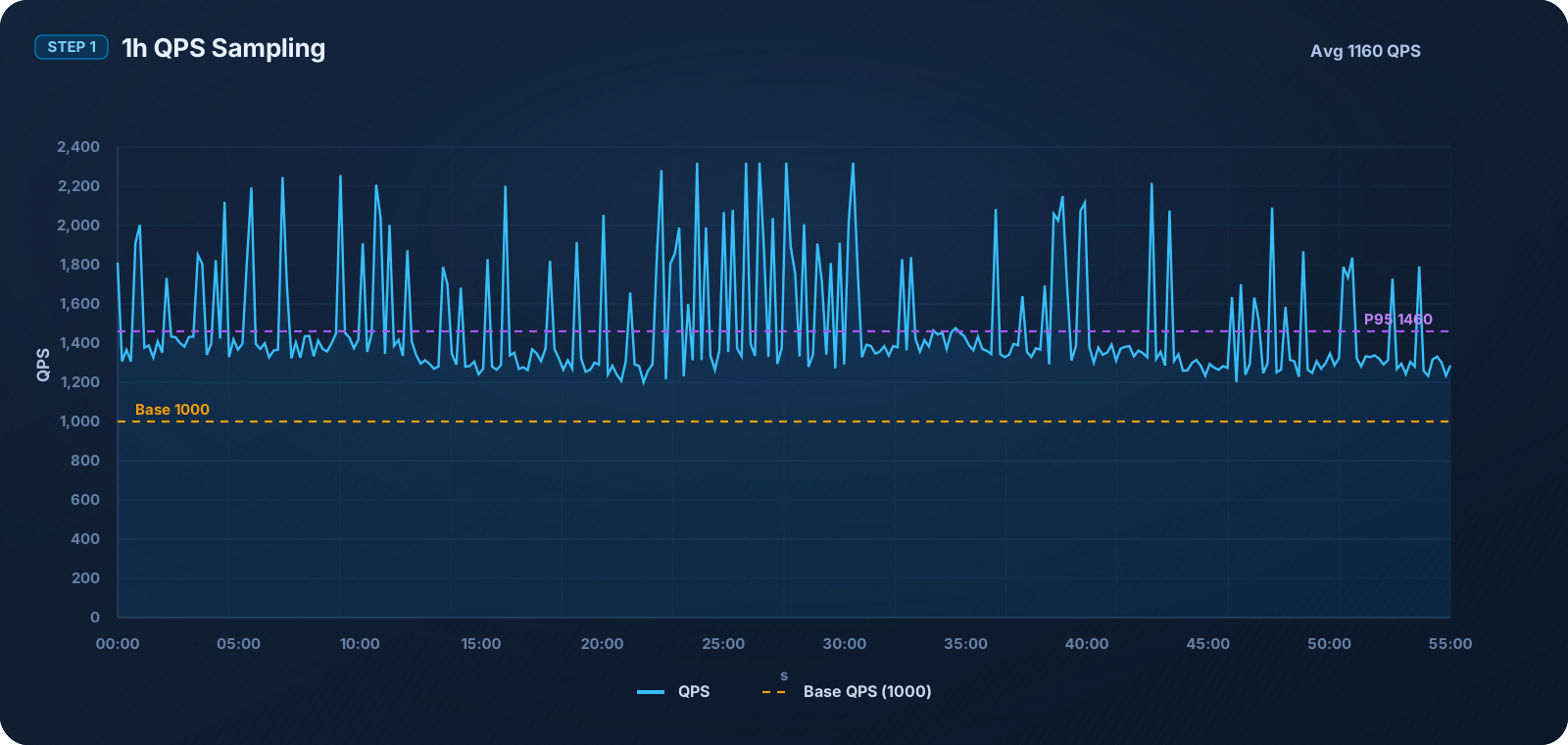
Calculate Billable QPS Using the 95th Percentile
The system sorts the 3600 QPS data points in a measurement period from highest to lowest, then removes the highest 5% of data points, or 180 data points. The highest remaining value is the billable QPS, also known as the P95 QPS.
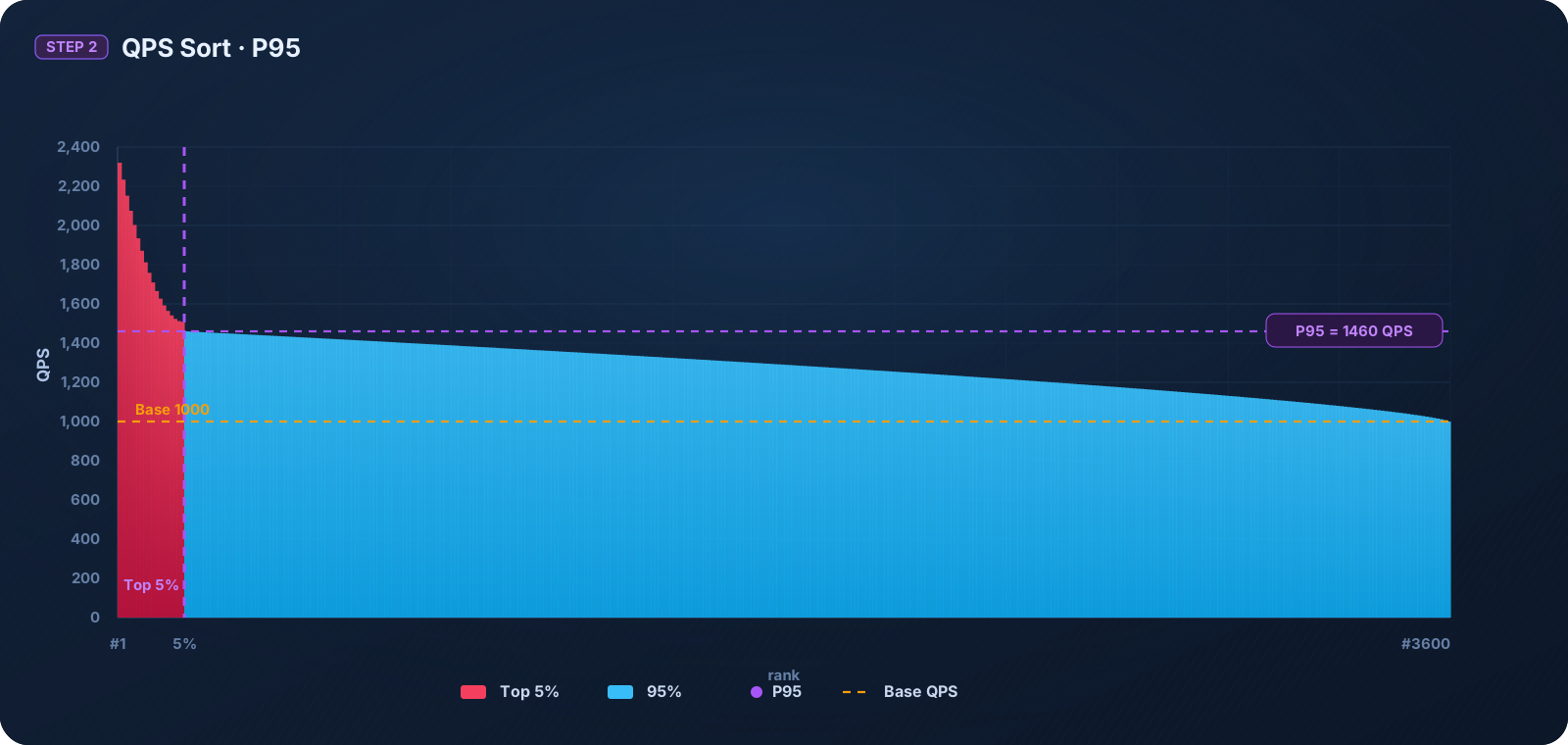
The values in the diagram are for illustration only. After the highest 5% of data points are removed, the highest remaining value is 1460 QPS, which is the billable QPS for that measurement period.
Calculate Chargeable QPS
Chargeable QPS is the portion of billable QPS that exceeds the package quota:
Chargeable QPS = Billable QPS - QPS supported by the package
Chargeable QPS is rounded up to the nearest hundred QPS. For example, if the package supports 1000 QPS and the billable QPS is 1460 QPS, the chargeable QPS is 460 QPS, which is rounded up and billed as 500 QPS.
After each one-hour measurement period ends, the system calculates the chargeable QPS for that period and deducts resource points accordingly.