Migrating from Legacy Authorization Policy to OPA
The legacy gateway policy in CloudBase will gradually switch over to OPA. The default behavior remains unchanged: the platform has built-in equivalent rules, so no action is required. Only when you have manually associated gateway policies with roles in the console do you need to follow the manual steps below or write a new policy.
1. Roles Associated with Preset Policies
Legacy gateway authorization provided a set of preset policies (each policy is essentially "allow / deny on a specific resource_type") and associated them with roles such as internal user / external user / default user. After switching to OPA, you need to re-associate the preset policies and save.
For the following legacy gateway policies:

Select "Create policy" and create a corresponding allow policy for the matching resource and role:
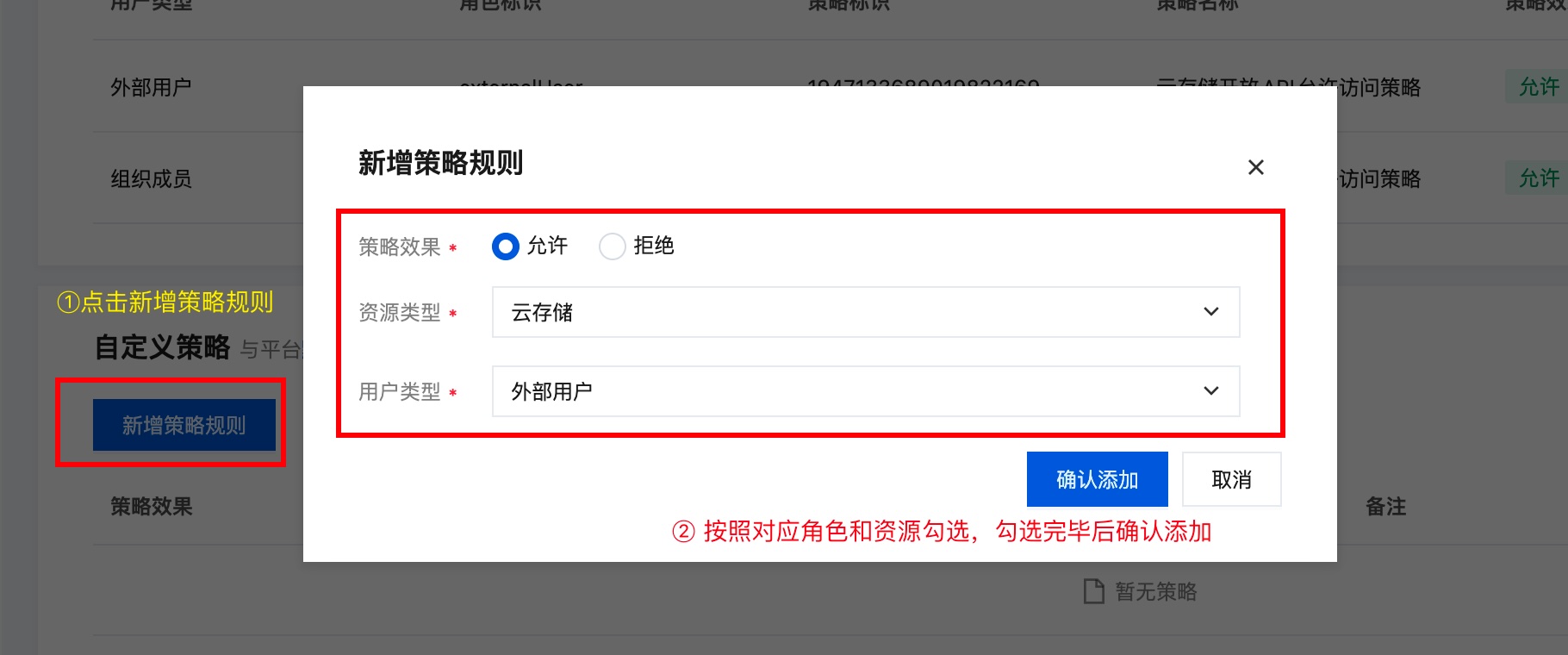
Perform the above operation for every policy. After verifying everything is correct, click Save.
2. Translating Custom Policies to Rego
For manually written custom policies, refer to the descriptions below to migrate to the new syntax:
2.1 Minimal Side-by-side Example
Policy declared by gateway authorization:
// Associated role: external user
// Meaning: allow external users to access cloud functions
{
    "statement": [
        {
            "action": "functions:*", // action: scope is the cloud function resource
            "resource": "*",
            "effect": "allow" // allow: declares the operation as allow
        }
    ],
    "version": "1.0"
}
Equivalent Rego:
package authz.user

default allow := false

# Meaning: allow external users to access cloud functions
allow if {
  # The two conditions are AND-ed; both must be satisfied for the allow to take effect
  # Match external users via auth_type == external
  input.subject.auth_type == "external"
  # Match cloud functions via resource_type == functions
  input.cloudbase.resource_type == "functions"
}
2.2 Common Field Mapping
The table below lists the corresponding Rego expressions for concepts in the legacy gateway policy:
| Gateway Authorization | Rego Expression Example |
|---|---|
Policy associated with role Administrator | input.subject.auth_type == "administrator" |
Policy associated with role External user | input.subject.auth_type == "external" |
Policy associated with role Internal user | input.subject.auth_type == "internal" |
Policy associated with role Anonymous user | input.subject.auth_type == "anonymous" |
Policy associated with role Registered user | input.subject.auth_type in {"external", "internal"} |
Policy associated with role All users | not input.subject.auth_type == "unauthenticated" |
Policy associated with role <custom role> | "<role name>" in input.subject.groups |
Resource <resource> associated in the policy | input.cloudbase.resource_type == "<resource>" |
Domain <host> specified in the policy | input.request.host == "<host>" |
HTTP method <method> specified in the policy | input.request.method == "<method>" |
Exact path <path> specified in the policy (no * wildcard) | input.request.path == "<path>" |
Prefix path <path> specified in the policy (with *, e.g. /path/*) | startswith(input.request.path, "<path>") |
Effect is allow effect = allow | allow if { ... } |
Effect is deny effect = deny | deny contains "describe rejection reason here" if { ... } |
The four-segment structure of action in the policy — resource identifier:domain:HTTP method:request path — is described in detail below:
Format:
- Resource identifier (required): see the resource identifiers below, such as functions, storages, cloudrun, etc.
- Domain (optional): the actual custom domain accessed; for HTTP API access the domain is unified as tcloudbasegateway. Omitted means * (any domain).
- HTTP method (optional): an uppercase HTTP method (such as GET, POST, PUT, DELETE). Omitted means * (any method).
- Request path (required): the HTTP request path; supports the
*wildcard.*means any path;/path/*means any path under/path/.
Examples:
functions:*→ allow any cloud function access (domain and method omitted)functions:/hello→ only allow access to path/hellofunctions:/api/*→ allow access to any path under/api/(e.g./api/users,/api/orders)cloudrun:xxx.api.tcloudbasegateway.com:POST:/v1/cloudrun/*→ allow POST access to any path under the CloudBase Run API via the specified domain
2.3 Common Side-by-side Examples
In the examples below, the package authz.user header is omitted; in actual use, just put them all into a single policy file.
Example 1 — Allow all users to access AI large models
allow if {
  input.cloudbase.resource_type == "ai"
}
Example 2 — Allow external users to access a single API
allow if {
  input.subject.auth_type == "external"
  input.cloudbase.resource_type == "apis"
  startswith(input.request.path, "/v1/apis/api_id")
}
Example 3 — Allow anonymous users to access cloud functions
allow if {
  input.subject.auth_type == "anonymous"
  input.cloudbase.resource_type == "functions"
}
Example 4 — Allow a single resource party to access a specific path:
allow if {
  input.cloudbase.resource_type == "functions"
  input.request.path == "/v1/functions/hello"
}
Example 5 — Allow all logged-in users to invoke a batch of cloud functions
allow if {
  not input.subject.auth_type == "unauthenticated"
  input.cloudbase.resource_type == "functions"
  startswith(input.request.path, "/v1/functions/api/")
}
Example 6 — Allow a custom role to access cloud functions
allow if {
  # Check whether the user has the specified custom role
  "my-custom-role" in input.subject.groups
  input.cloudbase.resource_type == "functions"
}
3. Notes
denytakes precedence overallow; when bothallowanddenyconditions are satisfied, the request will be rejected.- The switch is one-way; once an OPA policy is saved, it takes effect immediately and cannot be rolled back to the legacy gateway authorization. Please confirm before saving.