CloudBase Platform Changelog
2026-02-10
【Cloud Storage】: UI Redesign + Advanced Features Support
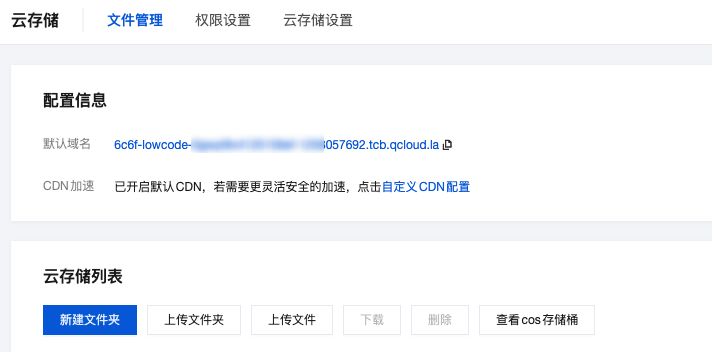
CloudBase Cloud Storage console has been redesigned with bucket name and region information display, and now supports COS advanced features like content moderation and data processing.
Main Updates:
- Bucket Information Display: Directly displays COS bucket name and region information
- One-Click Jump: Quick jump to COS console to use advanced features
- Content Moderation: Image/video/text security auditing, automatic identification of non-compliant content
- Data Processing: Image processing, document preview, video frame capture and transcoding, etc.
For details, please refer to: Cloud Storage Documentation
2026-01-27
【HTTP Cloud Functions】: Single Instance Multiple Concurrency + WebSocket Real-time Communication
HTTP Cloud Functions now support single instance multiple concurrency mode and WebSocket/SSE real-time communication, with comprehensive upgrades to Web service performance and cost optimization, and real-time application development experience. View Development Documentation →
Single Instance Multiple Concurrency: Reduce Cold Starts, Improve Concurrency Performance
A single function instance can handle multiple requests simultaneously without starting a new instance for each request. Compared to the "single instance single request" mode of regular cloud functions, it significantly reduces cold start frequency and resource consumption.
WebSocket Support: Bidirectional Real-time Communication Capability
Native support for WebSocket protocol, providing full-duplex communication capability. Suitable for scenarios requiring bidirectional communication such as real-time chat, collaborative editing, game servers, etc. WebSocket Usage Guide →
2026-01-26
【MySQL Database】: Support Migration to User's Own Account
CloudBase MySQL now supports migration from the CloudBase side to your Tencent Cloud account, with VPC private network connection support after migration. View Migration Guide →
Before migration, the database is deployed in the CloudBase official account and only supports public network connection. After migration, the database is under your account, supports VPC private network connection, and cloud functions can directly connect to the database.
2026-01-20
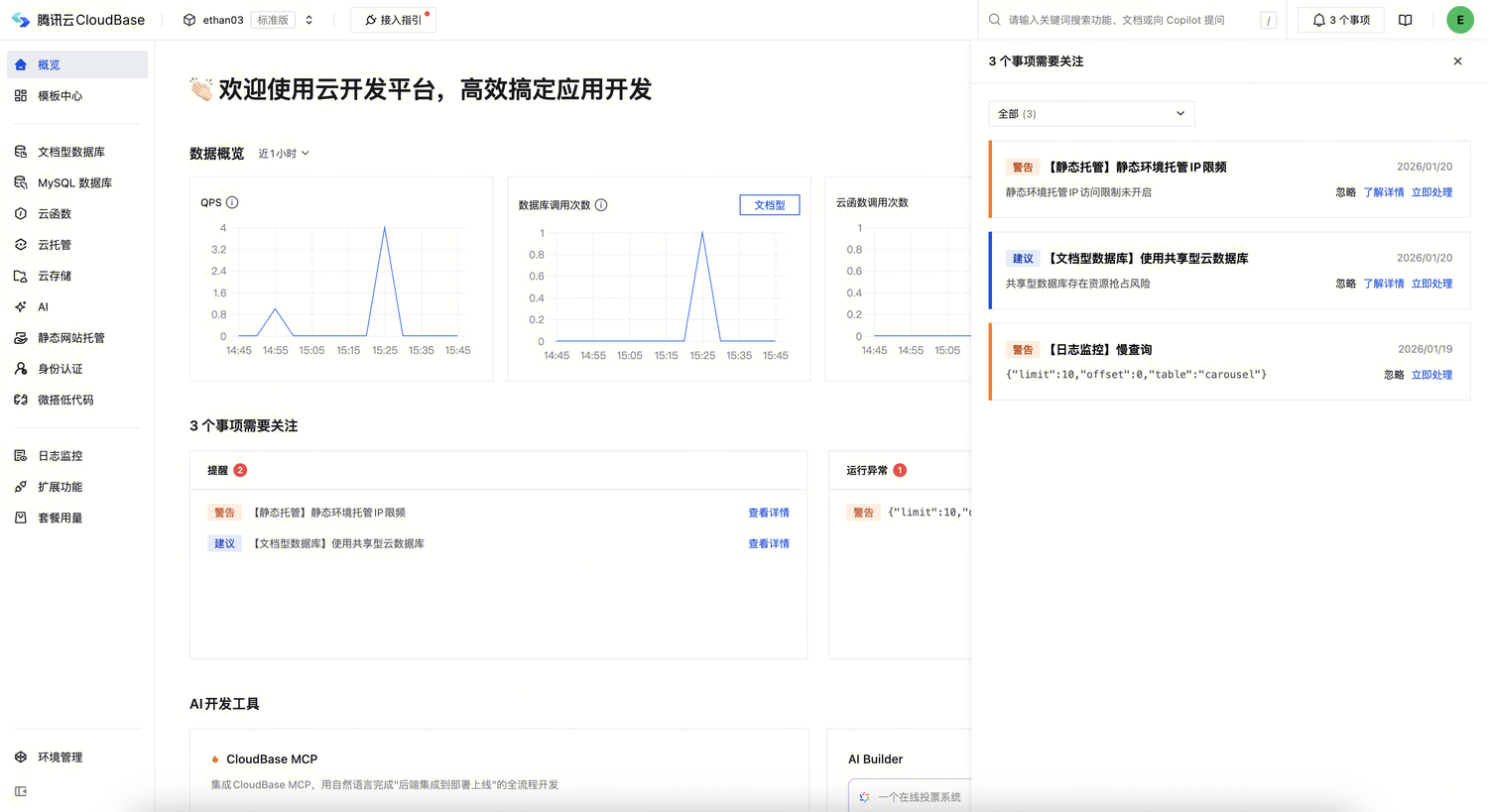
【Task Center】: Unified Management of Environment To-Do Items
The CloudBase platform overview page has been upgraded to Task Center, which unifies the management of environment risks, security reminders, and operational anomalies scattered in various places, allowing you to identify and handle all to-do items in one place.
2026-01-16
【Billing Mode】: Resource Point Billing Mode Launch
CloudBase platform launches Resource Point Billing Mode, replacing the traditional "package quota + additional resource" fixed quota method, achieving flexible deduction based on actual usage, making billing more accurate and reasonable. Covers the full range of current packages including Personal, Standard, Enterprise, and Enterprise Advanced versions. View Resource Point Billing Documentation →
Flexible Usage: Say Goodbye to Fixed Quota Limitations
Pain points of traditional mode: Fixed package quotas lead to waste when resources are not fully used, and require frequent additional purchases when usage exceeds quota, making it difficult to adapt to business fluctuations.
Advantages of resource point mode: All resource usage is converted to resource points according to unified standards for deduction, pay for what you use, flexibly adapting to various business scenarios.
WeDa/CloudBase discontinued old packages need to be converted to current packages (Personal, Standard, Enterprise, Enterprise Advanced) first before converting to resource point billing environments
2026-01-14
【Document Database】: Support Connecting to Your Own MongoDB Database
CloudBase has added Mongo Connector functionality, supporting integration of your existing MongoDB database into the platform without data migration, reusing existing resources, configuration time less than 5 minutes.
After connecting your own database, you can:
- Seamless Integration: Directly manage data in existing databases without data migration
- Data Models: Quickly generate data models based on existing data tables, automated data management
- SDK Support: Unified access using CloudBase Web SDK / Node SDK / Mini Program SDK
- Security and Control: Data remains in your database, full control over data security
Related Resources
2026-01-09
【HTTP Access Service】: Access Warning Intermediate Page
The original "default domain validity renewal" mechanism has been officially retired, no longer requiring frequent manual renewals.
Added Access Warning Intermediate Page, replacing the hard renewal mechanism with soft security reminders, ensuring test environment security and compliance.
When visitors access Web applications through CloudBase "default domains" (such as .tcloudbaseapp.com, .run.tcloudbase.com, *.app.tcloudbase.com), the system will automatically redirect to the Access Warning Intermediate Page, informing visitors that the current environment is only for development and testing, and the content has not undergone compliance review.
Mechanism Upgrade: From Hard Renewal to Soft Reminders
Pain points of old mechanism: Default domains require regular renewal, and once renewal is forgotten, the domain becomes inaccessible, causing development and testing interruptions.
Advantages of new mechanism: Cancel renewal requirements and replace with access warning intermediate page. As long as traffic anomaly risk control thresholds are not triggered, default domains can continue to be used in development and testing scenarios.
For details, please refer to: Access Warning Intermediate Page
2025-12-24
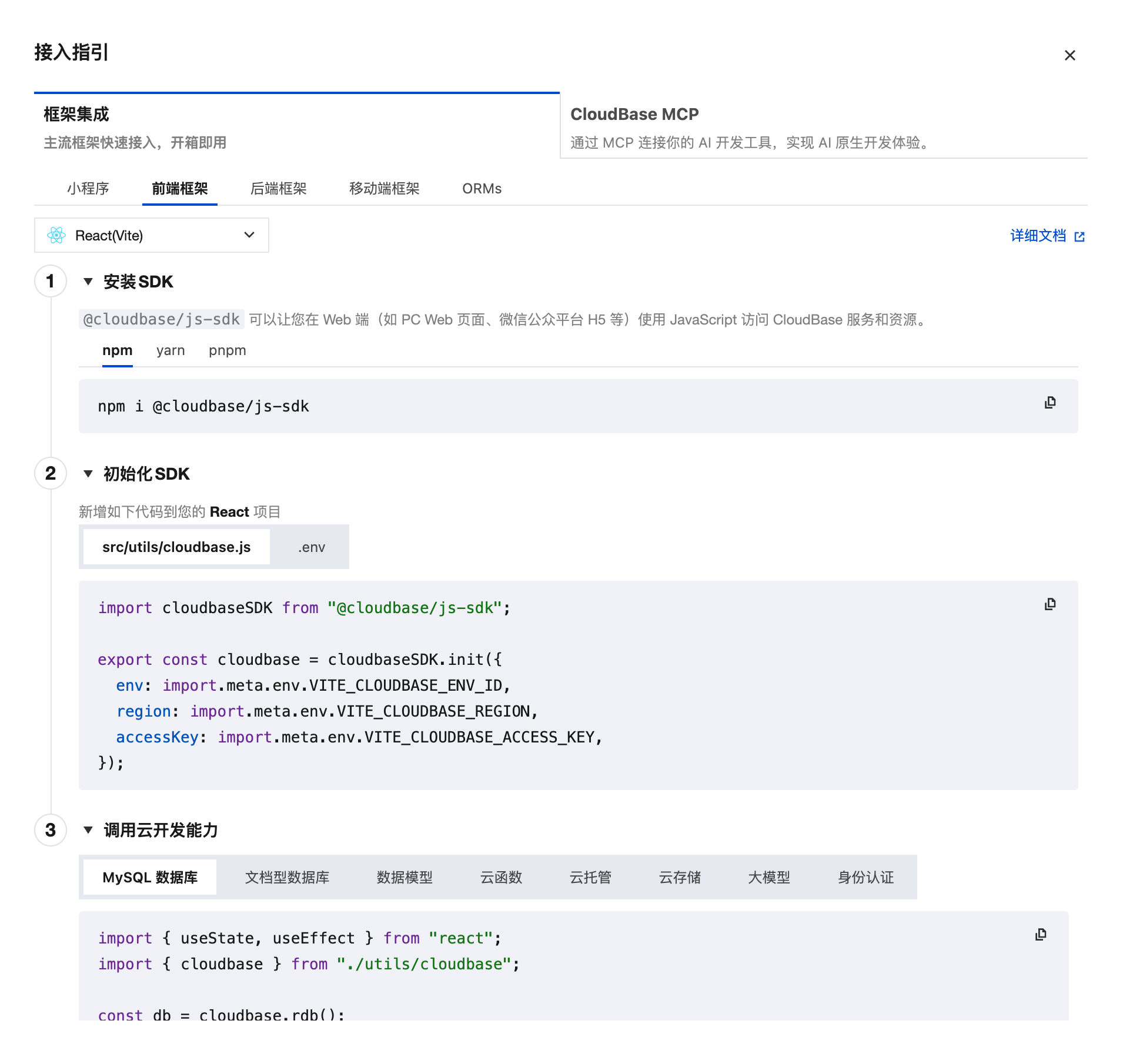
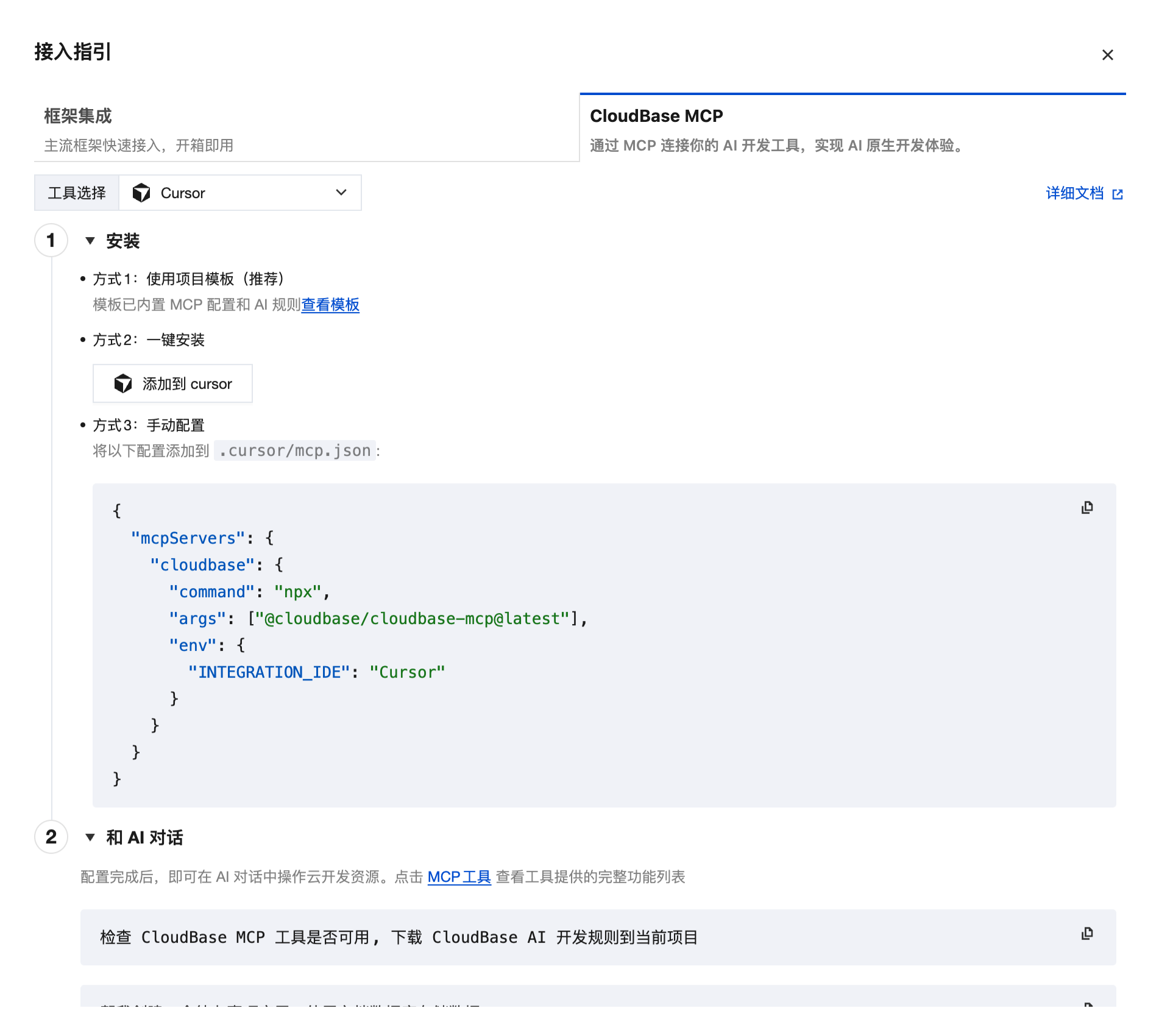
【Access Guide】: Mainstream Framework Quick Access + AI Development Tool MCP Connection
CloudBase has added Access Guide Module, providing quick access solutions for mainstream frameworks like React, Vue, WeChat Mini Program, and MCP connection guides for AI development tools like Cursor and WindSurf.
Mainstream Framework Quick Access: From Zero to Deployment in One Step
Traditional access methods require developers to consult multiple documents, manually configure SDKs, and write boilerplate code, with high learning costs and easy errors. Now you only need to select your technology stack in the access guide to get complete project templates and configuration solutions.
AI Development Tool MCP Connection: Intelligent Coding Experience Upgrade
To enable developers to use AI-assisted development more efficiently, CloudBase provides MCP (Model Context Protocol) connection guides for mainstream AI development tools, allowing AI assistants to directly call CloudBase capabilities.
2025-12-18
【Authentication】: Built-in Email Service + SMS Rate Limiting
CloudBase authentication has added zero-configuration email service, reducing configuration time from 15 minutes to 1 minute. Also launched SMS rate limiting to effectively prevent resource theft.
Built-in Email Service: Say Goodbye to SMTP Configuration
Traditional email login requires developers to apply for third-party email services and configure SMTP parameters themselves, a cumbersome and error-prone process. Now you only need to click "Enable Email Proxy" in the console to complete the configuration.
For details, please refer to: Authentication/Email Verification Code Login
SMS Rate Limiting: Prevent Resource Theft
To address the issue of cost surges caused by malicious SMS verification code requests, added single user daily SMS limit configuration, default 30 messages/day.
Configuration steps:
- Go to CloudBase Platform / Authentication / Login Methods
- Find the "SMS Verification Code" card and click "Edit"
- Set the daily sending limit (recommended 10-100 messages, adjust according to business scenario)
- Save configuration
For details, please refer to: Authentication/SMS Verification Code Login
To protect resource security, the system has enabled default rate limiting (30 messages/day) for all environments. If your business scenario requires higher quotas (such as order notifications for e-commerce platforms), please manually adjust in the console to avoid affecting normal business.
【Cloud Storage, Static Hosting】: Support Viewing COS Buckets
CloudBase Cloud Storage and Static Website Hosting have added View COS Bucket functionality, supporting the use of COS advanced capabilities, with comprehensive management experience upgrades.
One-Click Jump to COS Console: More Efficient Management
Traditional method requires manually constructing access routes to view the underlying COS bucket. Now you only need to click "View COS Bucket" on the "Cloud Storage" or "Static Website Hosting" page to directly jump to the corresponding COS bucket management page, using more advanced storage capabilities such as content moderation, data processing, access logs, etc.