Deep Dive into Cloud Function
In cloud functions, the runtime behavior of Node.js differs from that of local Node.js execution.
Startup Time
Cloud function has two types of startup:
- Cold startup: requires the platform to allocate computing resources, load code, and start the Node.js process, which takes longer;
- Hot startup: function instances and execution processes are reused (i.e., "instance reuse" mentioned below), which takes very little time.
Cloud function will trigger a cold startup if it has not been invoked within a certain period (tens of minutes). In such cases, the platform reclaims allocated computing resources and reallocates them only when the function is invoked again.
If continuous requests are made to the cloud function, the instances that have completed cold startup will be reused and can begin computation very quickly, which constitutes a hot startup.
CloudBase automatically schedules and allocates the number of instances based on the long-term access patterns of your cloud function, ensuring optimal performance while saving your resources.
Instance Reuse
Consider the following cloud function:
let i = 0;
exports.main = async (event = {}) => {
  i++;
  console.log(i);
  return i;
};
When the cloud function is called for the first time, the function returns a value of 1, which conforms to expectations.
If this cloud function is called consecutively, its return value may incrementally increase from 2 or revert to 1, which is the result of instance reuse:
- When hot startup occurs, the Node.js process executing the function is reused, and the process context is preserved, so the variable
iincrements. - When cold startup occurs, the Node.js process is entirely new, and the code executes from scratch, returning 1 at this point.
Therefore, developers should ensure that cloud functions are stateless and idempotent when writing them, that is, the execution of the current cloud function does not depend on residual information in the runtime environment from the previous execution.
Timezone
The default timezone in cloud functions is UTC+0, so obtaining local time within the function will result in an 8-hour difference from Beijing time.
The timezone during function runtime can be changed by defining the environment variable TZ. For example, setting TZ to Asia/Shanghai specifies Beijing time for the function.
For more information on timezones, please refer to: Time Zone Database.
On the server side (including databases and cloud functions), avoid using timezone-influenced local time and instead use absolute values like Unix timestamps, which can prevent numerous issues caused by timezone differences between the server and client.
Asynchronous Behavior in Node.js 8
Consider the following code:
exports.main = async (event = {}, context) => {
  setTimeout(() => {
    console.log("rid: ", context.request_id);
  }, 0);
  return "ok";
};
When called locally, the function returns "ok", and the requestId can be seen printed subsequently.
But if this code runs in a Node.js 8 cloud function, the function still returns "ok", but the content printed by the asynchronous function in setTimeout will not appear in this invocation's logs, for example:
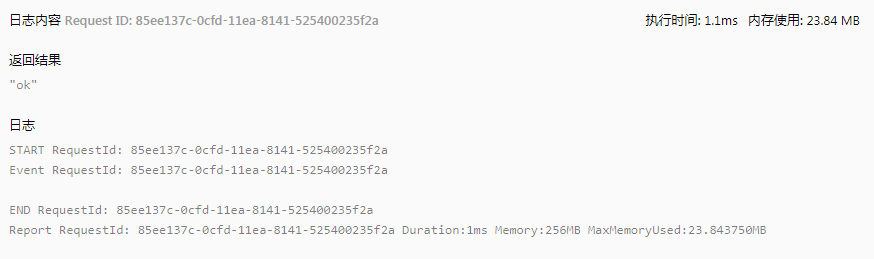
On the second invocation, you may see the print from the previous setTimeout in the invocation logs:
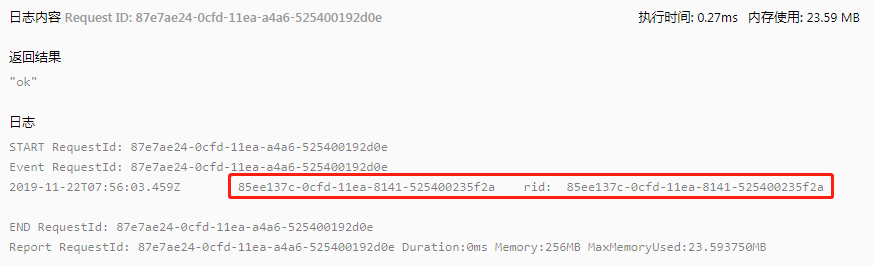
This is what confuses many developers.
For asynchronous functions, after the main process (such as await main(event, context) in the example) completes execution, the function instance process is frozen, and all asynchronous tasks within the process are suspended until the process is revived.
On the other hand, if the function instance process is not reused for some reason (e.g., the function code is updated), the code in this asynchronous process will never be executed.
Developers should not place critical code in the asynchronous process of Node.js 8 cloud functions. To ensure critical code runs reliably, place it in the main function flow or use cloud functions with Node.js 10 and above:
Example
The asynchronous nature of Node.js 8 cloud functions may introduce unexpected behaviors, for example:
The mini program wx-server-sdk provides the getWXContext method to obtain some context information (appId, openId, unionId) for the convenience of developers. This method essentially reads several parameters from environment variables.
If this method is used in an asynchronous process to obtain openId or unionId, it may lead to identity drift exceptions.
Consider the following code:
const cloud = require("wx-server-sdk");

exports.main = async (event) => {
  console.log("openid a: ", cloud.getWXContext().OPENID);
  setTimeout(() => {
    const { OPENID } = cloud.getWXContext();
    console.log("openid b: ", OPENID);
  }, 0);
};
Suppose two different users access the function via the mini program, with user A's openid as 1111 and user B's openid as 2222.
The logs for their two invocations will be as follows:
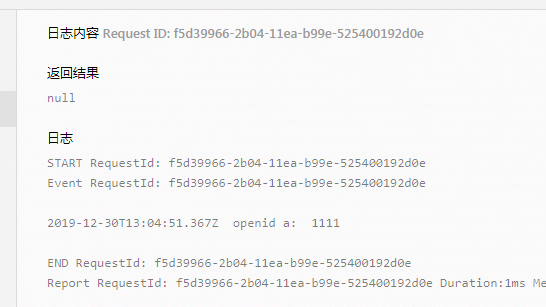
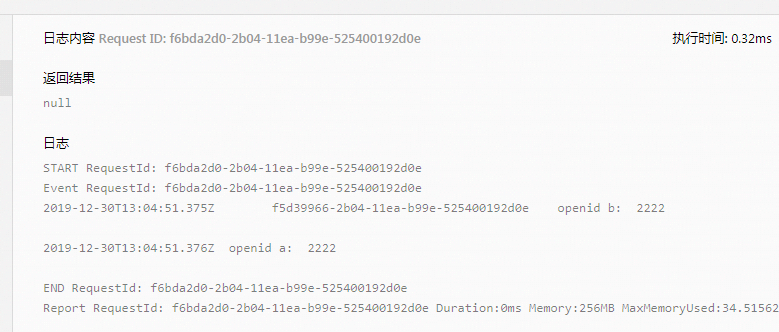
As can be seen, the first invocation printed user A's openid, which is as expected. However, the logic in the asynchronous process was not executed during that invocation.
During the second invocation, the function instance process is reused, and the asynchronous logic generated by the first invocation continues to run, printing user B's openid. However, this execution actually belongs to the asynchronous process originating from user A's function invocation.