HTTP Gateway
The tcb service command has been deprecated since v3.0.0, and its functionalities have been replaced by the following commands:
| Old Capability | New Command | Documentation |
|---|---|---|
| Security Domain Allowlist | tcb cors add/list/rm | Security Domain Management |
| Bind/Unbind Custom Domain | tcb domains add/ls/rm | Custom Domain Management |
| Create/Manage Routing Rules | tcb routes add/list/edit/delete | HTTP Gateway Routing Management |
The old commands retain backward compatibility but are no longer maintained. It is recommended to migrate as soon as possible.
HTTP Gateway enables access to CloudBase resources via HTTP links.
Access domains and SCF access paths can be managed via CLI tools and the console.
Create
You can use the following command to create an HTTP Gateway address via CLI command-line interaction.
tcb service create -e envId
You can also specify the SCF name functionName and the trigger path servicePath to create an HTTP Gateway address.
tcb service create -p servicePath -f functionName
Delete HTTP Gateway Link
You can use the following command to delete the SCF HTTP Gateway link via CLI command-line interaction.
tcb service delete -e envId
You can also specify the HTTP Gateway information to be deleted via parameters:
# Specify the Binding Path for HTTP Gateway
tcb service delete -p servicePath

# Specify HTTP Gateway Id
tcb service delete -i serviceId

# Delete all HTTP Gateways for the function via function name
tcb service delete --name functionName
When using the --name or -n parameter, ensure the correct format: --name value or -n value. The incorrect format -name value will be parsed as -n ame.
Enable/Disable HTTP Gateway
You can enable or disable the HTTP Gateway using the following command:
tcb service switch -e envId
Authentication Switch
You can enable or disable HTTP Gateway authentication using the following command:
tcb service auth switch -e envId
Query HTTP Gateway Information
You can list all HTTP Gateway links and view their basic information using the following command:
tcb service list
You will receive output similar to the following:
| Service ID | Trigger Path | Associated Resources | Trigger Type | Creation Time |
|--------------------------------------|--------------|-------------------|----------|---------------------|
| ab2c6749-b6ef-45ca-893e-c7bd2adb5ea2 | /http-test   | simple-event-func | SCF   | 2026-03-13 14:45:10 |
| 94eb95da-2a91-456c-b6f2-5bdd10833a79 | /image-test  | image-http-fun    | Cloud Run   | 2026-03-16 21:33:39 |
| 341f0a9f-7b5e-4505-b111-7c73f678a353 | /test        | httpTest          | Cloud Run   | 2026-03-13 14:39:08 |
Set More Query Constraints
-d domain       Specify domain
-p servicePath  Specify the HTTP Gateway path
-i serviceId    Specify the HTTP Gateway Id
Binding a Custom Domain to HTTP Gateway
Before binding a custom domain, first set your domain's CNAME record to the default domain. Failure to set the CNAME record will result in domain binding failure!
You can bind the HTTP Gateway domain using the following command:
tcb service domain bind domain
Unbinding a Custom Domain from HTTP Gateway
You can unbind the HTTP Gateway domain using the following command:
tcb service domain unbind domain
Querying HTTP Gateway Custom Domain
You can list all HTTP Gateway domains and view their basic information using the following command:
tcb service domain list
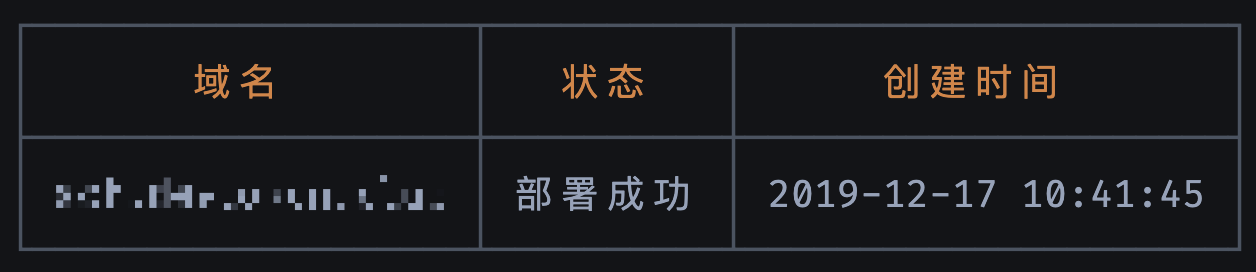
You will receive output similar to the following:
Set More Query Constraints
-d domain Specify domain