mp-skills
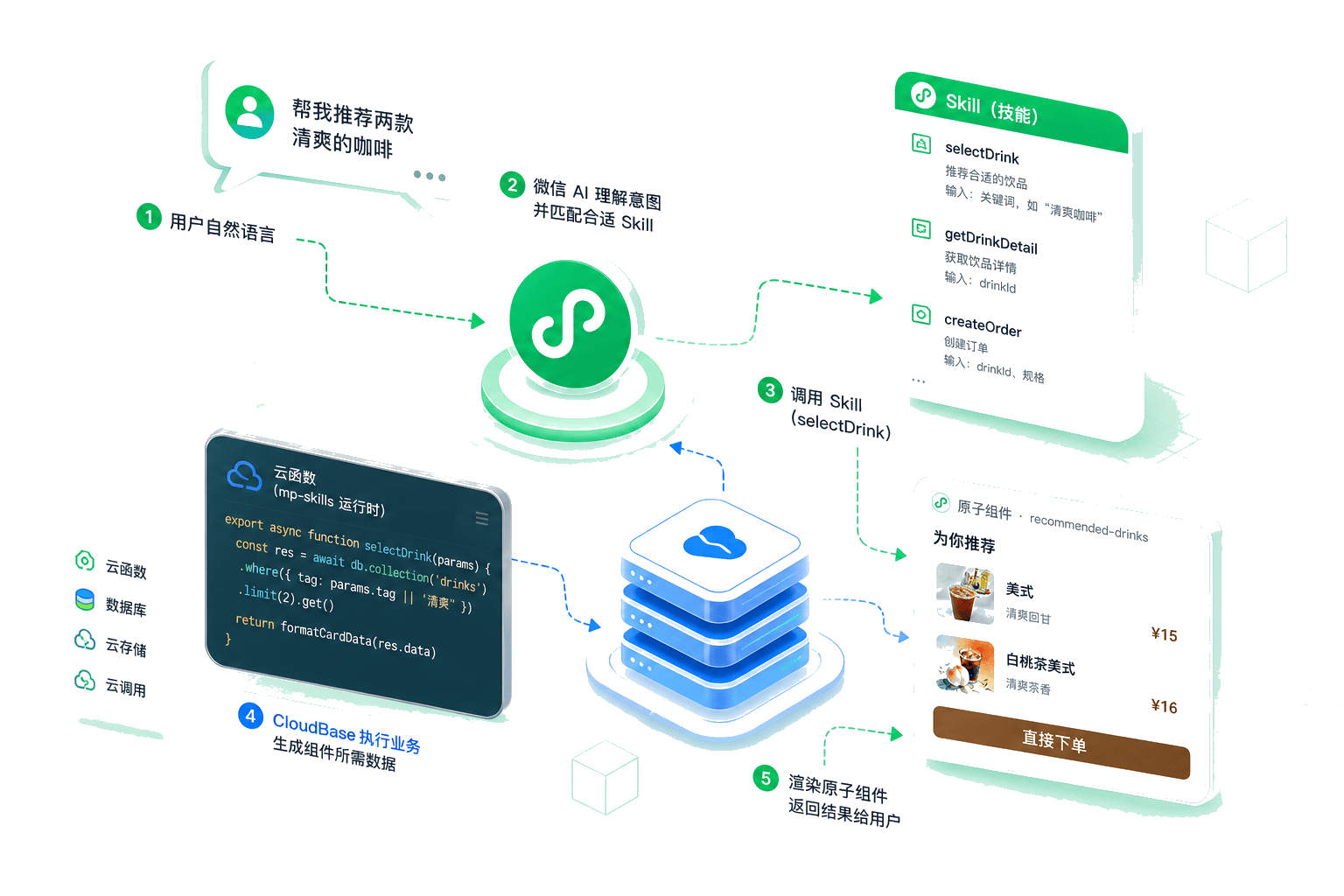
WeChat's Mini Program AI Development Mode is a new paradigm that transforms how users interact with mini programs. Instead of navigating pages and tapping buttons, users can accomplish tasks through natural language conversations—"Order a latte for me", "Book an appointment for tomorrow afternoon", "Check this month's water bill". The AI understands the intent and automatically executes the corresponding operations.
In this mode, developers package business features as SKILLs (containing business descriptions, atomic API declarations, and implementations). The mini program AI then invokes these SKILLs during conversations to fulfill user requests.
mp-skills is a toolkit provided by CloudBase, including a CLI tool and Skill marketplace that help developers quickly add AI conversational capabilities to their mini programs without building from scratch.
View "WeChat Mini Program AI Development Mode" solution →Core Tools
mp-skills CLI
An open-source CLI tool for managing SKILLs in Mini Program AI development:
- Search SKILLs — Discover available SKILLs across repositories
- Install templates — One-click install from the template marketplace
- Create from scratch — Generate new mini program project scaffolding
- Create SKILLs — Generate scaffolding to start development quickly
- Manage SKILLs — List, update, and remove installed SKILLs
- Environment setup — One-click initialization of cloud functions and databases
- Validate & Evaluate — Static validation and end-to-end quality evaluation
# Create a new AI mini program from scratch
npx mp-skills new my-ai-app

# Search for available SKILLs
npx mp-skills find

# Install a Skill
npx mp-skills add TencentCloudBase/awesome-miniprogram-skills -s order-skill

# Environment setup
npx mp-skills setup

# Validate and evaluate
npx mp-skills validate
npx mp-skills eval -c 3
Skill Template Marketplace
Awesome MiniProgram Skills is an open-source collection of ready-to-use business Skill templates:
| Scenario | Template |
|---|---|
| 🍜 Food Ordering | order-skill |
| 🏥 Hospital Registration | hospital-skill |
| 🚕 Ride Hailing | taxi-skill |
| 🛍️ Trendy Shopping | shopping-skill |
| 💳 Bill Payment | bill-skill |
| 🎉 Party Planning | party-skill |
| 🏪 Queue Management | queue-skill |
| ✅ Todo List | todolist-skill |
| 💧 Water Tracker | water-tracker |
| 💰 WeChat Pay | payment-skill |
| ✈️ Travel Planning | travel-skill |
| ✍️ Text Generation | text-gen-skill |
| 🎨 Image Generation | image-gen-skill |
| 🖼️ Image Editing | image-edit-skill |
Each template is a complete, runnable SKILL subpackage containing atomic APIs, atomic components, and business configuration. Supports both preview mode (local mock data) and production mode (cloud functions + cloud database).
Two Types of SKILLs
mp-skills manages two types of SKILLs with different purposes:
- In-App SKILLs — Installed into your mini program to provide AI conversational features for end users (ordering, hospital registration, bill payment, etc.). Users invoke them through natural language.
- AI Dev Assist — Installed for AI coding tools (like CodeBuddy) to guide the AI in helping you with development tasks (searching and installing SKILLs, creating projects from scratch, generating custom SKILL code).
Both types use different CLI tools for installation:
| In-App SKILLs | AI Dev Assist | |
|---|---|---|
| CLI tool | npx mp-skills add | npx skills add |
| Source repo | awesome-miniprogram-skills | mp-skills |
| Installed into | Mini program project | AI coding tool workspace |
| Example | npx mp-skills add TencentCloudBase/awesome-miniprogram-skills -s order-skill | npx skills add TencentCloudBase/mp-skills -s wxa-find-skills |
See In-App SKILLs and AI Dev Assist for details.
Quick Start
Scenario A: Create a new project from scratch
# Create project skeleton with AI development mode support
npx mp-skills new my-ai-app

# Search and install a Skill
cd my-ai-app
npx mp-skills find
npx mp-skills add TencentCloudBase/awesome-miniprogram-skills -s order-skill

# Environment setup
npx mp-skills setup

# Open in WeChat DevTools and experience AI conversations
Scenario B: Integrate into an existing project
cd your-project
npx mp-skills find
npx mp-skills add TencentCloudBase/awesome-miniprogram-skills -s order-skill
npx mp-skills validate
npx mp-skills setup
See Quick Start for detailed instructions.
Value & Use Cases
After integrating the AI Development Mode, users can complete tasks through conversations without navigating through page menus. Key benefits for developers:
- Reduced interaction costs: Multi-step flows (search → filter → view details → confirm → pay) compressed into a single natural language command
- Higher conversion rates: Conversational interaction feels more intuitive, reducing drop-off during operations
- Cover edge cases: Complex combinations ("Find a Sichuan restaurant for 4 people on Saturday at 6 PM, budget $50") are easily handled through SKILLs
- Incremental adoption: Install ready-to-use business SKILLs or package existing features as custom SKILLs
Underlying Technology
mp-skills is built on WeChat's AI Development Mode. In this mode, developers package mini program features as SKILLs (including business descriptions, atomic API declarations, and implementations) for the Mini Program AI to invoke during conversations.
A SKILL consists of the following components:
| Component | Description |
|---|---|
| SKILL.md | Business description document outlining usage scenarios and invocation conditions |
| mcp.json | Atomic API declarations defining API names, input/output parameters |
| apis/ | Atomic API implementations, one file per API, handling business logic |
| components/ | Atomic components (UI cards) for rendering API return data |
CloudBase makes this process simpler through the mp-skills CLI and Skill marketplace — you don't need to start from scratch. Get a complete SKILL implementation with a single command.
Getting Started
- Quick Start — Get started in 5 minutes
- mp-skills CLI — Complete CLI documentation
- In-App SKILLs — Browse all available Skills
- Tool SKILLs — Guided instructions for AI coding tools
Tutorials
| # | Tutorial | For Who | What You'll Learn |
|---|---|---|---|
| 0 | Build an AI-Powered Mini Program | Beginners | Create a new project with AI mode from scratch |
| 1 | Auto-Generate SKILLs from Code | Existing projects | Let AI scan your source and generate SKILLs |
| 2 | Write Your First AI SKILL | Detail-oriented | Walk through the full scaffold-to-SKILL workflow |
| 3 | Add Text Generation | Text needs | Integrate AI writing, translation, summarization |
| 4 | Add Image Generation | Image needs | Integrate text-to-image capabilities |
| 9 | Quality Check Before Launch | Ready to ship | Use validate + eval to ensure SKILL quality |