Initialization


@cloudbase/js-sdk is a cross-platform JavaScript SDK that lets you use JavaScript to access CloudBase services and resources across Web browsers, Node.js servers (Cloud Functions, CloudRun, self-hosted servers, etc.), WeChat Mini Programs, React Native, and more.
@cloudbase/js-sdk v4 is a Beta release. The npm latest tag is still v3, so npm install @cloudbase/js-sdk installs v3.
For production, use JS SDK v3. To try v4, install @cloudbase/js-sdk@beta.
The Node.js adapter is built in, so you do not need to install @cloudbase/node-sdk separately. Authentication uses the GoTrue client by default. Call it with app.auth().
Quick Start
Get started with CloudBase in just 3 steps:
- Web
- Node.js
npm install @cloudbase/js-sdk@beta -S
import cloudbase from "@cloudbase/js-sdk";

const app = cloudbase.init({
  env: "your-env-id", // Replace with your environment ID
  accessKey: "your-publishable-key", // Replace with your Publishable Key
});

// Start using CloudBase
const db = app.rdb();
const { data, error } = await db.from("todos").select();
Go to CloudBase Platform / API Key Configuration to generate one. Publishable Key is the recommended auth method for Web — no extra login steps needed.
npm install @cloudbase/js-sdk@beta -S
const cloudbase = require("@cloudbase/js-sdk");

const app = cloudbase.init({
  env: "your-env-id", // Replace with your environment ID
});

// In Cloud Functions or CloudRun, the SDK reads credentials from the environment
const db = app.rdb();
const { data, error } = await db.from("todos").select();
In Cloud Functions or CloudRun environments, the SDK automatically reads auth info from environment variables — no manual key configuration needed.
Some server-side features depend on the following optional packages — install as needed:
| Package | Purpose | When to Install |
|---|---|---|
@cloudbase/signature-nodejs | Request signing (TC3-HMAC-SHA256) | When using secretId / secretKey auth |
ws | WebSocket connections | When using realtime data push |
# Install as needed
npm install @cloudbase/signature-nodejs ws
Deprecated modules left unmounted
These three modules are deprecated. Installing @cloudbase/js-sdk does not install their packages. To keep the old calls working, install each package, import its register function, then call init. app.database(), app.mysql(), and app.rdb() still ship with the main package.
| Module | Call | Install | Import |
|---|---|---|---|
| Document realtime | collection.watch() | @cloudbase/realtime | registerRealtime |
| Data models | app.models | @cloudbase/model | registerModel |
| HTTP API | app.apis | @cloudbase/apis | registerApis |
npm install @cloudbase/realtime @cloudbase/model @cloudbase/apis -S
import cloudbase from "@cloudbase/js-sdk";
import { registerRealtime } from "@cloudbase/realtime";
import { registerModel } from "@cloudbase/model";
import { registerApis } from "@cloudbase/apis";

registerRealtime(cloudbase);
registerModel(cloudbase);
registerApis(cloudbase);
collection.watch() comes from @cloudbase/realtime. app.realtime() comes from registerRealtimeJs in the main package.
Installing the SDK
- Package Manager
- Node.js Server
- CDN Full Import
- CDN On-demand Import
# npm
npm install @cloudbase/js-sdk@beta -S

# yarn
yarn add @cloudbase/js-sdk@beta
Full import:
import cloudbase from "@cloudbase/js-sdk";

const app = cloudbase.init({
  env: "your-env-id",
  region: "ap-shanghai", // Defaults to Shanghai region if not specified
});
On-demand import (reduce bundle size):
// Core (required)
import cloudbase from "@cloudbase/js-sdk/app";
import { registerAuth } from "@cloudbase/js-sdk/auth";
import { registerMySQL } from "@cloudbase/js-sdk/mysql";
import { registerFunctions } from "@cloudbase/js-sdk/functions";
import { registerStorage } from "@cloudbase/js-sdk/storage";
// Deprecated. Install @cloudbase/model separately.
import { registerModel } from "@cloudbase/model";
import { registerRealtimeJs } from "@cloudbase/js-sdk/realtime-js";
import { registerAi } from "@cloudbase/js-sdk/ai";
import { registerCloudrun } from "@cloudbase/js-sdk/cloudrun";

registerAuth(cloudbase);
registerMySQL(cloudbase);

const app = cloudbase.init({
  env: "your-env-id",
  region: "ap-shanghai",
});

const auth = app.auth();
const db = app.rdb();
| Module | Package | Register function | Full import |
|---|---|---|---|
| Core | @cloudbase/js-sdk/app | - | Yes |
| Auth | @cloudbase/js-sdk/auth | registerAuth | Yes |
| Cloud Functions | @cloudbase/js-sdk/functions | registerFunctions | Yes |
| Cloud Storage | @cloudbase/js-sdk/storage | registerStorage | Yes |
| Document database | @cloudbase/js-sdk/database | registerDatabase | Yes |
| MySQL / PostgreSQL | @cloudbase/js-sdk/mysql | registerMySQL | Yes |
| Realtime | @cloudbase/js-sdk/realtime-js | registerRealtimeJs | Yes |
| AI | @cloudbase/js-sdk/ai | registerAi | Yes |
| CloudBase Run | @cloudbase/js-sdk/cloudrun | registerCloudrun | Yes |
| Document realtime | @cloudbase/realtime | registerRealtime | No, deprecated |
| Data models | @cloudbase/model | registerModel | No, deprecated |
| HTTP API | @cloudbase/apis | registerApis | No, deprecated |
@cloudbase/js-sdk/appis required- Document realtime, data models, and HTTP API are deprecated. A full install does not include them. See Deprecated modules left unmounted
- Realtime (
registerRealtimeJs) providesapp.realtime(). See Realtime - On-demand imports keep the bundle smaller
Since v3.1, @cloudbase/js-sdk has a built-in Node.js adapter. It can be used directly in Node.js environments (Cloud Functions, CloudRun, self-hosted servers, etc.), Node version >= 18.0 required.
# npm
npm install @cloudbase/js-sdk@beta -S

# yarn
yarn add @cloudbase/js-sdk@beta
Some server-side features depend on optional packages — install as needed:
| Package | Purpose | When to Install |
|---|---|---|
@cloudbase/signature-nodejs | Request signing (TC3-HMAC-SHA256) | When using secretId / secretKey auth |
ws | WebSocket connection | When using realtime data push |
# Install as needed
npm install @cloudbase/signature-nodejs ws
Initialize SDK
const cloudbase = require("@cloudbase/js-sdk");

const app = cloudbase.init({
  env: "your-env-id", // Replace with your environment ID
});
4.x.x indicates the latest version. You can pin it to a fixed version number.
<script src="https://static.cloudbase.net/cloudbase-js-sdk/4.1.0/cloudbase.full.js"></script>
<script>
  const app = cloudbase.init({
    env: "your-env-id", // Replace with your environment ID
    region: "ap-shanghai", // Defaults to Shanghai region if not specified
  });
</script>
4.x.x indicates the latest version. You can pin it to a fixed version number.
<!-- Core -->
<script src="https://static.cloudbase.net/cloudbase-js-sdk/4.1.0/cloudbase.js"></script>
<!-- Auth module -->
<script src="https://static.cloudbase.net/cloudbase-js-sdk/4.1.0/cloudbase.auth.js"></script>
<!-- Data model module -->
<script src="https://static.cloudbase.net/cloudbase-js-sdk/4.1.0/cloudbase.model.js"></script>
<!-- Cloud Function module -->
<script src="https://static.cloudbase.net/cloudbase-js-sdk/4.1.0/cloudbase.functions.js"></script>
<!-- Cloud Storage module -->
<script src="https://static.cloudbase.net/cloudbase-js-sdk/4.1.0/cloudbase.storage.js"></script>
<!-- Realtime (Broadcast / Presence / Postgres CDC, app.realtime()) -->
<script src="https://static.cloudbase.net/cloudbase-js-sdk/4.1.0/cloudbase.realtime-js.js"></script>
<!-- AI module -->
<script src="https://static.cloudbase.net/cloudbase-js-sdk/4.1.0/cloudbase.ai.js"></script>
<script>
  // Register feature modules
  registerAuth(cloudbase);
  registerModel(cloudbase);
  registerFunctions(cloudbase);
  registerStorage(cloudbase);
  registerRealtimeJs(cloudbase);
  registerAi(cloudbase);

  const app = cloudbase.init({
    env: "your-env-id", // Replace with your environment ID
    region: "ap-shanghai", // Defaults to Shanghai region if not specified
  });
</script>
Feature modules must be imported after the core module, and the auth module must always be included.
For the latest version number, visit NPM.
Initialization Parameters
Common Parameters
| Field | Type | Required | Default | Description |
|---|---|---|---|---|
env | string | Yes | - | CloudBase environment ID. Defaults to current env ID in Cloud Functions |
region | string | No | ap-shanghai | Region: ap-shanghai (default), ap-guangzhou, ap-singapore |
lang | string | No | zh-CN | Language: zh-CN (default), en-US |
accessKey | string | No | - | CloudBase API Key / Publishable Key for authentication |
timeout | number | No | 15000 | Request timeout (ms) |
persistence | 'local' | 'session' | 'none' | No | 'local' | Where the session is stored. 'local' uses local storage, 'session' uses session storage, 'none' keeps it in memory |
debug | boolean | No | false | true enables debug logs, including GoTrue debug logs. Auth prints OAuth debug messages. On NETWORK_ERROR, stderr prints the status and requestId; a string body also prints its first 1024 characters |
throw | boolean | No | Follows authMode | Whether business errors are thrown. supabase (default) is false and returns { code, message, requestId }. cloudbase is true and throws. An explicit value wins. With throw: true, auth methods throw |
authMode | 'supabase' | 'cloudbase' | No | supabase | Auth implementation. supabase uses GoTrue; cloudbase is the compatibility mode and uses CloudBase Auth |
auth | object | No | - | Auth options. Fields are in the table below |
auth fields are listed below. Except for detectSessionInUrl, they apply only to the default GoTrue client. With authMode: 'cloudbase', only detectSessionInUrl is passed to CloudBase Auth.
| Field | Type | Default | Description |
|---|---|---|---|
detectSessionInUrl | boolean | function | true | Restores a sign-in callback from the current URL. When set to a function, the URL is treated as a callback only if the function returns true. Set to false to turn this off |
persistSession | boolean | See description | Whether to write the session to storage. When omitted, this is true unless persistence is 'none'. An explicit value overrides persistence |
autoRefreshToken | boolean | See description | Whether to refresh the access token before it expires. When omitted, this matches the resolved persistSession |
flowType | 'implicit' | 'pkce' | 'implicit' | OAuth callback style. 'implicit' reads tokens from the URL hash. 'pkce' exchanges the authorization code in the query string for a session |
Other fields on auth are passed through to GoTrue. secretId, secretKey, sessionToken, secretType, and credentials are not. The SDK sets url, headers, fetch, storage, and storageKey; the same fields on auth have no effect. storageKey is always cloudbase-auth-js-${env}.
The region of the current environment must match the region value specified during initialization.
The default value of timeout varies by runtime environment:
- Web / Mini Program and other non-Node.js environments: Defaults to
15000(15 seconds). - Node.js environments (Cloud Functions, CloudBase Run, self-hosted servers, etc.): Defaults to no timeout (unlimited), to accommodate potentially long-running requests on the server side. If you need to limit the timeout, explicitly pass the
timeoutparameter.
Regardless of the environment, explicitly passing timeout takes precedence (maximum allowed value: 10 minutes).
Node.js-specific Parameters
The following parameters are only effective in Node.js environments.
| Field | Type | Required | Description |
|---|---|---|---|
secretId | string | No | Tencent Cloud API key pair. Generate at Tencent Cloud Console / API Key Management. Can also be configured via TENCENTCLOUD_SECRETID env var |
secretKey | string | No | Tencent Cloud API key pair. Can also be configured via TENCENTCLOUD_SECRETKEY env var |
credentials | object | No | Custom login private key containing private_key, private_key_id, env_id, used for createTicket to issue login credentials. Download from CloudBase Platform / Auth / Login Methods under "Custom Login" |
context | object | No | The context parameter from the CloudRun entry function, used for signature-free calls |
SYMBOL_CURRENT_ENV
cloudbase.SYMBOL_CURRENT_ENV;
Use this field during initialization to specify using the current Cloud Function or CloudRun environment. Only effective in Cloud Function or CloudRun environments.
In Cloud Functions or CloudRun, if init({}) is called without an env parameter, it defaults to the current environment ID instead of the CloudBase default environment. To use the default environment, specify init({env: tcb.SYMBOL_DEFAULT_ENV}).
import cloudbase from "@cloudbase/js-sdk";

// Initialize with the current Cloud Function's environment
const app = cloudbase.init({ env: cloudbase.SYMBOL_CURRENT_ENV });

exports.main = async (event, context) => {
  // Business logic
};
Login Authentication
After initialization, you need to complete authentication before using CloudBase features. Web and Node.js use different auth methods:
Web Login
The Web SDK uses client-side user permissions, supporting the following login methods:
| Method | Use Case | Login Interaction Required |
|---|---|---|
| Publishable Key | Public resource access | ❌ No login needed |
| Anonymous Login | Use without registration | ❌ No login needed |
| Account Login | User identity required | ✅ Required |
- Publishable Key (Recommended)
- Anonymous Login
- Account Login
Publishable Key can be safely exposed in the browser for requesting publicly accessible resources — no extra login steps needed. For more details, refer to the documentation.
How to get: Go to CloudBase Platform / API Key Configuration to generate one.
const app = cloudbase.init({
  env: "your-env-id",
  accessKey: "your-publishable-key", // Fill in the generated Publishable Key
});

// No extra login.
const db = app.rdb();
const { data, error } = await db.from("todos").select();
A Publishable Key can only be generated once. It is permanently valid and cannot be deleted. Keep it safe.
For details, see Anonymous Login.
const app = cloudbase.init({
  env: "your-env-id",
});

const auth = app.auth();
const { data, error } = await auth.signInAnonymously();
For details, see Account Login.
const app = cloudbase.init({
  env: "your-env-id",
});

const auth = app.auth();
const { data, error } = await auth.signInWithPassword({
  email: "user@example.com",
  password: "your password",
});
Node.js Authentication
The server supports multiple auth methods for accessing CloudBase resources (choose one).
| Auth Method | Description | Use Case |
|---|---|---|
| Default (Cloud Function/CloudRun env) | No parameters needed; auto-reads credentials from env vars | Cloud Functions, CloudRun |
| API Key | Configure server API Key in CLOUDBASE_APIKEY env var; SDK reads it auto | Self-hosted servers |
| Publishable Key | Pass accessKey in init; uses anonymous role | Public resource access |
secretId + secretKey | Explicitly pass Tencent Cloud API key pair in init | Self-hosted servers |
context | CloudRun scenario; signature-free call via entry function context param | CloudRun |
- Cloud Function (Default Auth)
- CloudRun
- Publishable Key
- secretId + secretKey
- API Key
In Cloud Function environments, the SDK automatically reads auth info from environment variables. These are temporary access credentials — no manual configuration needed.
const cloudbase = require("@cloudbase/js-sdk");

const app = cloudbase.init({
  env: "your-env-id",
});

exports.main = async (event, context) => {
  // Use CloudBase features directly
};
In CloudRun environments, pass the context parameter for signature-free calls.
💡 Note: If
contextis passed without anenvparameter, theenvIDfromcontextwill be used as the environment ID.
const cloudbase = require("@cloudbase/js-sdk");

exports.main = async (event, context) => {
  const app = cloudbase.init({
    context,
  });
  // Use CloudBase features
};
For details about Publishable Key, refer to the documentation.
- Permissions: Anonymous user permissions
- Validity: Permanently valid
- How to get: Via CloudBase Platform / ApiKey Management
const cloudbase = require("@cloudbase/js-sdk");

const app = cloudbase.init({
  env: "your-env-id",
  accessKey: "your-publishable-key",
});
Generate a key pair at Tencent Cloud Console / API Key Management.
const cloudbase = require("@cloudbase/js-sdk");

const app = cloudbase.init({
  env: "your-env-id",
  secretId: "your-secretId",
  secretKey: "your-secretKey",
});
Configure via the CLOUDBASE_APIKEY environment variable. In Cloud Functions, enable API Key settings and add CLOUDBASE_APIKEY — the SDK reads it automatically.
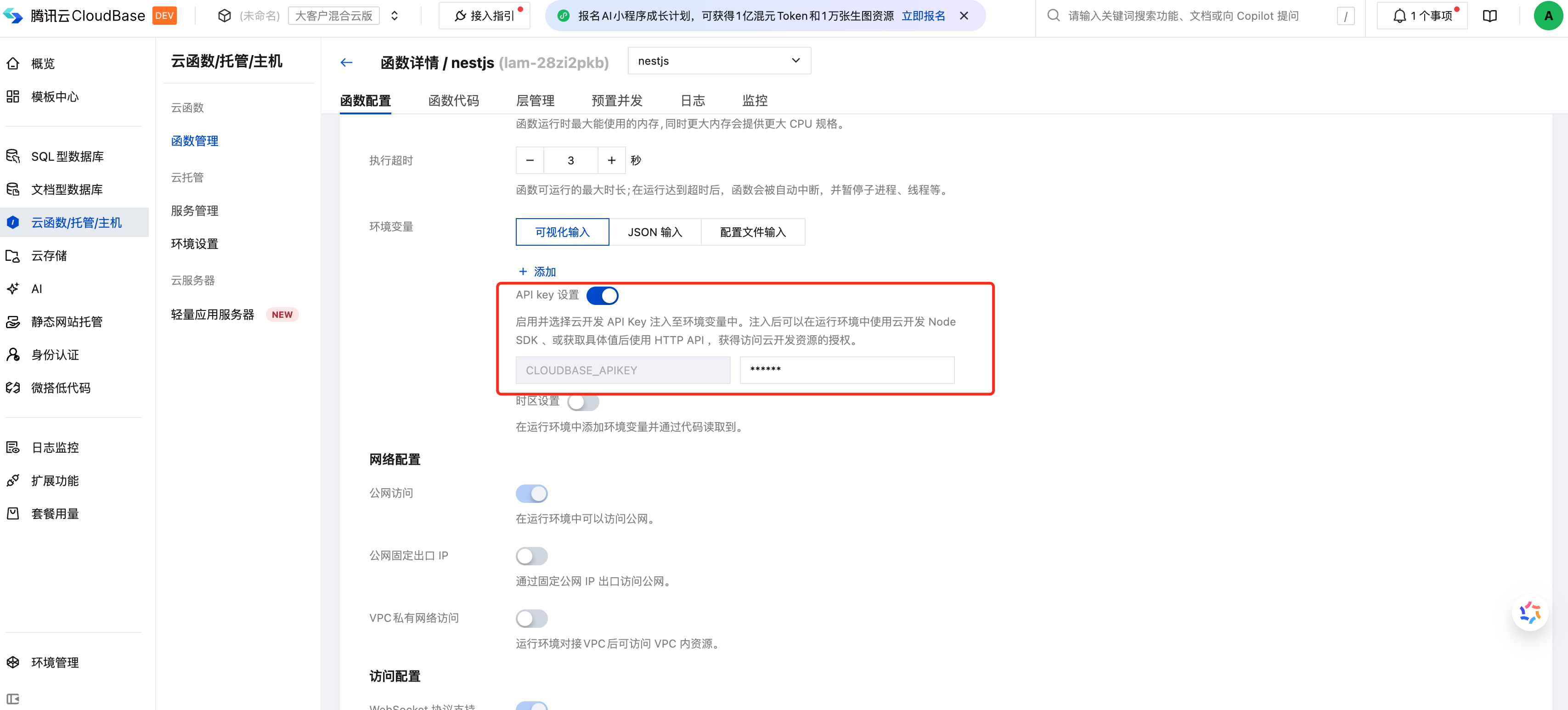
const cloudbase = require("@cloudbase/js-sdk");

// No explicit passing needed — SDK reads from env var automatically
const app = cloudbase.init({
  env: "your-env-id",
});
When the server does not use API Key or Publishable Key, it defaults to admin permissions. Otherwise, the API signatures, parameters, and return values are identical to the client side.