Agent Runtime
The core flow of a Vibe Coding platform is: the user says something → the Agent loops through LLM and tool calls → a deployable application is produced. To make this flow work reliably, platforms face the following key challenges at the Agent runtime layer:
- Security boundaries: The Agent needs to operate cloud resources (databases, deployments, etc.), but LLM output is unpredictable — secrets must never be exposed to the LLM or its generated code
- Agent orchestration & session continuity: The Agent Loop must orchestrate prompts, route tool calls, and manage session state. User conversations may span multiple turns and days — both context and sandbox workspaces need to be persisted
- Code execution environment & elasticity: LLM-generated code (npm install, build, running user logic) needs a secure, isolated environment — it cannot run directly on the production server. Sandbox instances should be created and destroyed on demand, with no resource consumption when idle
- Model flexibility: Different tasks call for different models (strong reasoning models for code generation, lightweight models for simple Q&A). The platform needs to switch flexibly
CloudBase provides corresponding solutions for each of these challenges:
| Challenge | CloudBase Solution |
|---|---|
| Security boundaries | Controlled trust boundaries — Agent Loop as the sole credential holder; LLM and Sandbox are unaware of secrets |
| Agent orchestration & session continuity | Agent Loop — deployed in Cloud Functions, drives loop control, session management (CloudBase Database persistence), credential management |
| Code execution environment & elasticity | Sandbox — isolated container/microVM, created/reclaimed on demand, workspace persisted to COS/CFS across conversations |
| Model flexibility | MaaS Model Service — unified multi-model access, dynamically switchable by task type |
The following sections start with the Core Architecture for the big picture, then walk through each component in detail.
Core Architecture
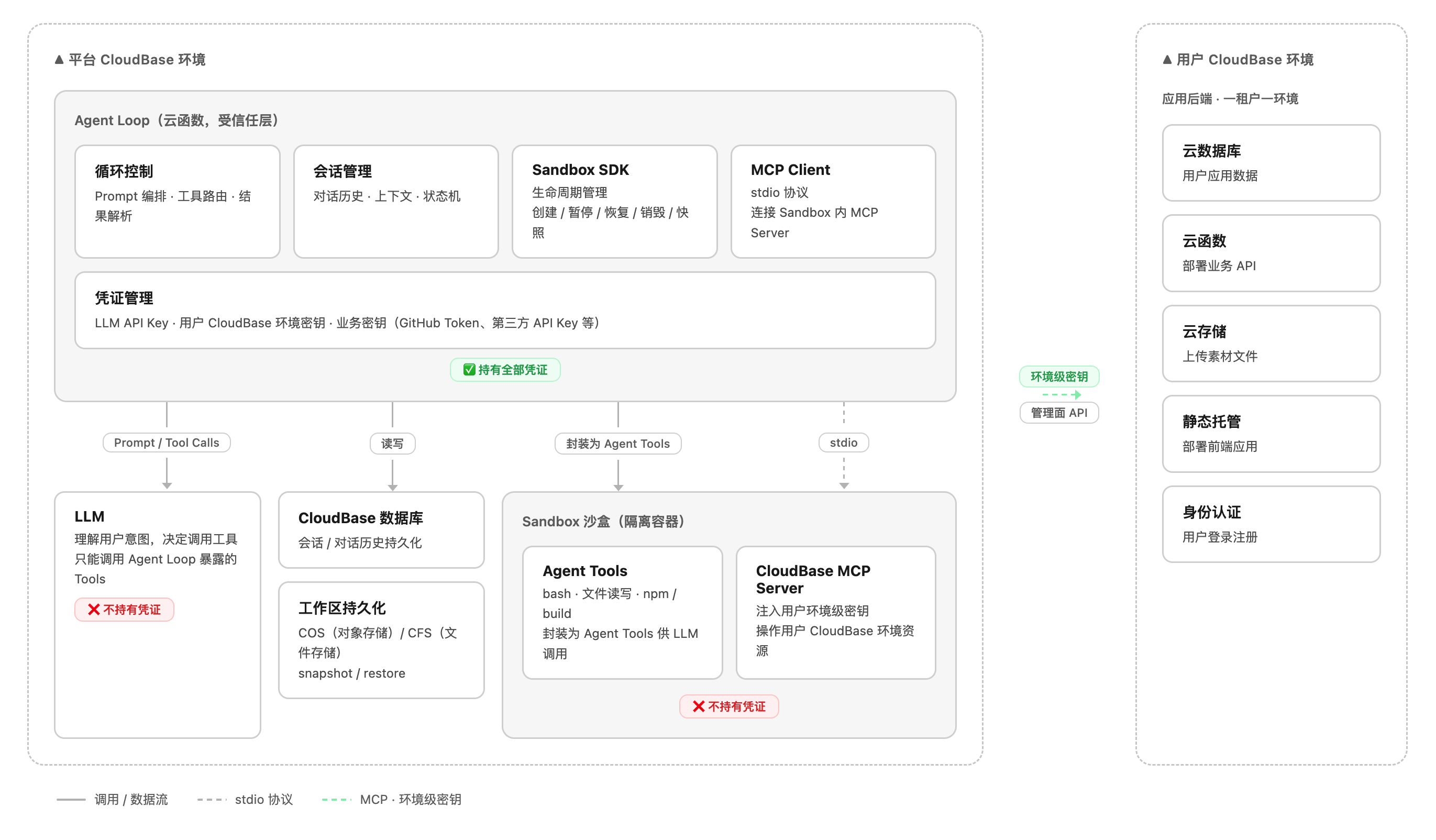
Controlled Trust Boundaries
The core design principle of the runtime architecture is controlled trust boundaries — constraining unpredictable components within well-defined security boundaries, with every cross-boundary operation mediated by the Agent Loop as the trusted intermediary.
The system is divided into three trust levels:
| Trust Layer | Component | Trust Level | Credentials | Description |
|---|---|---|---|---|
| Trusted | Agent Loop | ✅ Trusted | Holds all credentials | Deterministic code written by the platform — controllable and auditable |
| Untrusted — Reasoning | LLM | ❌ Untrusted | None | Output is unpredictable; may be affected by prompt injection or hallucinations |
| Untrusted — Execution | Sandbox | ❌ Untrusted | Env-level secrets only (for MCP) | Executes arbitrary LLM-generated code in an isolated sandbox |
Why must the LLM and Sandbox remain outside the trust boundary?
- LLM: Model output is unpredictable. If the LLM were aware of secrets, malicious prompt injection could trick the model into embedding secret-exfiltration logic in generated code
- Sandbox: The code it executes is generated by the LLM and its content is uncontrollable. If the Sandbox held platform-level secrets, malicious code could exfiltrate keys via
curl, call management APIs directly to delete data, or attack other users' environments
Therefore, the Agent Loop serves as the sole trusted intermediary for all cross-boundary operations: the LLM can only "request" operations, the Sandbox can only "execute" within a constrained scope, and real decision-making authority and credentials always remain under the Agent Loop's control.
Request Lifecycle
A complete Vibe Coding request goes through the following stages from user input to application deployment:
Agent Loop
The Agent Loop is business code deployed as a CloudBase Cloud Function, responsible for driving the entire request lifecycle.
Loop Control
The core of the Agent Loop is a "call LLM → execute tools → feed back results" cycle:
- Assemble user input + session context + tool definitions into a prompt and send it to the LLM
- Parse the LLM's returned Tool Calls and route them to the corresponding tools (Sandbox SDK or MCP Client)
- Append tool execution results back into the prompt and continue the next iteration
- When the LLM returns final text (not a tool call), end the loop and respond to the user
Session Management
Session state is persisted to CloudBase Database, including:
- Conversation history: the complete message list (user / assistant / tool)
- Context metadata: current Sandbox instance ID, workspace snapshot ID, user environment ID, etc.
- State machine: the current phase of the request (coding / building / deploying / completed)
Credential Management
The Agent Loop holds the following credentials via Cloud Function environment variables. No credential is ever passed to the LLM or exposed in the Sandbox workspace:
| Credential | Purpose |
|---|---|
| LLM API Key | Call the LLM inference API |
| User CloudBase env secrets (SecretId / SecretKey) | Issue env-level temporary credentials, injected into the Sandbox for MCP use |
| Business secrets | Held as needed, e.g. GitHub Token (pull code repos), NPM Token (access private packages), third-party API Keys, etc. |
Sandbox
The Sandbox is the Agent's programming tool layer, providing a fully isolated OS environment built on CloudBase Sandbox.
Capability Overview
| Capability | Description |
|---|---|
| Filesystem | Read-write workspace directory with support for read / write / list / remove / stat / mkdir |
| Shell execution | Run arbitrary shell commands and return stdout / stderr / exitCode |
| CloudBase MCP | Run the CloudBase MCP Server inside the Sandbox and expose cloud resource operations over stdio |
| Lifecycle management | Support create / pause / resume / destroy, as well as snapshots |
| Workspace persistence | Persist the workspace via COS (checkpoint) or CFS (mount), ensuring it survives across conversations and instances |
| Isolation | Each user's Sandbox is isolated from every other; no platform-level management credentials |
| Low latency | Tool invocation latency is typically < 500ms |
| Resource quota | Disk ≥ 512MB, configurable command timeout (≥ 5 minutes) |
Connecting Agents to the Sandbox
The Agent needs to forward LLM tool calls (bash, file read/write) to the Sandbox for execution. There are three approaches depending on your platform architecture:
| Approach | How it works | Best for |
|---|---|---|
| Sandbox SDK | Call SDK directly in Agent code to operate sandboxes | Custom Agent Loop |
| Sandbox MCP Server | Run MCP Server inside sandbox, exposing bash/file tools | Any MCP-compatible tool (OpenCode, Cursor, Claude Code, etc.) |
| Override built-in tools | Replace Agent's built-in bash/read/write with custom remote implementations | Building on open-source Agents (e.g. OpenCode) |
Approach 1: Direct programming with Sandbox SDK
For custom-built Agent Loops — use the Sandbox SDK directly in your Agent service code to create and operate sandboxes.
Note:
@cloudbase/sandbox-sdkis currently in beta testing, with APIs compatible with E2B SDK. Contact the product team for access.
import { Sandbox } from '@cloudbase/sandbox-sdk';

// 1. Create sandbox with user-level credentials injected
const sandbox = await Sandbox.create({
  envVars: {
    CLOUDBASE_ENV_ID: userEnvId,
    TENCENTCLOUD_SECRETID: credentials.secretId,
    TENCENTCLOUD_SECRETKEY: credentials.secretKey,
    GITHUB_TOKEN: user.githubToken,
    NPM_TOKEN: user.npmToken,
  }
});

// 2. Filesystem operations (wrapped as Agent Tools for LLM)
await sandbox.files.write('/app/index.js', code);
const content = await sandbox.files.read('/app/index.js');
const entries = await sandbox.files.list('/app');

// 3. Execute shell commands
const result = await sandbox.commands.run('npm install && npm run build');
// result: { stdout, stderr, exitCode }

// 4. Destroy sandbox
await sandbox.kill();
Approach 2: Connect via Sandbox MCP Server
For any MCP-compatible AI Coding tool — run an MCP Server inside the CloudBase Sandbox that exposes bash execution and file operations as standard MCP tools. Any MCP-compatible Agent can connect directly.
The Sandbox MCP Server exposes the following tools:
| MCP Tool | Description |
|---|---|
terminal_execute | Execute shell commands inside the sandbox, returns stdout / stderr / exitCode |
file_read | Read file content at a given path in the sandbox |
file_write | Write content to a file at a given path in the sandbox |
file_list | List directory contents in the sandbox |
Add the Sandbox MCP Server to your AI tool's MCP configuration (OpenCode / Cursor / Claude Code, etc.):
{
  "mcpServers": {
    "sandbox": {
      "url": "https://<sandbox-id>.sandbox.tcloudbasegateway.com/mcp"
    }
  }
}
Note: The Sandbox MCP Server is currently in beta testing. Contact the product team for access.
If using the Sandbox SDK programmatically, you can also obtain the MCP endpoint via SDK:
import { Sandbox } from '@cloudbase/sandbox-sdk';

const sandbox = await Sandbox.create({ /* ... */ });

// Get the sandbox MCP Server HTTP endpoint
const mcpUrl = sandbox.getMCPEndpoint();
// → https://<sandbox-id>.sandbox.tcloudbasegateway.com/mcp
Approach 3: Override Agent built-in tools (OpenCode example)
Approach 3: Override Agent built-in tools (OpenCode example)
For building on open-source AI Coding Agents — override built-in tools without modifying Agent core code, transparently replacing local execution with remote sandbox.
OpenCode supports overriding built-in tools with identically named custom tools. Create the following files to forward bash, read, and write to a remote CloudBase Sandbox:
OpenCode built-in tools        Custom tool override (same name wins)
┌──────────┐                   ┌──────────────────────────────┐
│ bash     │  ──replaced by──▶ │ bash.ts                      │
│ read     │  ──replaced by──▶ │ read.ts                      │
│ write    │  ──replaced by──▶ │ write.ts                     │
└──────────┘                   │  ↓ calls Sandbox SDK         │
                               │  ↓ remote CloudBase Sandbox  │
                               └──────────────────────────────┘
1. Initialize the Sandbox connection
Note:
@cloudbase/sandbox-sdkis currently in beta testing, with APIs compatible with E2B SDK. Contact the product team for access.
// .opencode/tools/sandbox-client.ts
import { Sandbox } from '@cloudbase/sandbox-sdk';

let sandbox: Sandbox | null = null;

export async function getSandbox() {
  if (sandbox) return sandbox;
  sandbox = await Sandbox.create({
    envVars: {
      CLOUDBASE_ENV_ID: process.env.CLOUDBASE_ENV_ID!,
      TENCENTCLOUD_SECRETID: process.env.TENCENTCLOUD_SECRETID!,
      TENCENTCLOUD_SECRETKEY: process.env.TENCENTCLOUD_SECRETKEY!,
    }
  });
  return sandbox;
}
2. Override the built-in bash tool
// .opencode/tools/bash.ts
import { tool } from '@opencode-ai/plugin';
import { getSandbox } from './sandbox-client';

export default tool({
  description: 'Execute a shell command in the remote CloudBase Sandbox',
  args: {
    command: tool.schema.string().describe('Shell command to execute'),
    timeout: tool.schema.number().optional().describe('Timeout in ms'),
  },
  async execute(args) {
    const sandbox = await getSandbox();
    const result = await sandbox.commands.run(args.command, {
      timeout: args.timeout || 300000,
    });
    return [
      `Exit code: ${result.exitCode}`,
      result.stdout ? `stdout:\n${result.stdout}` : '',
      result.stderr ? `stderr:\n${result.stderr}` : '',
    ].filter(Boolean).join('\n');
  },
});
3. Override the built-in read / write tools
// .opencode/tools/read.ts
import { tool } from '@opencode-ai/plugin';
import { getSandbox } from './sandbox-client';

export default tool({
  description: 'Read a file from the remote CloudBase Sandbox',
  args: {
    path: tool.schema.string().describe('Absolute file path in sandbox'),
  },
  async execute(args) {
    const sandbox = await getSandbox();
    return await sandbox.files.read(args.path);
  },
});
// .opencode/tools/write.ts
import { tool } from '@opencode-ai/plugin';
import { getSandbox } from './sandbox-client';

export default tool({
  description: 'Write content to a file in the remote CloudBase Sandbox',
  args: {
    path: tool.schema.string().describe('Absolute file path in sandbox'),
    content: tool.schema.string().describe('File content to write'),
  },
  async execute(args) {
    const sandbox = await getSandbox();
    await sandbox.files.write(args.path, args.content);
    return `Written to ${args.path}`;
  },
});
4. Set environment variables and start
export CLOUDBASE_ENV_ID=your-env-id
export TENCENTCLOUD_SECRETID=your-secret-id
export TENCENTCLOUD_SECRETKEY=your-secret-key

opencode
Once started, all bash commands and file operations in OpenCode are transparently forwarded to the remote CloudBase Sandbox. The developer experience is identical to local development.
This approach also works with other open-source AI Coding Agents that support custom tool overrides.
Connecting Agents to CloudBase
The Agent needs to operate resources in the user's CloudBase environment (create tables, deploy functions, upload files, etc.). There are two approaches:
| Approach | How it works | Best for |
|---|---|---|
| Run CloudBase MCP Server inside the Sandbox | Start MCP Server in Sandbox, Agent Loop connects via stdio | Custom Agent Loop that manages coding tools and cloud operations in one sandbox |
| Agent connects to CloudBase MCP directly | Agent connects to remote CloudBase MCP Server via HTTP SSE | Using OpenCode / Cursor / Claude Code or other MCP-compatible tools |
Approach 1: Run CloudBase MCP Server inside the Sandbox
Using the sandbox instance created above, call CloudBase MCP tools via mcporter (MCP client CLI):
// 1. Install mcporter inside the Sandbox
await sandbox.commands.run('npm install -g mcporter');

// 2. Call CloudBase MCP tools via mcporter
//    Read NoSQL database structure
await sandbox.commands.run('mcporter call cloudbase.readNoSqlDatabaseStructure');

//    Create a database collection
await sandbox.commands.run('mcporter call cloudbase.writeNoSqlDatabaseStructure name:todos');

//    Deploy a cloud function
await sandbox.commands.run('mcporter call cloudbase.manageFunctions action:create name:addTodo');
The user's environment-level credentials were already injected when the Sandbox started (see
envVarsabove). mcporter uses them to call management APIs, and can only operate on that specific user's CloudBase environment.
Approach 2: Agent connects to CloudBase MCP directly
For OpenCode, Cursor, Claude Code, Cline, and other MCP-compatible tools. Add the CloudBase MCP Server to the tool's MCP configuration:
{
  "mcpServers": {
    "cloudbase": {
      "command": "npx",
      "args": ["-y", "@cloudbase/cloudbase-mcp@latest"],
      "env": {
        "CLOUDBASE_ENV_ID": "your-env-id",
        "TENCENTCLOUD_SECRETID": "your-secret-id",
        "TENCENTCLOUD_SECRETKEY": "your-secret-key"
      }
    }
  }
}
For detailed configuration, see the CloudBase MCP integration guide.
Workspace Persistence
The Sandbox instance itself is ephemeral, but the workspace must survive across conversations. Recommended options:
| Option | I/O Performance | Consistency | Cost |
|---|---|---|---|
| Mount CFS | Close to local disk | Strong consistency | Higher |
| Checkpoint to COS | Equivalent to local after restore | Eventual consistency | Lower |
The core workload of Vibe Coding is high-frequency small-file read/write (
npm installcan generate tens of thousands of small files), so it is highly sensitive to I/O performance.
Using the Checkpoint approach as an example, workspace persistence should be triggered at three key moments:
Note:
@cloudbase/sandbox-sdkis currently in beta testing, with APIs compatible with E2B SDK. Contact the product team for access.
import { Sandbox } from '@cloudbase/sandbox-sdk';

// ═══════════ 1. Save after each conversation turn ═══════════

async function handleUserMessage(sandbox, sessionId, userMessage) {
  const response = await agentLoop(sandbox, userMessage);
  await sandbox.checkpoint(sessionId);
  return response;
}

async function resumeSession(sessionId) {
  const sandbox = await Sandbox.create();
  await sandbox.restore(sessionId);
  return sandbox;
}


// ═══════════ 2. Periodic save (prevent data loss during long tasks) ═══════════

function startPeriodicCheckpoint(sandbox, sessionId, intervalMs = 60_000) {
  const timer = setInterval(async () => {
    try {
      await sandbox.checkpoint(sessionId);
    } catch (err) {
      console.error('Periodic checkpoint failed:', err);
    }
  }, intervalMs);
  return () => clearInterval(timer);
}

const stopCheckpoint = startPeriodicCheckpoint(sandbox, sessionId, 60_000);


// ═══════════ 3. Save before sandbox destruction ═══════════

async function destroySandbox(sandbox, sessionId, stopCheckpoint) {
  stopCheckpoint();
  await sandbox.checkpoint(sessionId);
  await sandbox.kill();
}
checkpoint()persists the sandbox workspace's full filesystem to COS, andrestore()recovers it into a new sandbox instance. For long-running coding tasks (e.g. largenpm install), a periodic save interval of 30–60 seconds is recommended to balance data safety and I/O overhead.
MaaS Model Service
CloudBase provides a unified access layer for large language models, allowing platform teams to choose and switch models flexibly.
- Multi-model access: Unified access to mainstream large models such as DeepSeek, Hunyuan, GLM, MiniMax, and Kimi
- Dynamic switching: Platform teams can choose models dynamically based on task type (for example, strong reasoning models for code generation and lightweight models for simple conversations)
- Unified billing: Model usage is billed in a unified way, making costs easier to control
- Flexible deployment: Supports both public-cloud model APIs (low cost, no infrastructure maintenance) and private deployment (data stays inside the private network, suitable for high-security scenarios)