Mini Program WeChat Pay Integration Guide
After creating a WeChat Pay integration in the CloudBase console's Integration Center, the platform automatically generates an HTTP cloud function for you, with all capabilities — placing orders, querying orders, refunds, and callbacks — already encapsulated. This guide describes how to invoke that cloud function from the Mini Program side to complete the full ordering-to-callback payment loop.
About the function name: The cloud function generated by Integration Center is named like
<integration-name>-<random-string>(e.g.miniapp-wxpay-rwmx67sc). For ease of explanation, this document uniformly refers to it aspay-common— replace it with the actual function name in your own code.
End-to-end pipeline:
- Outbound requests: Mini Program →
wx.cloud.callHTTPFunction(platform auto-auth + openid injection) →pay-commonHTTP cloud function → WeChat Pay API - Asynchronous callbacks: WeChat Pay → Integration Center (verify + decrypt) →
pay-common→ business side
Architecture Overview
The flow consists of two pipelines: outbound ordering and asynchronous callback:
Responsibility breakdown:
| Role | Responsibility |
|---|---|
| Mini Program | Calls pay-common via wx.cloud.callHTTPFunction; the platform auto-injects openid — no login or token required |
| pay-common cloud function | Reads user identity from the x-wx-openid header; handles outbound requests like ordering, querying, and refunding; receives and handles callbacks |
| WeChat Pay API | The party that actually executes payment business |
| Integration Center | Hosts credentials uniformly; performs signature verification and decryption on callbacks, then forwards plaintext to the cloud function |
Prerequisites
| Item | Requirement |
|---|---|
| Mini Program | WeChat-verified; personal Mini Programs cannot enable payment |
| WeChat Pay merchant ID | Applied for, and bound to the above Mini Program on the merchant platform |
| Merchant super-admin permission | Used to download the API certificate and set the APIv3 key |
| Mini Program base library version | ≥ 3.15.2 (prerequisite for the wx.cloud.callHTTPFunction API) |
| Node.js 18+ / CloudBase CLI | For local development and debugging |
| WeChat Developer Tools | Latest stable version |
Step 1 · Prepare Merchant Credentials
Log in to the WeChat Pay merchant platform as super-admin and obtain the values from the three sections below. All values will be entered into the Integration Center form in Step 2.
1.1 APIv3 Key
Path: Account Center → API Security → Set APIv3 Key.
For first-time use, click "Set" and customize a 32-character alphanumeric combination. This key is shown only once at setup time — keep it safe.
The APIv3 key is used for AES-GCM decryption of callbacks and signature verification of some V3 API responses. If not set, the WeChat server will refuse to send any callback notifications, and the merchant platform's "Transaction Center → Notification Query" will show "Notification send failed".
1.2 Merchant API Certificate
Path: Account Center → API Security → API Certificate → Apply / Download.
After downloading and unzipping, keep:
apiclient_key.pem: the merchant API private key, used for signing order requests- 40-character hex certificate serial number (shown on the page), like
36048761817F82958048330A6301E922AB28A04D
apiclient_cert.p12 and apiclient_cert.pem are not used in this guide.
1.3 WeChat Pay Public Key
Path: Account Center → API Security → WeChat Pay Public Key Management → View / Download Public Key.
Keep:
wxp_pub.pem: the WeChat Pay public key file- Public Key ID (shown on the page), like
PUB_KEY_ID_0114...
Difference between public key and platform certificate: WeChat Pay V3 signature verification historically had two schemes — "WeChat Pay Public Key" (downloaded once, valid long-term, recommended) and "WeChat Pay Platform Certificate" (X.509 certificate, expires, requires API rotation). If you fill in the WeChat Pay Public Key in the Integration Center form, pay-common uses the public-key scheme; otherwise it falls back to the platform-certificate scheme.
Difference from the merchant API certificate: The WeChat Pay public key is used to verify responses and callbacks issued by WeChat to merchants (representing WeChat-side identity); the merchant API certificate is used to sign requests sent by the merchant (representing merchant-side identity). The two have opposite roles — do not confuse them.
1.4 Credential Checklist
After completing the three sections above, you should have the following 7 values, all of which will be filled into the Integration Center form in Step 2 (field names follow the env vars actually injected by pay-common):
| # | Integration Center field / env var | Format | Source |
|---|---|---|---|
| 1 | appId | Mini Program AppID, like wxc1546068399a59fc | WeChat Official Accounts platform |
| 2 | merchantId | 10-digit merchant ID | Merchant platform homepage |
| 3 | apiV3Key | 32-char APIv3 key | See 1.1 |
| 4 | merchantSerialNumber | 40-char hex certificate serial number | See 1.2 |
| 5 | privateKey | Full content of apiclient_key.pem (PEM text) | See 1.2 |
| 6 | wxPayPublicKey | WeChat Pay public key PEM content | See 1.3 |
| 7 | wxPayPublicKeyId | Public Key ID (PUB_KEY_ID_...) | See 1.3 |
Step 2 · Create the Integration in CloudBase
2.1 Enter Integration Center
Path: CloudBase platform → Templates & Integrations → Integration Center → Mini Program WeChat Pay → Create Integration.
2.2 Fill in Integration Information
The console wizard requires the following:
- Integration name (custom, e.g.
miniapp-wxpay) - The 7 credentials obtained in Step 1:
appId/merchantId/apiV3Key/merchantSerialNumber/privateKey/wxPayPublicKey/wxPayPublicKeyId
Integration Center will host the credentials above in a unified manner and use them to handle callback signature verification and decryption.
2.3 Auto-generated Cloud Function Resources
Upon successful creation, the system automatically performs two operations:
- Creates an HTTP cloud function based on the integration name (⚠️ function name is like
<integration-name>-<random-string>, e.g.miniapp-wxpay-rwmx67sc; this article refers to it aspay-common). - Generates the callback domain and specific callback URLs to receive WeChat Pay async notifications:
| Resource | Description |
|---|---|
| Callback base domain | Like https://<integration-id>.integration-callback.tcloudbase.com |
| Pay callback | /wechatpay/order |
| Refund callback | /wechatpay/refund |
| Transfer callback | /wechatpay/transfer (current version not yet supported; Integration Center has not yet handled transfer callbacks; if you need merchant transfer, take it over yourself) |
The pay callback URL must be filled into the merchant platform's "Pay Result Notify URL" (merchant platform → Product Center → Development Settings). The refund callback URL is determined by the notify_url carried in the V3 refund interface request — pay-common already automatically uses the corresponding URL generated by Integration Center, no manual filling required. Integration Center automatically injects the URLs above into the cloud function as env vars (see Step 3).
Step 3 · Understand the pay-common Cloud Function
When the integration is created in Step 2, the platform has already injected all the form parameters (AppID, merchant ID, APIv3 key, certificate, private key, callback addresses, etc.) into the cloud function as environment variables. They are read at runtime via process.env; no plaintext credentials appear in the business code, and Integration Center users don't need to maintain any configuration files.
To modify configuration, go to "Integration Center → corresponding integration → Edit"; after saving, the platform will automatically redeploy the cloud function.
3.1 Source Structure
To view or download the auto-generated cloud function source, use tcb fn code <function-name> --download or view it in the console. Directory structure:
pay-common/
├── index.js                      HTTP cloud function entry (CLI deploy entry)
├── app.js                        Express app entry, route dispatch (_action)
├── scf_bootstrap                 HTTP cloud function startup script (listens on port 9000)
├── bin/
│   └── www                       Local/container startup script (listens on port 3000)
├── Dockerfile                    Cloud hosting deploy config (not used in Integration Center mode)
├── cloudbaserc.json              CloudBase CLI deploy config (no need to modify in Integration Center mode)
├── package.json
├── config/
│   └── config.js                 Reads process.env, normalizes PEM, validates credentials
├── controllers/
│   └── payController.js          Route controllers (order, query, refund, transfer, callback)
├── routes/
│   └── pay.js                    Public route definitions
├── services/
│   ├── payService.js             Unified entry, routes by signMode to strategies
│   ├── orderService.js           Callback handling (needs business system integration)
│   └── strategies/
│       └── sdkStrategy.js        SDK self-signing strategy (used by all outbound order/refund/transfer requests)
├── utils/
│   ├── validator.js              Parameter validation
│   └── cloudbaseAuth.js          Extracts openid from request headers (x-wx-openid / JWT)
└── tests/                        Unit/integration tests
3.2 Payment-related Routes
The Mini Program calls pay-common via wx.cloud.callHTTPFunction; routing uses Express standard routes via the path parameter (e.g. /wx-pay/wxpay_order). The platform auto-injects the x-wx-openid header; no login or token required.
💡 The legacy approach (
wx.request+ cloud API gateway +body._actiondispatch) still works but is not recommended;callHTTPFunctionis more concise.
Route path / _action | Category | Description |
|---|---|---|
wxpay_order | Order | JSAPI / Mini Program ordering (mainly used in this guide) |
wxpay_query_order_by_out_trade_no | Query | Query order by merchant order number |
wxpay_query_order_by_transaction_id | Query | Query order by WeChat order number |
wxpay_close_order | Close | Close order (recommend proactive close after 10 minutes unpaid) |
wxpay_refund | Refund | Apply for refund |
wxpay_refund_query | Refund | Query refund |
wxpay_transfer | Transfer | Merchant transfer. Integration Center does not yet support the transfer callback /wechatpay/transfer; the initiation API works, but callbacks must be taken over yourself |
wxpay_transfer_bill_query | Transfer | Query transfer bill by merchant order number |
wxpay_transfer_bill_query_by_no | Transfer | Query transfer bill by WeChat order number |
When using callHTTPFunction, path has the format /wx-pay/<route-path>, e.g. path: '/wx-pay/wxpay_order'.
3.3 Callback Handling
services/orderService.js is a business placeholder layer; the default implementation only logs. Before going live, depending on your business database choice (MySQL, MongoDB, CloudBase database, etc.), fill in business logic in the following callback handler methods:
| Method | Triggered When | Typical Implementation |
|---|---|---|
handlerUnified(params) | After successful order placement | Persist the order in PENDING state, recording out_trade_no, amount, user identifier, etc. |
handlerUnifiedTrigger(params) | Pay callback | Idempotency check on order state, cross-check amount, atomically update state to PAID, and trigger business side effects like shipping |
handlerRefund(params) | After successful refund initiation | Update order or refund record state to "Refunding", record out_refund_no |
handlerRefundTrigger(params) | Refund callback | Update refund result based on refund_status (SUCCESS / CHANGE / REFUNDCLOSE); handle account refund and benefit reclaim |
handlerTransfer(params, result) | After successful transfer acceptance | Record merchant transfer order number, WeChat transfer order number, and amount |
handlerTransferTrigger(params) | Transfer callback | Update final state of the transfer record based on state (SUCCESS / FAIL, etc.). Integration Center does not yet support transfer callback forwarding; you must take this over yourself if enabled |
When implementing, follow these principles:
- Return as early as possible: All
*Triggercallbacks must return{"code":"SUCCESS"}within 5 seconds, otherwise WeChat will retry (up to 24 hours, ~15 times). Complete idempotency checks synchronously where possible; dispatch time-consuming side effects (shipping, push notifications, external API calls) asynchronously to message queues or scheduled tasks.
Step 4 · Integrate with the Mini Program Frontend
After pay-common is deployed, there are three integration approaches on the Mini Program side; choose based on your team's stack:
- Option 1: Mini Program custom integration — most common path for native developers, calls the backend via
wx.cloud.callHTTPFunction; platform auto-injects openid; no login flow needed. - Option 2: Use the official sample project — directly reuse the built-in
examples/miniprogram/in the repository — out-of-the-box, suitable for quick verification or refactoring on top of the demo. - Option 3: Integrate in WeDa low-code — zero development; paste the page method into WeDa.
Whichever option you choose, complete the prerequisites in 4.1 first; for the API contract, see the route list in 3.2 and callback handling in 3.3.
4.1 Prerequisites
Confirm base library version
In project.config.json, confirm libVersion ≥ 3.15.2 (the minimum requirement for wx.cloud.callHTTPFunction).
Initialize cloud development
Call wx.cloud.init() in app.js's onLaunch; afterwards you can use wx.cloud.callHTTPFunction:
App({
  onLaunch() {
    wx.cloud.init({
      env: 'your-env-id',  // ⚠️ Replace with your CloudBase env ID
      traceUser: true,
    })
  },
})
💡
callHTTPFunctiondoes not require enabling a CloudBase Auth identity provider, does not require installing@cloudbase/js-sdk, and does not require building npm.
4.2 Option 1: Mini Program Custom Integration
Suitable for native Mini Program self-built projects. Calls pay-common via wx.cloud.callHTTPFunction; platform auto-injects openid; no login flow, no token management.
Key constraints:
ENV_ID: CloudBase env ID, found in console → Environment Overview → Env ID, liketest-wxpay-5gy4ugzreef15cfeFN_NAME: the auto-generated HTTP cloud function name after the integration is created — view it in console → Integration Center → integration detail page or Cloud Functions list, likeminiapp-wxpay-rwmx67sc- The order request body has at minimum 3 fields:
description/out_trade_no/amount amount.totalis in cents (1 cent = 0.01 yuan);out_trade_nomust be globally unique- No need to pass
payer.openid— the backend automatically obtains it from the platform-injectedx-wx-openidheader - Response structure: the response body has a double-layer
datanesting — useres.code/res.msgto check the status, andres.data.datafor the payment params
The integration takes 3 steps: Initialize → Wrap the request → Initiate payment.
Step 1: Initialize Cloud Development in app.js
// app.js
const ENV_ID = 'your-env-id'             // ⚠️ Replace with your CloudBase env ID
const FN_NAME = 'miniapp-wxpay-xxxxxx'   // ⚠️ Replace with the cloud function name generated by Integration Center

App({
  globalData: { envId: ENV_ID, fnName: FN_NAME },

  onLaunch() {
    wx.cloud.init({ env: ENV_ID, traceUser: true })
  },
})
Step 2: Wrap a utility function for the call
Wrap the callHTTPFunction call into a Promise so it can be await-ed in pages:
// utils/pay.js
function callPayCommon(action, data) {

  const { envId, fnName } = getApp().globalData
  const out_trade_no = 'ORDER_' + Date.now()
  return new Promise((resolve, reject) => {
    wx.cloud.callHTTPFunction({
      name: fnName,
      config: { env: envId },
      method: 'POST',
      header: { 'Content-Type': 'application/json' },
      path: `/wx-pay/${action}`,        // Express route, e.g. /wx-pay/wxpay_order
       data: {
        description: 'Test product',
        out_trade_no,
        amount: { total: 20, currency: 'CNY' },    // 0.2 CNY
        // ❌ No need to pass payer.openid; the backend gets it automatically from the x-wx-openid header
      },
      success: (res) => resolve(res.data),   // res.data is { code, msg, data }
      fail: (err) => reject(new Error(err.errMsg || 'Request failed')),
    })
  })
}

module.exports = { callPayCommon }
Step 3: Initiate payment in a page
// pages/index/index.js
const { callPayCommon } = require('../../utils/pay.js')

Page({
  data: { paying: false },

  async onTapPay() {
    if (this.data.paying) return        // Prevent double-tap
    this.setData({ paying: true })

    try {
      // 1. Generate a globally unique order number
      const out_trade_no = `ORDER${Date.now()}${Math.random().toString(36).slice(2, 8)}`

      // 2. Place order (no payer.openid needed; platform auto-injects x-wx-openid)
      const res = await callPayCommon('wxpay_order', {
        description: 'Test product',
        out_trade_no,
        amount: { total: 20, currency: 'CNY' },   // Unit: cents (20 = 0.2 yuan)
      })
      if (res.code !== 0) {
        wx.showToast({ title: res.msg || 'Order failed', icon: 'error' })
        return
      }

      // 3. Invoke WeChat Pay (double-layer data: res.data.data is the payment params required by wx.requestPayment)
      const p = res.data.data
      await wx.requestPayment({
        timeStamp: String(p.timeStamp),
        nonceStr: p.nonceStr,
        package: p.package,             // like 'prepay_id=wx20...'; pay-common already assembled it
        signType: p.signType,           // V3 public key mode is 'RSA'
        paySign: p.paySign,
      })

      // 4. Fallback query (covers callback delay; final state is determined by server callback)
      const q = await callPayCommon('wxpay_query_order_by_out_trade_no', { out_trade_no })
      if (q.code === 0 && q.data?.trade_state === 'SUCCESS') {
        wx.showToast({ title: 'Payment successful', icon: 'success' })
      }
    } catch (err) {
      // User-canceled payment is not a failure
      if (err?.errMsg?.includes('cancel')) return
      console.error('[pay] Payment failed:', err)
      wx.showToast({ title: 'Payment failed', icon: 'error' })
    } finally {
      this.setData({ paying: false })
    }
  },
})
Implementation notes:
- Routing: use
path: '/wx-pay/xxx'for Express standard routing; no_actionfield needed - openid: no need to pass from the frontend; the backend auto-obtains it from the platform-injected
x-wx-openidheader - package: use the API response value as-is, do not concatenate
prepay_id=...yourself — pay-common already handles it - Payment result: the frontend
successis only for UI updates; final state is determined by the server callback; the server executes business side effects like shipping after receiving the callback
4.3 Option 2: Use the Official Sample Project
Suitable when you don't want to set up a scaffold yourself and want to quickly run the full pipeline. The official repo provides a complete Mini Program sample: awesome-cloudbase-examples/integration/cloudbase-wx-pay/examples (also includes a React Web test page). The examples/miniprogram/ directory of this project also has the same sample built in.
One-time Configuration
- Import project: WeChat Developer Tools → upper-right "Import Project" → select the
examples/miniprogram/directory. - Fill in key parameters (⚠️ all required, otherwise calls will 404):
app.jstopENV_ID→ actual CloudBase env IDapp.jstopFUNCTION_NAME→ must be changed to the real function name generated after integration creation (view it in console → Integration Center → integration detail page, likeminiapp-wxpay-rwmx67sc, not the defaultpay-common)appidinproject.config.json→ actual Mini Program AppIDlibVersioninproject.config.json→ confirm ≥3.15.2
💡 The sample uses
wx.cloud.callHTTPFunction; nonpm install, no build npm, no extra dependencies needed.
Simulator Self-check
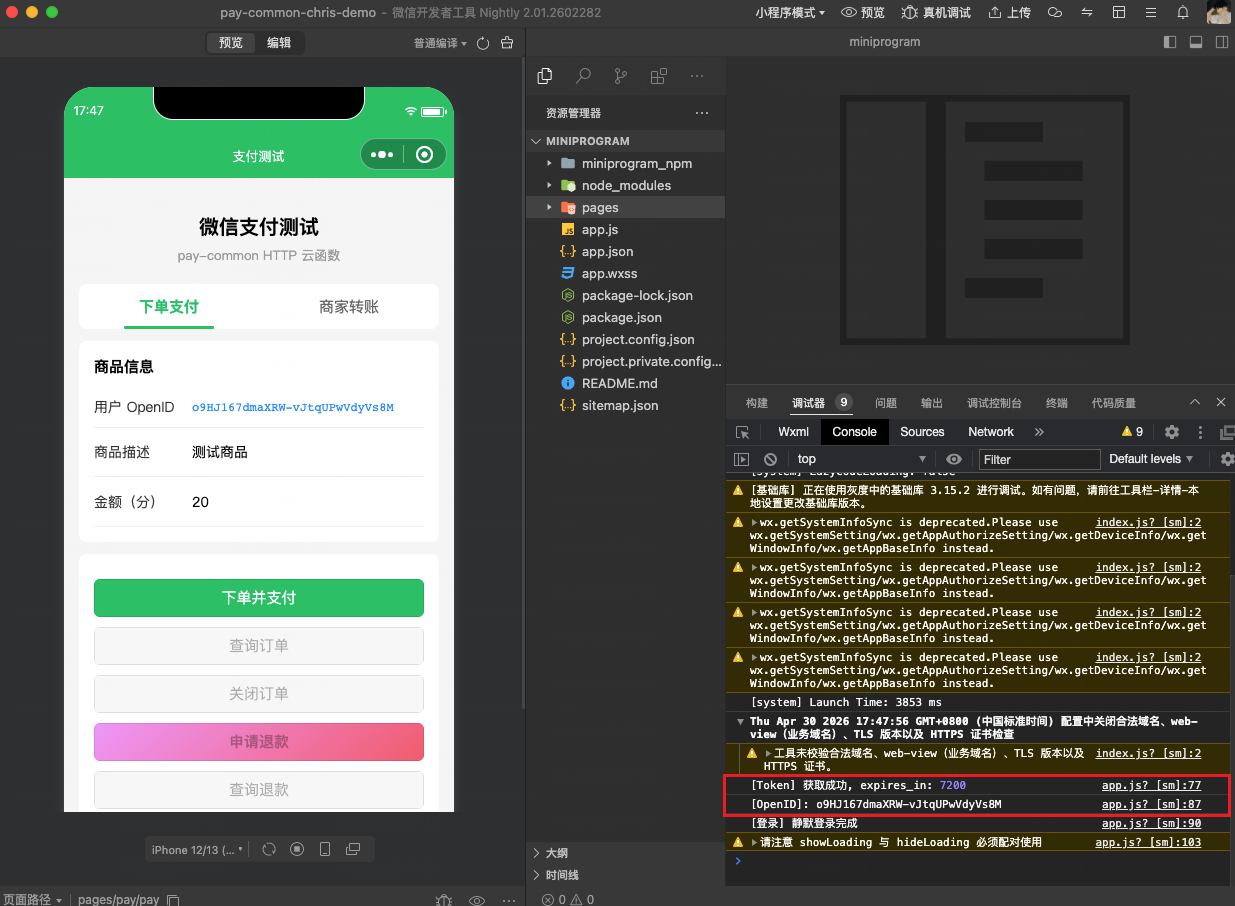
Click "Compile" in the upper-left. Seeing successful Cloud Development initialization in the Console means configuration is correct.
The simulator can be used to verify: whether Cloud Development initialized successfully, whether ordering returns prepay_id, and whether page interaction is normal. But the simulator cannot complete real payment — the openid injected by callHTTPFunction in the simulator may be a test value and ordering will be rejected by WeChat; even bypassing that, wx.requestPayment requires entering the payment password in the WeChat app, which the simulator cannot do.
Real-device Payment Test
- Upper-right "Real-device Debug" → scan the QR code with your phone's WeChat.
- Tap the "WeChat Pay" button on the phone → WeChat shows the password screen → enter password to complete payment.
4.4 Option 3: Integrate in WeDa Low-code
Suitable for zero-development scenarios where you want to build the payment page with low-code. WeDa low-code can directly reuse pay-common — same as a native Mini Program, calling the backend via wx.cloud.callHTTPFunction; platform auto-injects openid; no login flow, no token management.
Pipeline:
WeDa page method → wx.cloud.callHTTPFunction (platform auto-injects x-wx-openid)
                → path: /wx-pay/wxpay_order
                → unwrap response, call wx.requestPayment to invoke payment
Key constraints:
- No need for
$w.auth, no accessToken, no Bearer auth —callHTTPFunctionalready handles identity automatically - No need to pass
payer.openid— backend auto-obtains it from thex-wx-openidheader - The pay-common function name uses the real function name generated after integration creation (like
pay-050603-mdd8hhn8-demo-scfweb) - The Mini Program base library version built by WeDa must be ≥ 3.15.2
Page method example (paste into WeDa page → Methods → Custom Method):
/**
 * WeDa page method: initiate a complete payment
 * Doc: https://cloud.tencent.com/document/product/1301/57912
 */
export default async function ({ event, data }) {
  const out_trade_no = 'ORDER_' + Date.now()

  // 1. Call pay-common to place order (no openid needed; platform auto-injects x-wx-openid)
  const orderRes = await new Promise((resolve, reject) => {
    wx.cloud.callHTTPFunction({
      name: 'pay-common',                         // ⚠️ Replace: real function name after integration creation
      config: {
        env: 'your-env-id',                        // ⚠️ Replace: CloudBase env ID
      },
      method: 'POST',
      header: {
        'Content-Type': 'application/json',
      },
      path: '/wx-pay/wxpay_order',                 // Express standard route
      data: {
        description: 'Test product',
        out_trade_no,
        amount: { total: 20, currency: 'CNY' },    // 0.2 yuan
        // ❌ No payer.openid; backend auto-gets it from x-wx-openid header
      },
      success: resolve,
      fail: reject,
    })
  })

  const body = orderRes.data
  if (body.code !== 0) {
    wx.showToast({ title: body.msg || 'Order failed', icon: 'error' })
    return
  }
  const p = body.data && body.data.data ? body.data.data : body.data
  // p = { timeStamp, nonceStr, package, signType, paySign }

  // 2. Invoke WeChat Pay
  wx.requestPayment({
    timeStamp: p.timeStamp,
    nonceStr: p.nonceStr,
    package: p.package,                  // like 'prepay_id=wx20...'
    signType: p.signType || 'RSA',
    paySign: p.paySign,
    success() {
      // Frontend only updates UI; final state is determined by server callback
      // Recommended: 1-2 seconds later, call wxpay_query_order_by_out_trade_no as fallback
    },
    fail(err) {
      // On user cancel, err.errMsg contains 'cancel'; can distinguish from real failure
    },
  })
}
Troubleshooting:
- If
callHTTPFunction is not a function: Check whether the WeDa-built Mini Program base library version is ≥ 3.15.2. - If ordering returns
appid and openid mismatch: Cross-check whether theappIdin Integration Center and the Mini Program AppID used by WeDa are the same — see the FAQ. - If 404 is returned: Check the
name(function name) andpath(route) parameters.
FAQ
Q1: callHTTPFunction is not a function
The Mini Program base library version is too low. wx.cloud.callHTTPFunction requires base library version ≥ 3.15.2.
Solution: In project.config.json, set libVersion to 3.15.2 or higher. In WeDa scenarios, also confirm the WeDa-built Mini Program base library meets this requirement.
Q2: Ordering returns MISSING_CREDENTIALS
MISSING_CREDENTIALS typically comes from missing credentials on the cloud function side. Go to "Integration Center → corresponding integration → Edit" and cross-check item by item against the 1.4 credential checklist: appId / merchantId / apiV3Key / merchantSerialNumber / privateKey / wxPayPublicKey / wxPayPublicKeyId — all 7 are required. After saving, redeploy is triggered automatically; verify again 1–2 minutes later.
Q3: Ordering returns DECODER routines unsupported
The PEM private key is rejected by OpenSSL — usually because the value pasted into the Integration Center form lost its leading/trailing lines or had newlines replaced. Check:
- Whether the value contains the complete
-----BEGIN PRIVATE KEY-----and-----END PRIVATE KEY-----lines - Whether internal newlines were replaced with spaces (recommend pasting the full
apiclient_key.pemfile content) - Whether there are extra spaces at the leading or trailing edge
After fixing, save in Integration Center to trigger redeployment. The normalizePem() in config/config.js will normalize literal \n back to real newlines, so manual handling is normally not needed.
Q4: Returns "openid is invalid"
The passed openid does not match the current Mini Program AppID. Handling:
- When using
callHTTPFunction, openid is auto-injected by the platform; this issue usually doesn't occur. If it does, confirm the currently logged-in WeChat account matches the Mini Program AppID - The
appIdin Integration Center must be the Mini Program AppID, not the Official Account AppID - The merchant ID and Mini Program must be bound on the merchant platform
Q5: No callback notification received
Troubleshoot in order:
- Whether the merchant platform's notify URL points to Integration Center (
https://<integration-id>.integration-callback.tcloudbase.com/wechatpay/order) - Whether the APIv3 key has been set on the merchant platform and matches the one in Integration Center
- Whether the integration detail page status is "Active"
- Whether
handlerUnifiedTriggerappears in function logs; if not, check the WeChat-side status in the merchant platform's "Transaction Center → Notification Query"
Q6: wx.requestPayment fails to invoke without other hints
Common reasons:
- Mini Program AppID not bound to the merchant ID (merchant platform → Product Center → JSAPI Pay)
- Mini Program does not have WeChat Pay capability
- Personal Mini Program in use (does not support payment)
Q7: Simulator can click the button but cannot invoke payment
Real-device payment must be tested on a real device. Click "Real-device Debug" in the upper-right of WeChat Developer Tools and complete the operation by scanning with your phone.
Q8: Real-device payment returns a limit prompt
This prompt indicates the payment popup has been invoked and the technical pipeline is working — it's a risk-control limit triggered on the WeChat Pay side. Common causes:
- Test amount too small: long-term use of 0.01 yuan is identified as "test small-amount transaction"; recommend 0.1–1 yuan.
- Single user single day count exceeded: same WeChat account paying the same merchant more than 5–10 times in a day; recommend switching account or testing the next day.
- New merchant ID risk-control period: new merchant IDs have implicit single-day total amount caps (100–500 yuan).
- Business category does not match transaction scenario: the category filled at onboarding differs significantly from actual use.
- Mini Program review status abnormal: associated Mini Program is not yet on shelf or has not passed "WeChat Pay" capability review.
Troubleshooting suggestions:
- Log in to the WeChat Pay merchant platform; check risk-control prompts in "Account Center → Account Overview"
- Check failed transaction details in "Transaction Center → Transaction Monitoring"
- Test with another WeChat account on a real device for comparison
Q9: Can anonymous login invoke payment?
Not supported. The JSAPI ordering interface requires payer.openid; callHTTPFunction satisfies this requirement by auto-injecting x-wx-openid from the platform — provided the user is logged in to the WeChat client. Anonymous access or having no openid set in the simulator means ordering cannot complete.
Q10: Creating an integration reports NOT_ENOUGH / Platform certificate expired
When creating an integration, validation of merchant credentials fails; example console error:
[InvalidParameter] WeChat Pay platform certificate mode validation failed
StatusCode: 403  Code: "NOT_ENOUGH"
Message: Platform certificate has expired; please contact WeChat Pay technical support.
Root cause: The merchant has switched to public-key mode on the WeChat Pay merchant platform, but the integration creation form still validates by "platform certificate mode" — the SDK still tries to fetch the now-decommissioned platform certificate and is rejected by the WeChat gateway.
Solution:
- In the integration creation form, switch to "public-key mode" and fill in the public key ID (
wxPayPublicKeyId). The public key ID can be copied from merchant platform → Account Center → API Security → WeChat Pay Public Key. - Also confirm that the value pasted into the "WeChat Pay Public Key" field is PEM content (starting with
-----BEGIN PUBLIC KEY-----) and matches the public key ID. - If you have switched to public-key mode but still want to keep certificate mode (not recommended), you need to re-apply for and download a new platform certificate on the merchant platform.
How to tell which mode is currently in use: merchant platform → Account Center → API Security; look at whether "WeChat Pay Public Key" or "WeChat Pay Platform Certificate" is enabled.
Appendix · Environment Variables Quick Reference
When creating the integration, Integration Center automatically injects the following env vars into the cloud function — users do not need to maintain them manually. Listed here only for troubleshooting and extension development reference:
| Variable | Required | Description |
|---|---|---|
signMode | Yes | Mode switch; default in Integration Center is gateway |
appId | Yes | Mini Program AppID |
merchantId | Yes | Merchant ID |
apiV3Key | Yes | APIv3 key |
merchantSerialNumber | Yes | Merchant certificate serial number |
privateKey | Yes | apiclient_key.pem content |
wxPayPublicKey | Yes | WeChat Pay public key PEM |
wxPayPublicKeyId | Yes | WeChat Pay public key ID |
notifyURLPayURL | Yes | Integration Center pay callback URL (auto-injected) |
notifyURLRefundsURL | Yes | Integration Center refund callback URL (auto-injected) |
transferNotifyUrl | No | Integration Center transfer callback URL. Not yet supported in current version; leave blank |
Further Reading
| Topic | Link |
|---|---|
| JSAPI Ordering (Mini Program/Official Account Pay) | https://pay.weixin.qq.com/doc/v3/merchant/4012791897 |
| Pay Callback Protocol | https://pay.weixin.qq.com/doc/v3/merchant/4012791901 |
wx.requestPayment API | https://developers.weixin.qq.com/miniprogram/dev/api/payment/wx.requestPayment.html |
wx.cloud.callHTTPFunction | https://developers.weixin.qq.com/miniprogram/dev/wxcloud/reference-sdk-api/utils/Cloud.callHTTPFunction.html |